
October 6, 2026 · 26 min read
What Is a Portfolio Website? Definition, Types and Examples
A portfolio website is a site you own that shows samples of your work. Here is the plain definition, what a personal portfolio means, the eight different kinds of portfolio and who asks for each, what a student version needs, and how one differs from a resume, a LinkedIn profile or a PDF.
A portfolio website is a website you own that shows samples of your work, so that anyone you send the link to can judge whether you could do similar work for them. It normally carries a one-line statement of what you do, three to six pieces of work with the problem and the result for each, something about you, and a way to get in touch. Where a CV or résumé describes your history and a LinkedIn profile proves you exist, a portfolio website shows the work itself — at an address that belongs to you, always on, and sent as a single link.
That is the definition. Most of the confusion comes after it, because "portfolio" is doing at least eight different jobs in ordinary speech — a designer's gallery, the evidence pack a promotion panel asked for, a teaching dossier, a nurse's revalidation file, a share account — and advice written for one of those is close to useless for another. So this guide takes it apart properly: what "personal portfolio" means, what a portfolio website is used for, what it contains, the different kinds of portfolio and which one somebody is asking you for, what it does for a student with no professional work yet, why a PDF portfolio is not the same thing, and how a portfolio website differs from the four things people most often mistake it for. If you already know which you need and want the straight comparison, our guide to portfolio vs resume covers that pair in detail.
Personal portfolio meaning: what the word is actually doing
A portfolio started as an object. The word comes from the Italian for a case that carries loose sheets, and for a long time that is exactly what it was: a flat leather folder an artist or architect carried their drawings in. The meaning then moved from the case to the contents, which is why a sentence like "send me your portfolio" is now about the work rather than about anything you can hold.
In current use the word carries three layers at once, and it helps to keep them apart:
- The collection. The work you have chosen to show. This is the part that matters, and the part that takes real effort.
- The container. The thing the collection is kept in: a printed book, a PDF, a platform profile, a website.
- The purpose. The decision the collection is meant to serve: winning a client, passing a promotion round, satisfying a regulator, getting onto a course.
Almost every argument about what a portfolio "should" be is really an argument about the third layer, conducted as though it were about the second. A gallery of large images is right for a photographer whose purpose is to win commissions and wrong for an operations manager whose purpose is to prove to a panel that a process improvement actually happened.
Personal portfolio definition, in one line
A personal portfolio is a collection of your own work and achievements, assembled and presented by you, about you. The "personal" is there to separate it from the other sense of the word used in business — an organisation's portfolio of projects, products or clients — and to signal that the subject is one person rather than a studio or an agency. When somebody says "personal portfolio" they usually mean one of two things: a public showcase of their own work, or a private evidence file about their own career. Both are personal portfolios. They look nothing alike.
A personal portfolio website, then, is that collection published at your own address so other people can reach it without you sending anything. The change from folder to website is not cosmetic. A folder is shown; a website is found. That single difference is what makes a portfolio website a piece of infrastructure rather than a document.
The other meanings, so you can rule them out
If you searched for "portfolio, what is" and landed somewhere confusing, it may be because the word also means these things, none of which are about showing your work:
- An investment portfolio — the collection of shares, funds and other assets somebody owns.
- A government portfolio — the area of responsibility a minister holds, as in "the health portfolio".
- A product or project portfolio — the full set of things a company sells or has underway, managed as a group.
- A portfolio career — earning from several part-time roles or clients at once rather than one job.
Only the last of those has anything to do with the rest of this guide, and only indirectly: people with portfolio careers tend to need portfolio websites, because they have to explain several strands of work to several kinds of buyer.
What a portfolio website is used for
Four jobs, and it is worth knowing which of them you are actually trying to do, because they pull the design in different directions:
- Winning work. A freelancer or studio sends the link in place of a pitch deck. The site has to show the work, say who it is for and make enquiring easy.
- Applying for jobs. The link goes on the résumé and in the application form, and gets opened after the screening pass rather than during it. Here the site is there to confirm that the claims were true.
- Being found. Somebody searches for the kind of work you do, or for your name after meeting you, and the site is what comes up. This is the one a PDF cannot do at all.
- Holding one durable address. One link that stays correct as your work, roles and email change, instead of a trail of attachments and platform profiles that slowly rot.
A site built for the first job and a site built for the second look slightly different — services and prices matter in one and are noise in the other — but the overlap is large enough that most people can serve both from one page.
What a portfolio website contains
The contents are more settled than the word suggests. Strip away styling and nearly every working portfolio website has the same six parts, in roughly this order:
- A statement of what you do. One or two lines at the top, naming the work and who it is for. "I design and build booking systems for independent clinics" does more than any adjective. This is the single most commonly botched element, usually by being replaced with a greeting.
- The work. Three to six pieces, each with the problem, what you did and what happened. Not everything you have ever made — the weakest piece sets the reader's expectation as firmly as the strongest. We go into how many to show in how many projects a portfolio website needs.
- Something about you. Short, specific, written as a person rather than as a brochure. Our guide to the portfolio about page has the structure.
- What you offer, if you are selling. Services, scope, how you work, sometimes a price range. Freelancers need this; job seekers usually do not.
- Proof from other people. A testimonial, a named client, a credential — anything that is not your own assertion about yourself.
- A way to get in touch. Reachable from anywhere on the page, with no form fields you do not need. A surprising number of portfolios make the contact route the hardest thing to find.
That is the full version. The useful version is much smaller: a line saying what you do, two or three pieces of work with context, and an email address. Everything else is an improvement on a thing that already works. Our breakdown of which pages a portfolio website needs covers when to split this into separate pages and when one scrolling page is better — and one page versus multi-page argues the case both ways.
Here is an invented example of the difference the first element makes. Two openings for the same person:
"Hi, I'm Dani. I'm a creative problem-solver passionate about beautiful digital experiences."
Against:
"I'm Dani. I rebuild checkout flows for small online shops — usually because people are abandoning the basket and nobody can tell why."
The second one costs nothing extra and tells a visitor within four seconds whether they are in the right place. It also gives every project underneath it something to be evidence for, which is the quiet mechanism behind every portfolio that works.
Different kinds of portfolio
This is where most people actually get stuck, and it is not a vocabulary problem. Somebody has asked you for "a portfolio" and you do not know which of several unrelated artefacts they mean. The question sorts itself out once you separate two things that get muddled: what the collection is for, and what it is kept in.
Kinds by purpose
Sorted by who is asking and what they are deciding:
- A creative work portfolio. Finished pieces of visual, written, built or performed work, shown to win commissions, clients or a job. This is the kind most online advice assumes, and the kind that belongs on a public website.
- A career or evidence portfolio. The outcomes, artefacts, feedback and credentials behind the claims on your CV, assembled for one specific decision: this job, this promotion round, this pay progression review. Usually private, often a PDF, frequently requested at short notice. Our career portfolio guide is written for exactly this, including for professions whose work does not photograph.
- An academic portfolio. Research, publications, grants, teaching, supervision and service, assembled for appointment, probation or tenure. Its shape is usually dictated by the institution.
- A teaching portfolio or dossier. A statement of teaching philosophy, course materials, student feedback and evidence of development. See our teaching portfolio guide for how these are structured and assessed.
- A student learning portfolio, often called an e-portfolio. Coursework gathered over time, including drafts and reflections, kept in the institution's own system and marked by a tutor. The point is progress, not polish — which is the opposite of a creative portfolio's point.
- A registration or CPD portfolio. Development records and reflective accounts kept to satisfy a regulator or professional body. These have real requirements attached. The UK's Nursing and Midwifery Council, for instance, requires registrants to write written reflective accounts on its own form as part of revalidation, and warns them not to record any information that could identify another person. The CIPD's CPD policy asks members for at least three CPD records a year with reflection on the impact of their learning, and says members are randomly selected for an annual audit. Our nursing portfolio guide works through one of these in full.
- A project or product portfolio. The business sense: the set of projects or products an organisation is running, managed as a group so somebody can decide what to fund. Nothing to do with you personally.
- An investment portfolio. Included only so you can rule it out.
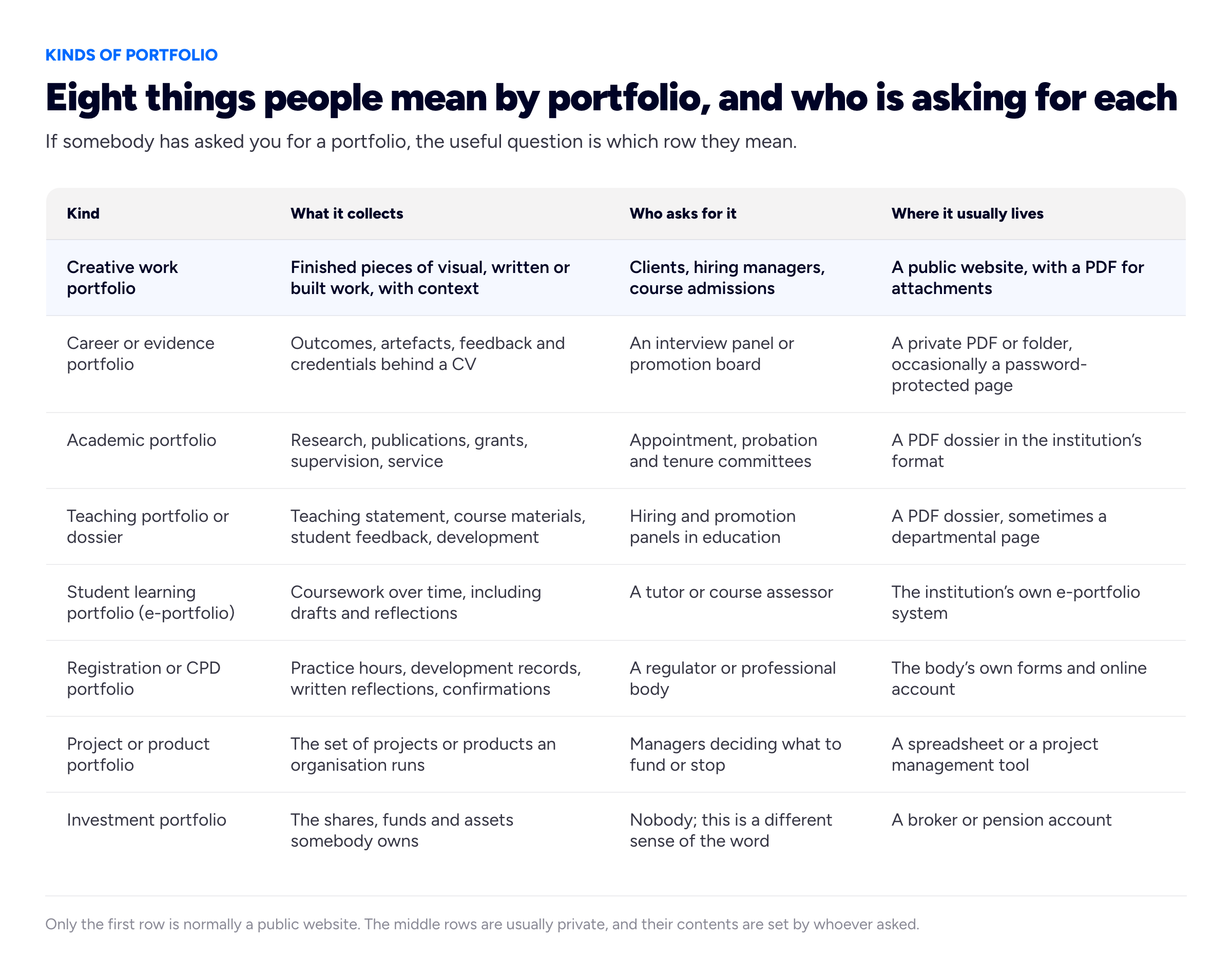
Rows two to six are usually private and their shape is dictated by the reader, which is why advice written for row one so reliably fails the person who has been asked for row three.
Kinds by format
The same collection can live in four different containers, and the choice is not a matter of taste — each one gets you a different set of abilities:
- A printed folder or book. Still the best thing in the room for physical work: textiles, prints, packaging, architectural drawings. It cannot be found, cannot be linked, and only exists where you are standing.
- A PDF. Portable, attachable, easy to tailor per application, and the right answer when the reader asked for a document or when the contents are confidential. It goes stale the moment you send it, and nobody discovers a PDF.
- A platform profile. Behance, Dribbble, a marketplace listing, an institution's e-portfolio system. Quick to fill, comes with an audience, and sets the rules — including what the page looks like, what sits beside your work, and whether the address still works next year. We weigh this properly in Behance and Dribbble versus your own portfolio website.
- A website of your own. Findable, linkable, updatable in place, yours to shape, and the one container that can hold all of the above by linking to them. The cost is that you have to make it exist.
Most people eventually run two: a website as the permanent address, and a PDF generated from it for the applications that demand a file. That is not duplication, it is the same collection in the two containers that get used.
So which kind do you need?
Three questions settle it almost every time. Who asked? If a regulator, a tutor or an internal panel asked, the format is theirs and you should go and find their template before writing a word. Will strangers need to find it? If yes, it has to be a website; nothing else is findable. Can the work be published at all? If most of it is confidential, you need the private evidence kind, plus perhaps a thin public site that describes the work without showing it — our notes on portfolios under an NDA cover how to do that honestly.
What is a portfolio website for a student?
For a student it does a job that a CV cannot do yet: it gives you something to show when the honest answer to "what have you done professionally?" is "not much so far". A portfolio is the one document where coursework, a self-set brief, a society redesign, a hackathon entry, a part-time job's actual output and an unpaid piece for a local organisation all count — provided each one is labelled for what it is. Nobody minds a student project. They mind a student project presented as client work.
Three things make a student portfolio work, and all three are within reach in a weekend:
- Two or three finished things, not twenty exercises. A finished small project with the brief, your decisions and the result reads as professional. A grid of tutorial outputs reads as a course folder.
- Write the brief yourself if nobody set one. "I rebuilt our department's timetable page because nobody could read it on a phone" is a real problem with a real constraint, and it tells a reader far more than a module code does.
- Say what stage you are at. Final-year, graduating in June, looking for a placement. It costs nothing and it removes the only question an employer would otherwise have to ask.
There is a trap worth naming here, because the two things share a word. A course e-portfolio — the one in your university's own system, where you upload drafts and reflections for a tutor to mark — is not a portfolio website, and it should not be your public one. It is assessed, so it is organised around evidence of progress rather than around your best work; it usually lives behind an institutional login; and in most cases it stops being yours when you graduate. Keep it for the assessment and build the public site separately, pulling across only the pieces that stand on their own. Our guide to building a portfolio with no experience is written for precisely this position, and personal website examples shows what the finished thing looks like at this stage.
A portfolio website is not a PDF portfolio
These get used as synonyms and they are not, which matters because people often build the wrong one for the task in front of them. A PDF portfolio is a document: fixed pages, laid out once, sent as an attachment. A portfolio website is an address: a live page anyone can reach, updated in place.
The differences that actually bite:
- Nobody discovers a PDF. It only exists where you have sent it. A website can be found by someone searching, which is the whole point for a freelancer.
- A PDF goes stale the second you press send. Every copy you have ever emailed is still out there with the old work and the old email address in it. A website has one version, and it is always the current one.
- A PDF is easy to tailor; a site is not. This is the PDF's real advantage. For an application that wants a document, you cut it to the six pages that fit this employer. A website serves everyone the same page.
- A PDF can carry work you are not allowed to publish. Shared privately with one recipient, under an agreement, it can contain things a public URL must never show.
- Weight and layout. A PDF holds print-quality spreads and large files that would make a web page crawl; a web page adapts to a phone, which a PDF stubbornly does not.
So the answer is usually both, not either: the website as the permanent address you give people and search engines, and a PDF exported from the same collection for applications and for the confidential material. If you can only make one and strangers need to find you, make the website. If you can only make one and a named panel asked you for a document, make the PDF — and read our career portfolio guide, which is about that document specifically.
Portfolio website vs résumé, LinkedIn, Behance and a personal blog
These are the four things a portfolio website gets confused with. None of them is a substitute, because each answers a different question for a different reader at a different moment.
Versus a CV or résumé
A résumé is a compressed claim, read early, by somebody whose job is to eliminate people. The UK's National Careers Service sets out the standard sections of a CV — contact details, a personal statement, work history, education, skills, references — and that structure is the point: it is predictable so a screener can scan it in seconds. A portfolio website is the evidence behind those claims, read later, by somebody who has already decided you are plausible and now wants to see the work. One tells, the other shows. The practical consequence is that you need both, and that the résumé should carry the portfolio link where a reader will actually see it; we cover where exactly in putting a portfolio link on a résumé.
Versus a LinkedIn profile
A LinkedIn profile is for being found and looking credible. It is read by people you never sent it to, it is formatted identically to everyone else's, and it sits on a page that also shows your competitors and an advert. It is excellent at findability and weak at proof: there is nowhere to properly walk through a piece of work, and the whole page is built to compare you with other people. A portfolio website is the opposite — nobody stumbles across it, and once they are there you control everything they see. Using the profile as the thing that gets found and the site as the thing that convinces is the normal arrangement. Our guide to turning a LinkedIn profile into a portfolio website covers the move.
Versus Behance, Dribbble or a marketplace profile
These are genuinely useful, and for some disciplines they bring real traffic. The trade-off is the address. The profile is rented: the platform decides the layout, the ranking, the adjacent content and whether the URL still resolves in three years. It is also, for client work, a page that shows your work surrounded by other people's. Run both if the audience is there, but keep the address you give to people on something you own.
Versus a personal blog or personal website
This is the subtlest of the four, because a portfolio website often is a personal website. The difference is what the page is organised around. A blog is organised around posts in date order, so its newest thing is its most prominent thing, and it rewards continuous writing. A portfolio is organised around a handful of pieces chosen for quality, so its best thing is its most prominent thing, and it rewards editing rather than publishing. A personal website can hold both — a portfolio section and a writing section — and plenty do. What fails is a portfolio laid out as a feed, where the top of the page is whatever you touched last rather than whatever is best. There are worked examples in our roundup of personal website examples.
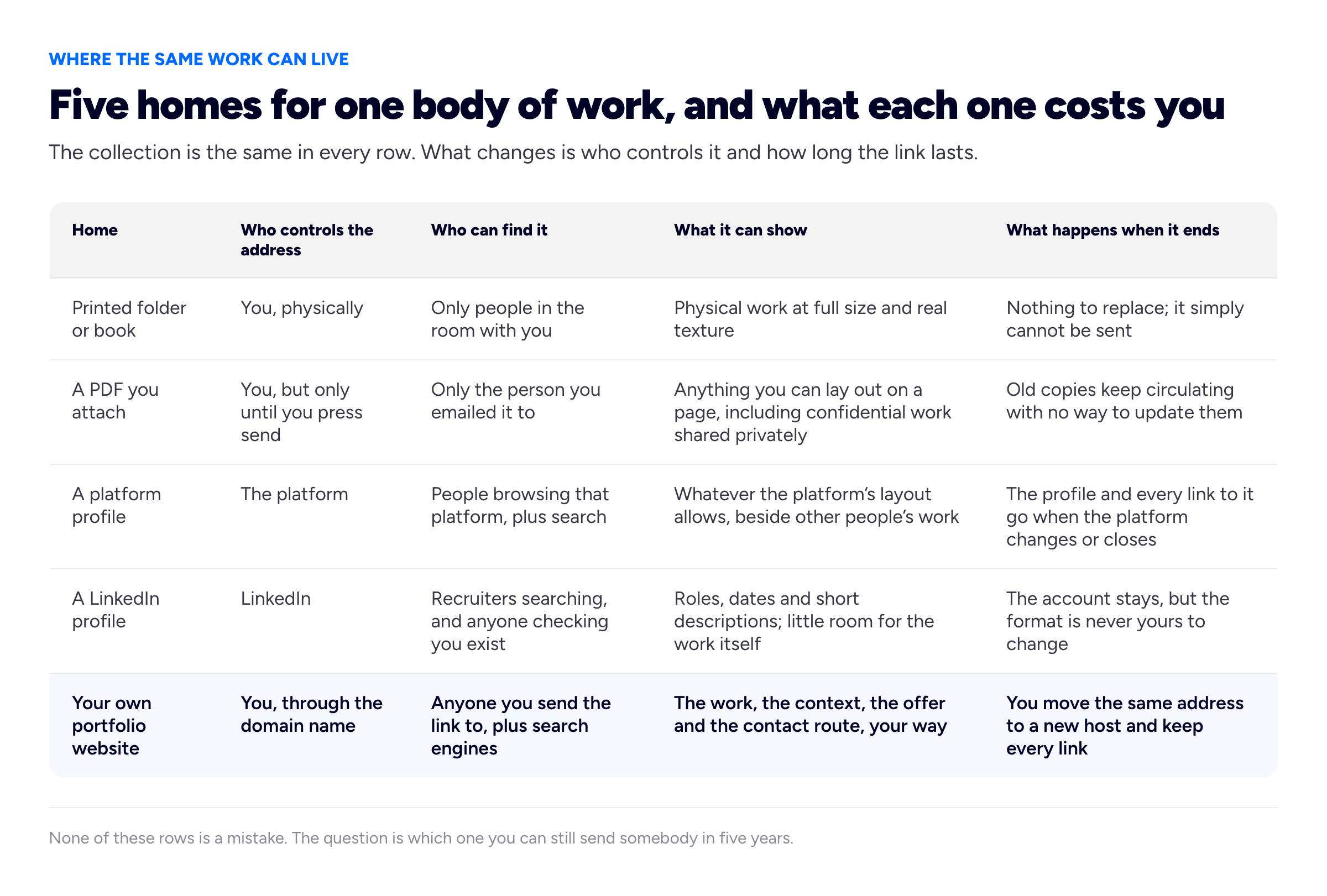
The last column is the one almost nobody weighs in advance, and the only one that matters later: a link is exactly as durable as whoever owns the address.
Who needs a portfolio website, and who does not
Our honest read, having watched which people get value from one:
- Freelancers and independent consultants. Close to essential. You are asking strangers to send money for work they have not seen; a link that shows the work does that job and a marketplace profile does it on somebody else's terms. We argue this out in do freelancers need a website.
- Designers, developers, writers, photographers, editors and illustrators. Expected. In several of these fields a portfolio link is effectively part of the application.
- Students and recent graduates. Worth it, and easier than it looks — see the section above. It is often the only place coursework and self-set projects can be shown as work rather than as assignments.
- Career changers and people with little formal experience. Unusually valuable, because a portfolio is the one document where self-initiated work counts, provided you label it honestly. That is the whole subject of building a portfolio with no experience.
- Specialists in non-visual fields — analysts, project managers, teachers, clinicians, operations people. Worth one, but usually a short public site plus a private evidence pack, because the substance of the work cannot be published.
- People in salaried roles with no plans to move. Genuinely optional. A profile kept current may be enough until something changes.
- Anyone whose client work is entirely confidential. A site is still useful, but it describes capability and process rather than showing output, and it must not leak what you were trusted with.
What separates a portfolio website that works from one that does not
This section is judgement rather than fact, formed from looking at a lot of portfolio sites. Six things do most of the work:
- A specific claim at the top. Named work for a named kind of client. Everything below it then reads as evidence for something.
- Fewer pieces, each with context. Three strong projects with the problem and the outcome beat twelve screenshots. The reader is not counting.
- Honest labels. Say what was a client job, what was self-initiated, what was a team effort and what you specifically did. Readers in your field can tell, and getting caught on this costs more than the thinner portfolio would have.
- A reachable contact route. One click from anywhere, with an address you actually read.
- Speed, and working on a phone. A heavy gallery that takes several seconds to appear is a portfolio nobody saw.
- Findability, if you want to be found. A site is not in search results automatically. Google's own SEO starter guide is the primary documentation for how pages get discovered and indexed, and it is worth twenty minutes before you assume the problem is your work. Our portfolio SEO guide applies it to this kind of site.
How to get one without learning to build websites
Three routes, in rising order of effort. Build it yourself if you write code already, in which case you knew that. Use a site builder if you want to lay out pages by hand — more control, and more decisions than most people want to make about a portfolio. Or fill in a form and let a template do the layout, which is what we do: you answer questions about your work, pick a look, and get a live site on a free subdomain, with the option of pointing your own domain at it later. You can see the looks on our templates, real sites on examples, and what is included on the free portfolio website page.
One thing we will not do is publish a ranked list of the ten best portfolio websites, which is a popular thing to search for and a nearly useless thing to read. The sites that win awards are usually made by studios for studios, and copying their choices is how people end up with a scroll-jacked landing page that hides the work. A more productive version of that search is to find three or four sites by people doing roughly your job for roughly your clients, and note only the structural decisions: what is in the first screen, how many projects are shown, how each one is introduced, where the contact route sits. Those transfer. The animation does not.
If you are stuck on the words rather than the website, two of our free tools are the usual unblockers: the portfolio content generator for first drafts of the sections, and the résumé builder for the document version that applications still ask for. Neither needs an account, and both work whether or not you ever make a site with us.
Frequently asked questions
What is a portfolio website in simple terms?
A website that shows samples of your work so somebody can judge whether you could do similar work for them. It usually says what you do in one line, shows three to six pieces with the problem and the result for each, says something about you, and gives a way to get in touch. It lives at an address you control, so you can send one link instead of attaching files.
What is a personal portfolio?
A collection of your own work, achievements and evidence, put together and presented by you. "Personal" distinguishes it from an organisation's portfolio of projects or products, and signals that the subject is one person. In practice people use the phrase for two quite different things: a public showcase of their work, and a private evidence file about their career.
What is a portfolio website used for?
Four things: winning work, where the link replaces a pitch; job applications, where it confirms that the résumé was true; being found, when somebody searches for the kind of work you do or for your name; and holding one durable address that stays correct as your work, roles and email change. The first two can be done with a document. The last two cannot.
What is a portfolio website example?
The commonest shape is a single scrolling page: a headline saying what you do, a short about section, three to six projects each with the brief and the outcome, a testimonial or two, and a contact link. A developer's version leads with code and live links, a photographer's with full-width images, a writer's with excerpts and bylines, and a project manager's with problems solved rather than pictures. We keep real ones on our examples page and the layouts on templates.
What should be on a portfolio website?
At minimum: one line saying what you do and for whom, two or three pieces of work with the problem and the outcome, and a contact route. Add an about section, services if you are selling, and proof from other people — a testimonial or a named client — once the minimum is live. Publishing the small version beats planning the full one.
How can I create a free portfolio website?
Pick a platform that publishes on a free subdomain, fill in your work, and publish; the paid step, if you ever want it, is pointing your own domain name at the result. With us that means signing up, answering questions about your work or importing a LinkedIn profile, choosing a look and pressing publish — see the free portfolio website page for what is included. Free static hosting with a hand-built page is the other route, and costs time instead of money.
What are the different kinds of portfolio?
Sorted by purpose: a creative work portfolio for winning clients or jobs, a career or evidence portfolio for interviews and promotion rounds, an academic portfolio for appointment and tenure, a teaching portfolio or dossier, a student learning e-portfolio assessed by a tutor, and a registration or CPD portfolio required by a professional body. The word also means an investment portfolio, a minister's area of responsibility and a company's set of projects or products, which are different senses entirely.
How we put this guide together
The definition, the three layers of the word, the four uses, the eight kinds of portfolio and the four containers, the five-homes comparison, the student advice and the warning about course e-portfolios, the website-versus-PDF list, the who-needs-one list and the six things that separate a working portfolio from a dead one are our own framing and recommendations, formed from building this product and looking at a great many portfolio sites. They are not an industry standard and no survey backs them; weigh them as opinions with reasons attached.
We deliberately left out the numbers that fill most articles on this topic: the share of employers who say they look at portfolios, how many seconds a visitor spends before deciding, and the conversion rates sometimes quoted for portfolio sites. We could not trace any of the versions we found to a published method, and a statistic you cannot check is not a reason to do anything. Where we make a claim about what works, it is labelled as our judgement instead.
Where a claim belongs to somebody else it is cited. The standard sections of a CV come from the UK National Careers Service's page on what to include in a CV. The requirement to write reflective accounts on the regulator's own form, and the instruction not to record information that could identify another person, come from the Nursing and Midwifery Council's guidance on written reflective accounts. The development requirements — at least three CPD records a year, reflection on the impact of learning, and a random annual audit of members — come from the CIPD's CPD policy. The point that search visibility has to be earned rather than assumed is taken from Google Search Central's SEO starter guide. All four pages were read at source when we wrote the guides they first appeared in, and the wording quoted here is theirs rather than a summary of somebody else's summary. Professional requirements change, so check the current page for your own body before relying on it.
Dani and the checkout-flow example are invented for illustration, and so are the two opening lines compared in the contents section and the timetable-page project used in the student section. No real person, client, course or business is described anywhere in this guide. We also deliberately decline to rank the "top ten" portfolio websites, for the reason given above: the examples that circulate under that heading are chosen for visual ambition rather than for whether they got anybody hired.
Related reading: portfolio vs resume, the career portfolio, which pages a portfolio website needs, building a portfolio with no experience, personal website examples and one-page versus multi-page portfolios.
More from the blog
October 2, 2026 · 15 min read
How to Start a Cover Letter: Greetings, Opening Lines and Examples
Start with your details and the date, a greeting to a named person or "Dear Hiring Manager", then an opening that names the role, gives one specific hook and says why this employer. Greetings compared...
September 27, 2026 · 22 min read
How to Write a Letter of Presentation (With 6 Examples)
A letter of presentation is what Spanish, Italian and Portuguese speakers call a cover letter, and it also means a letter introducing yourself or your services to a prospective client. What each meani...
August 24, 2026 · 29 min read
Portfolio Bio Examples: Thirty Bios You Can Adapt Today
Thirty complete bios across ten professions, at three lengths each, plus the four-part formula behind them and three bad bios rewritten. Every one is invented, so you can take the shape without taking...