
August 14, 2026 · 14 min read
Portfolio SEO: How to Get Your Portfolio Found on Google
What a portfolio site can realistically rank for, the six on-page fields that do most of the work, the speed thresholds Google actually measures, and what is not worth your time.
Portfolio SEO gets sold badly. The pitch is usually that with the right keywords your portfolio will rank for "freelance web designer" and clients will arrive on their own. That is not going to happen, and chasing it will waste months.
What portfolio SEO can do is narrower and genuinely valuable: make you findable by the people who are already looking for you or for a problem you have written about specifically. That is a real, achievable outcome, and most portfolio sites are leaving it on the table for reasons that take an afternoon to fix.
This guide covers what you can realistically rank for, the six on-page fields that do most of the work, the speed thresholds Google actually measures, and how to stop your subdomain and custom domain competing with each other.
What you can realistically rank for
Three tiers, in descending order of achievability.
Your own name. This is the one that matters most and the one people neglect. Every referral, every recruiter, every person you met at a conference will search your name before they email you. Ranking first for it is usually easy — you are the most relevant page on the internet for your own name — and the cost of not ranking is that someone else's LinkedIn, or a namesake, takes the introduction you earned.
Problem language from your case studies. Long, specific queries: "reduce Shopify checkout abandonment", "migrate Rails app to Postgres 16", "accessibility audit for a booking form". These have low volume — sometimes a few searches a month — but the intent is extremely high, and almost nobody is competing for them. A well-written case study is the natural page to rank here, because it is the only page on your site written in the client's language rather than your job title's.
Niche plus location. "Freelance designer Lisbon", "React developer Manchester". Achievable but competitive, and dominated by directories. Worth setting up, not worth building a strategy on.
What you will not rank for, realistically, is a head term like "web developer". Those results belong to job boards, agencies, and marketplaces with thousands of pages and years of links. Skipping that fight is not defeat, it is triage.
The six fields that do most of the work
Before anything else, get these right on your home page and on each case study. They are not exotic and they are not tricks — they are the fields a crawler reads to decide what your page is about.
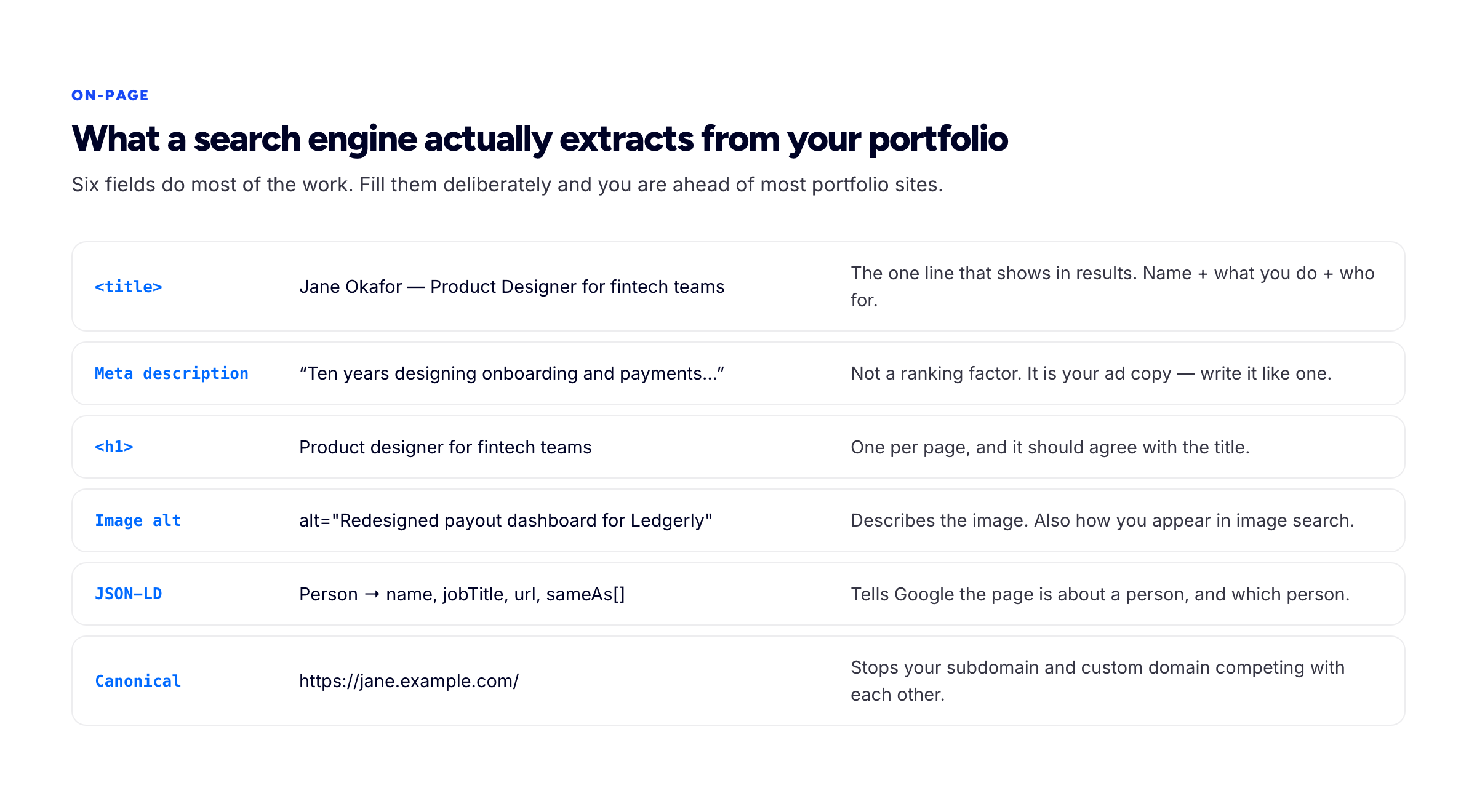
Six fields, filled deliberately, puts you ahead of most portfolio sites.
The title tag
The most valuable line of text on your site. It is what appears in search results, browser tabs, bookmarks and every link preview when someone shares you in Slack.
Use Name — Role for Audience: "Jane Okafor — Product Designer for fintech teams". That single line covers your name, your craft and your specialism. Common mistakes: leaving it as "Home", filling it with your tool's default, or stuffing it with five comma-separated keywords, which looks like exactly what it is.
Give every case study its own title describing the problem, not "Project 1".
The meta description
Not a ranking factor. Google will often rewrite it. Write it carefully anyway, because when it is used it is your ad copy — around 150 characters that decide whether the person clicks your result or the one below it.
Describe what the reader will get, in a human sentence. Skip keyword lists.
The H1
One per page, and it should agree with your title tag. If your title says "Product Designer for fintech teams" and your H1 is "Hello 👋", you have wasted the strongest heading on the page. Your positioning statement is usually the right H1.
Image alt text
Alt text exists first for people using screen readers, and that is reason enough to write it properly. It is also how your work can surface in image search, which for visual freelancers is a real channel.
Describe the image and its context: alt="Redesigned payout dashboard showing weekly settlement totals", not alt="dashboard" and certainly not alt="freelance designer portfolio web design UI UX". Google's image SEO documentation is short and worth reading once.
Structured data
A small block of JSON-LD that tells search engines the page is about a person, and which person. At minimum, a Person entity with your name, job title, the page URL, and sameAs links to your LinkedIn, GitHub and other profiles.
Those sameAs links are the part that matters. They connect your portfolio to your established profiles, which helps search engines resolve that all of these refer to one entity — a meaningful advantage when you share a name with someone else. Google's introduction to structured data explains the format; most portfolio builders, Bunfolio included, emit this for you.
The canonical URL
If your site is reachable at more than one address — a free subdomain and a custom domain, or with and without www — pick one as canonical and declare it. Otherwise you are asking search engines to choose between duplicates, and they may not choose the one you would. Google's guidance on consolidating duplicate URLs covers the mechanics.
Speed, measured the way Google measures it
Page experience is a modest ranking input and a large conversion input. For a portfolio the conversion argument is the stronger one: a client who waits five seconds for your hero image is forming an opinion about how you work.
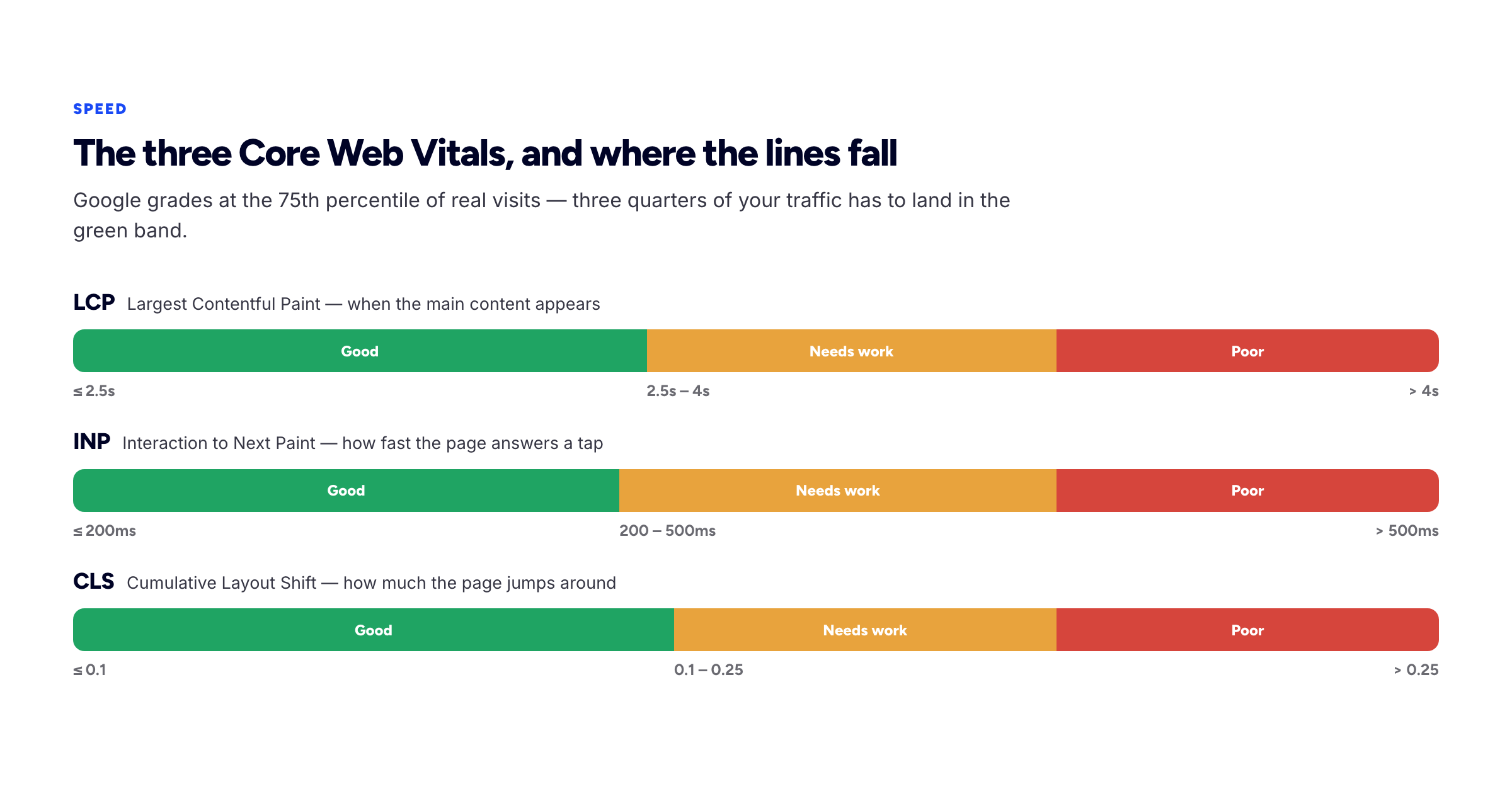
Thresholds from web.dev. Google grades at the 75th percentile of real visits.
The three Core Web Vitals are Largest Contentful Paint (good at 2.5 seconds or under), Interaction to Next Paint (200 milliseconds or under), and Cumulative Layout Shift (0.1 or under). The grading happens at the 75th percentile of real user visits, so it is the slower quarter of your traffic — older phones, worse connections — that decides your score, not your own laptop.
On portfolio sites, nearly all failures come from one place: images. A 4 MB hero photograph straight out of a camera will fail LCP on its own. In rough order of impact:
- Export images at the size they are actually displayed, and serve WebP or AVIF.
- Set explicit width and height on every image so the page does not jump as they load — that is CLS, and it is the cheapest of the three to fix.
- Lazy-load anything below the fold; load the hero image eagerly.
- Keep custom fonts to two families and let text render with a fallback rather than staying invisible.
- Be suspicious of embedded animation libraries and third-party widgets. Chat bubbles and analytics scripts are the usual INP offenders.
Getting indexed at all
None of the above matters if crawlers never see the page. Four checks:
- Is it actually public? A staging password or a leftover
noindextag will silently keep you out of search entirely. This is the most common cause of "my portfolio doesn't show up in Google". - Is there a sitemap? A sitemap listing your home page and every case study, referenced from
robots.txt. Most builders generate one — though not all of them generate yours, which is one of the gaps we found when we went looking at what a published Notion page serves to crawlers. - Is it verified in Search Console? Free, takes ten minutes, and it is the only place that tells you what Google actually thinks of your site — which pages are indexed, which queries you appear for, and any errors.
- Does anything link to it? A page with no inbound links is hard to discover. Put your portfolio URL on LinkedIn, GitHub, your marketplace profiles, your email signature, and any community profile you hold. These are not powerful links, but they are how a new site gets found in the first place.
Expect indexing to take days to weeks for a new domain. There is no way to buy speed here, and anyone selling you one is selling you something else.
Subdomain, custom domain, or both
A free portfolio subdomain — yourname.bunfolio.com — is a perfectly good place to start. It is indexable and it can rank. Google treats subdomains as their own sites for most purposes, which means you are not inheriting the platform's authority, but you are also not competing with it.
A custom domain you own is the better long-term home, for a reason that has nothing to do with rankings: it is portable. If you change tools in three years, your address and whatever search equity it has accumulated come with you. Starting on a subdomain and connecting a domain later is a completely reasonable path, provided your builder lets you attach the domain without moving to a paid plan; which builders actually allow that is worth two minutes of checking before you commit to one. The important part is that when you do connect it, the old address redirects to the new one rather than both staying live.
What you should not do is run the same content on two live addresses without a canonical or a redirect. That is the one configuration that actively costs you.
Finding the problem language your clients actually use
The hardest part of portfolio SEO is not technical. It is that you describe your work in the vocabulary of your profession, and clients search in the vocabulary of their symptoms. A designer writes "conversion rate optimisation"; the person with the problem searches "people keep abandoning my checkout". Those are different phrases and only one of them is on your site.
You do not need a paid keyword tool to close that gap. You need to collect the sentences your clients have already said to you.
- Mine your own inbox. Search your email for the first message from each of your last ten clients. The subject lines and opening paragraphs are, literally, the language of someone with your problem and a budget. This is better data than any keyword tool, because it comes from people who actually paid.
- Read the job posts you did not apply for. Marketplace listings and job boards are full of buyers describing their problem in their own words. Skim thirty and note the phrases that repeat.
- Use Google's own suggestions. Type the start of a problem phrase into the search bar and read the autocomplete list. Then run the search and read the "People also ask" and "Related searches" blocks. All three are generated from real queries and all three are free.
- Check the forums. Whatever community your clients live in — an industry subreddit, a Slack group, a Facebook group for shop owners — is a stream of unfiltered problem statements.
Then use those phrases where they belong: in case study titles, in the first paragraph of each case study, and in the subheadings. Not sprinkled through your home page. The home page is for your positioning; the case studies are where problem language earns its keep, because a page can only rank for a problem it actually discusses in detail.
One caution worth stating plainly: these queries are low volume. A phrase searched forty times a month is a good target for a portfolio, and expecting thousands of visits from this work will only make you abandon it. The visitor who arrives on a page describing precisely their problem is worth a hundred who arrived from a generic term.
Measuring whether any of this worked
Search Console is the only tool in this guide you genuinely need, it is free, and most freelancers who set it up never open it again. Three reports are worth ten minutes a month.
Performance → Queries. The actual phrases people used before clicking your site. This is the highest-value list you will ever have, because it tells you what the internet thinks you are about, which is frequently not what you intended. If a case study is pulling in queries you did not target, that is a signal to write more about that problem.
Performance → Pages. Which pages get impressions. If your case studies have none, they are either not indexed or not about anything specific enough. Both are fixable.
Indexing → Pages. Which of your URLs are indexed and which are excluded, with the reason. "Discovered — currently not indexed" on a new site usually means wait. "Excluded by 'noindex' tag" means you have a configuration problem and nothing else you do matters until it is fixed.
Two habits make this useful rather than decorative. Check monthly, not daily — search data is noisy over short windows and daily checking produces anxiety rather than insight. And when you publish a new case study, submit its URL for indexing directly; it is a single field in Search Console and it shortens the discovery wait considerably.
Set one honest expectation before you start: for a new portfolio on a new domain, meaningful search traffic is a six-month horizon, not a six-week one. The work in this guide is worth doing anyway, because most of it — clearer titles, faster pages, real case studies — improves how the site converts the visitors you already have, and that pays off immediately.
What not to bother with
- Keyword density. Not a thing. Write for a person.
- Meta keywords tag. Ignored by Google for roughly two decades.
- Buying links. Against Google's spam policies, and portfolios are exactly the kind of small site that gets hurt rather than helped.
- Publishing thin blog posts for volume. Six hundred generic words on "why design matters" adds nothing. One real case study beats twenty of those.
- Chasing head terms. Discussed above. Spend the effort on problem language instead.
A one-afternoon checklist
- Rewrite your title tag as Name — Role for Audience.
- Write a 150-character meta description that reads like a sentence.
- Make your H1 your positioning statement, and check there is only one.
- Write real alt text on every image, and choose and name the images themselves deliberately.
- Confirm a Person JSON-LD block exists with
sameAslinks to your profiles. - Pick your canonical address and make the other one redirect.
- Compress and resize every image; set width and height attributes.
- Verify the site in Search Console and submit the sitemap.
- Give each case study its own page with a problem-shaped title.
- Add the URL to every profile you own.
That is the whole realistic programme. Everything after it is patience.
Frequently asked questions
How long until my portfolio ranks?
For your own name, often within a few weeks of being indexed. For problem-language queries, a few months, depending on how specific the phrase is. If you are being promised days, you are being sold something.
Does a free subdomain hurt my SEO?
No. It can rank perfectly well. The argument for a custom domain is ownership and portability, not a ranking penalty.
Do I need a blog on my portfolio?
Only if you will actually write. An abandoned blog is worse than none. If you have limited writing time, spend it on case studies — they convert better and rank for higher-intent queries.
Is a single-page portfolio bad for SEO?
It limits you. One page can only be about one thing, so you have one shot at one set of queries. Giving each case study its own page multiplies your surface area, which is the main structural SEO decision a portfolio owner makes.
Should I add FAQ structured data?
Probably not worth the effort now. Google restricted FAQ rich results to a narrow set of authoritative sites, so most portfolios will get the markup ignored. Person and BlogPosting markup are the ones that still earn their place.
What about AI search and chat assistants?
The practical answer today is that the same things help: clear structure, accurate content, and being indexed. There is no separate technical trick, and anyone offering one is guessing.
How we put this guide together
Every technical figure here is cited to primary documentation rather than a secondary summary — the Core Web Vitals thresholds come from web.dev, the structured data and canonical guidance from Google Search Central. The strategic advice about what is realistically rankable is our judgement, based on building and hosting portfolio sites; it is deliberately more pessimistic than most SEO content on this topic, because most SEO content on this topic is selling a service.
Related reading: how to write a portfolio case study, which is where most of your rankable content will come from, and how to build a freelance portfolio website that wins clients.
More from the blog
September 30, 2026 · 16 min read
What Is Freelancing? A Plain-English Guide to Freelance Work
Freelancing is selling a skill to several clients one job at a time instead of working for one employer. How a freelancer differs from an employee, contractor or gig worker, one freelance job from enq...
August 23, 2026 · 24 min read
How to Get Paid on Time as a Freelancer
The payment terms that prevent a late invoice, and the five-rung escalation ladder for chasing one — from a neutral nudge on day one to a formal letter before action.
July 30, 2026 · 22 min read
How to Get Your First Freelance Clients
Six channels ranked by how fast each one realistically produces work, cold outreach that earns a reply, and how to turn a first job into the evidence that wins the second.