
July 9, 2026 · 13 min read · Updated September 25, 2026
How to Build a Freelance Portfolio Website That Wins Clients
The eight sections a hiring client actually reads, how to choose which work to show, and the technical floor your site has to clear — plus a realistic weekend plan for getting it live.
Most freelance portfolios fail for a boring reason: they are built to be admired rather than read. They open with a full-screen animation, hide the work behind a menu, and never once say who the person is for. The client — who has a problem, a budget, and four other tabs open — leaves in about twelve seconds.
A portfolio that wins work does something less glamorous. It answers, in order, the four questions a buyer is actually asking: what do you do, who do you do it for, can you prove it, and how do I reach you. Everything else is decoration.
This guide walks through the structure that answers those questions, what to put in each section, how to choose which projects to show, and the technical floor your site has to clear. It is written for freelancers — developers, designers, writers, marketers — who are selling their own time, not applying through a company careers page.
A marketplace profile is rented. A portfolio is owned.
If you already have an Upwork, Fiverr, Contra or Malt profile that brings in work, that is genuinely good. Keep it — for a few freelancers it really is the whole answer, and we have named who genuinely does not need a website rather than pretend the case is universal. But it is worth being clear-eyed about what that profile is and is not.
A marketplace profile is a page on someone else's website, laid out to their template, ranked by their algorithm, monetised by their commission, and revocable under their policy. It works well for one thing: capturing buyers who are already on that platform with a budget. It works badly for everything else — you cannot control the layout, you cannot rank for your own name in Google, you cannot publish a three-page case study, and you cannot take the audience with you if the platform changes its rules.
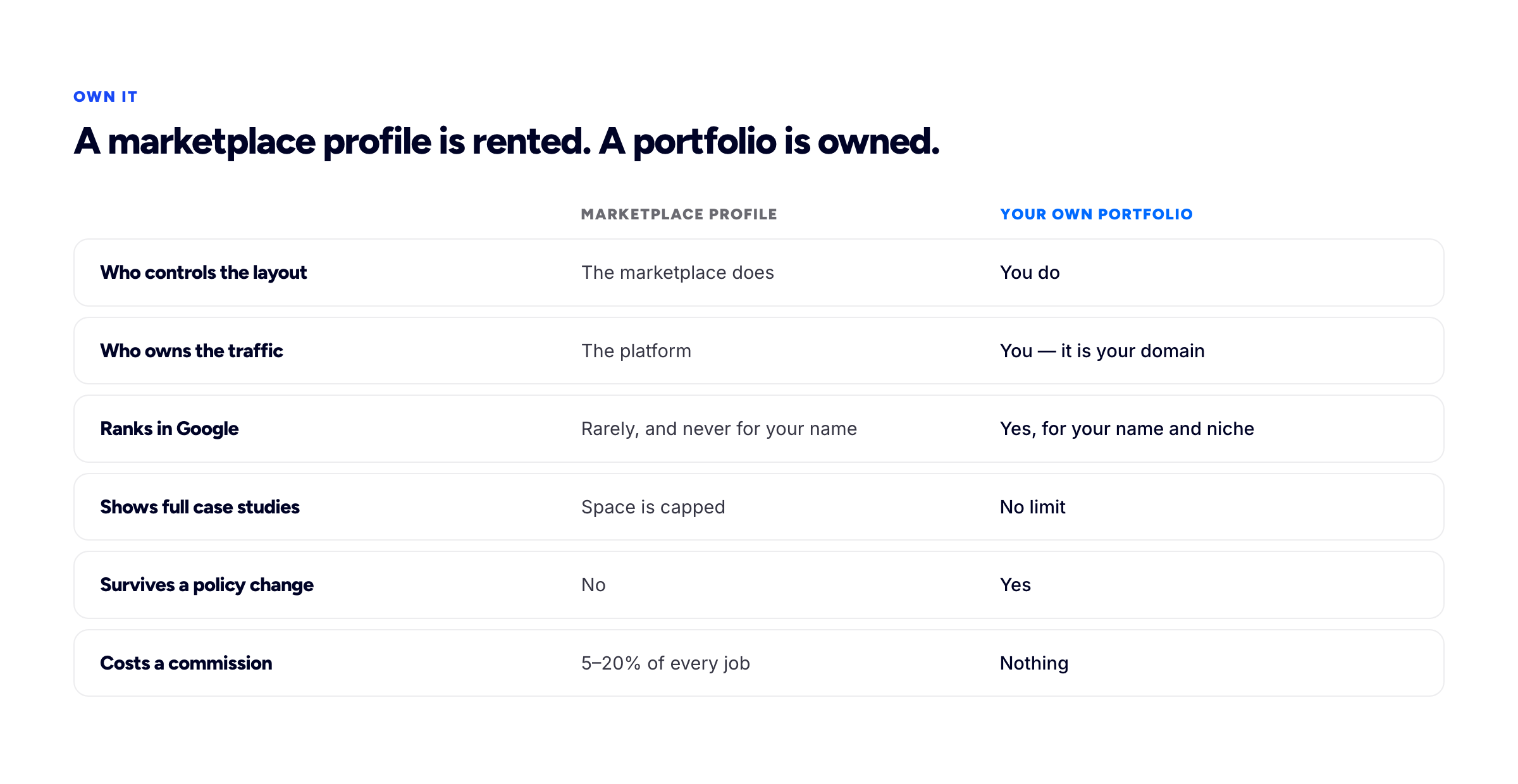
The same work, presented on rented land versus owned land.
The two are not in competition. The pattern that works is to use marketplaces for what they are good at — cold demand — and use your own site as the place you send everyone else: the referral, the conference contact, the person who found your name in a Slack group, the recruiter who wants to see more than a résumé. When a warm lead lands on your own domain, you control the entire argument. The résumé that recruiter asked for is a separate artefact, and a free résumé builder will produce it without an account if you no longer keep one current.
The eight sections a hiring client actually reads
Below is the structure we recommend, ordered the way a visitor moves through the page. The attention estimates are deliberately pessimistic — assume you get less than you think, because you usually do.
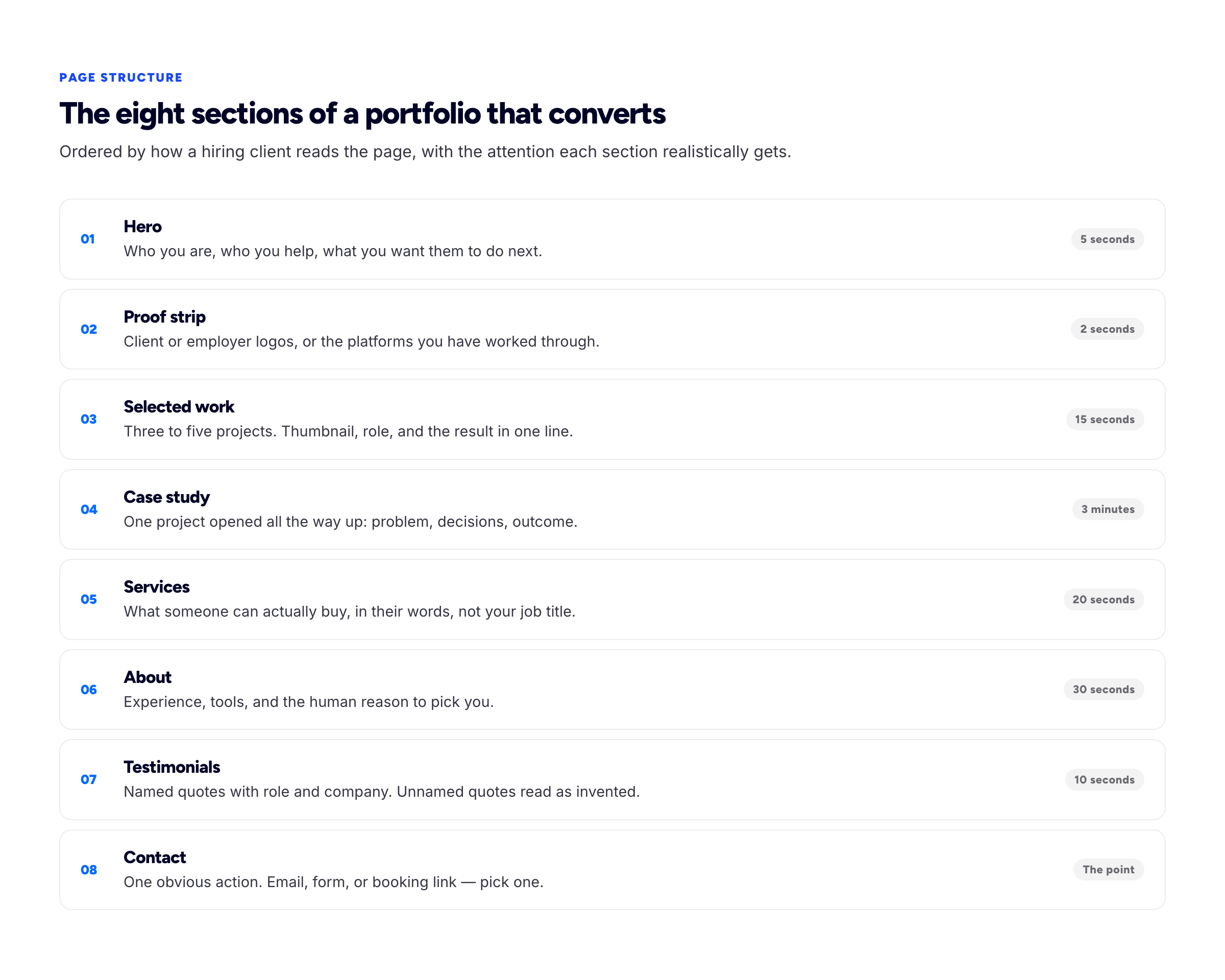
Ordered by how the page is read, not how it is built.
1. The hero: one sentence that names your buyer
The hero has one job — to make a visitor think this person does the thing I need. That requires naming the buyer, not just the craft.
"Freelance web developer" describes you. "I build fast, accessible storefronts for independent retailers" describes them. The second version loses the visitors who were never going to hire you and keeps the ones who were, which is exactly the trade you want.
Add a portrait if you have one. It is not vanity: a face converts an abstract vendor into a person you could email, and freelance hiring is a trust transaction more than a procurement one.
2. The proof strip: borrowed credibility, immediately
A row of logos — clients, employers, publications, platforms you have earned a top rating on — does more work per pixel than any other element on the page. It answers "has anyone else trusted this person" before the visitor has consciously asked.
Two rules. Only use marks you are actually entitled to display, which for most freelance contracts means naming an employer or a client you worked with directly, not every brand that appeared somewhere in the supply chain. And if you have no logos yet, do not fake it with generic "as featured in" filler — replace the strip with a single named testimonial instead. An empty proof strip is better than a dishonest one.
3. Selected work: three to five, not everything
The word "selected" is doing real work. A portfolio of fifteen projects reads as an archive; a portfolio of four reads as a point of view. Every weak project you add pulls the average down, and visitors judge you on the average, not the maximum.
Each card needs four things: an image that survives being 300 pixels wide, the project name, your actual role, and one line of outcome. "Lead developer — cut page load from 6.1s to 1.4s, which recovered a third of abandoned sessions" tells a client more than three paragraphs of technology lists.
4. One opened-up case study
This is the section that separates portfolios that get enquiries from portfolios that get compliments. A case study takes one project and shows the thinking: what was broken, what constraints you worked under, the decision you were least sure about, and what happened afterwards.
You only need one to start with. It is the piece a serious buyer reads before they email you, and it is the piece almost nobody bothers to write. We have a full template with word budgets in how to write a portfolio case study.
5. Services: what someone can actually buy
Freelancers routinely list capabilities ("React", "Figma", "SEO audits") where buyers are looking for packages ("a two-week design sprint", "a performance rescue for a slow Shopify store", "ongoing front-end support, retained monthly").
Name three things, describe what the client receives, and say roughly how long each takes. This section does the heaviest lifting in the service trades, where there is no artefact to look at at all — a virtual assistant's portfolio is mostly a services page with evidence attached to each line. If you are comfortable publishing a starting price, do — it filters out the budget mismatches that waste the most time on both sides. If you are not, "projects typically start at" with a range does most of the same work.
6. About: the human reason to pick you
By the time someone reaches your About section they have already decided you are plausible. This section decides whether they like you.
Write it in first person. Include how long you have been doing this, the kind of team you work well with, the tools you actually reach for, and one specific human detail. Skip the third-person biography voice — "Jane is a passionate creative" is a sentence no freelancer has ever said out loud.
7. Testimonials: names, roles, and companies
An unattributed quote is worth close to nothing, because every visitor knows you could have written it yourself. A quote with a full name, a role and a company is evidence, because it is checkable.
Ask for these at the moment a project ends well, when the client's goodwill is highest. A useful prompt: "Would you mind writing two sentences on what changed for you after the project?" It gets you an outcome rather than a personality compliment.
8. Contact: exactly one obvious action
Offering an email address, a contact form, a calendar link, and four social icons is not generosity — it is a decision you have handed back to a busy person. Pick the one you will genuinely respond to fastest and make it the loudest thing on the page.
Say what happens next and how quickly. "Email me and I'll reply within a working day, usually with two or three questions" costs one line and materially raises the number of people who write.
How to choose which work to show
The instinct is to show the most technically impressive thing you have built. The better filter is: which of these projects most resembles the work I want to be hired for next?
A portfolio is a proposal about your future, not a record of your past. If you have spent three years on internal tooling and want to move into consumer product work, the internal tooling should not lead — even if it was harder. Lead with the closest match you have, and if you do not have one, build one deliberately rather than hoping a client takes the leap on your behalf.
Three practical filters:
- Can you show it? Check your contracts. Some client work is under NDA. You can usually still write about the problem and the outcome in general terms — "a mid-size logistics company" — but confirm before you publish, not after.
- Did you make decisions on it? Work where you executed someone else's spec is weaker evidence than smaller work where you chose the approach.
- Did it ship? A modest thing real people use beats an ambitious thing that never left your laptop.
Write like a person who has done the work
The single fastest quality upgrade available to most portfolios is deleting adjectives and adding specifics. Compare:
We delivered a beautiful, user-centric redesign that dramatically improved the client's digital presence.
The booking form had eleven fields and a 71% drop-off. We cut it to four, moved date selection to the first step, and drop-off fell to 38% over the following month.
The first sentence could describe any project by any freelancer. The second could only have been written by someone who was there — which is precisely the signal a buyer is scanning for. Numbers are the easiest way to get there, but they are not the only way. A named constraint ("the client had two weeks before a trade show"), a rejected alternative, or a direct client quote all do the same job.
If you genuinely have no numbers — common for early-career freelancers and for design work where the client never shared analytics — say what changed qualitatively and attribute it. "The support team stopped getting questions about the returns policy" is honest, specific, and persuasive without inventing a metric.
The technical minimum
You do not need a perfect site. You need one that clears a floor, because below that floor the content stops mattering.
- It loads quickly. Google publishes a public benchmark for this in the Core Web Vitals: a Largest Contentful Paint of 2.5 seconds or less, an Interaction to Next Paint of 200 milliseconds or less, and a Cumulative Layout Shift of 0.1 or less, measured across the slowest quarter of real visits. Uncompressed hero images are the usual culprit on portfolio sites.
- It works on a phone. A large share of first visits are mobile — someone reading your link on the way to a meeting. If your project grid collapses into unreadable slivers, that is the impression you made.
- It is on a real address. A subdomain like
yourname.bunfolio.comis perfectly respectable and free. A custom domain you own is better, because it survives you changing tools. - It says who you are in the page title. "Home" is a wasted title tag. "Jane Okafor — Product Designer for fintech teams" is the line that shows in search results and in every Slack link preview.
- The contact route actually works. Test it from a device you are not logged into. Broken contact forms are alarmingly common and silently expensive.
If you want to go further than the floor, portfolio SEO covers titles, structured data and speed in detail.
Five mistakes that cost you the enquiry
- The mystery hero. A striking image and a poetic phrase, and no indication of what you do. Beautiful, and it converts nobody.
- Everything you have ever made. Student projects sitting next to client work. The visitor averages them.
- Process theatre. Twelve screens of wireframes and sticky notes, with no statement of what problem any of it solved.
- An out-of-date site. A footer that says 2023 tells a visitor you have stopped. Update something quarterly, even if it is one line.
- Hiding the contact route. If someone has to hunt for how to reach you, some fraction of them will not bother. That fraction is your income.
A realistic weekend plan
You do not need a month. You need a focused Saturday and a shorter Sunday.
Saturday morning — decide. Write your one-sentence positioning: I help [who] to [outcome]. Rewrite it five times and pick the least clever version. Choose your three or four projects.
Saturday afternoon — write. For each project: name, your role, one line of outcome, and 60 words of context. Then draft the About section in first person. Writing is the part people postpone; do it before you touch any design.
Sunday morning — build. Put it into whatever tool you like. If you would rather not build from scratch, Bunfolio gives you a free portfolio site on your own subdomain — sign in with Google, paste your LinkedIn profile to pre-fill the sections, edit the parts that are wrong, and publish. You can see all four templates running on sample content before you start.
Sunday afternoon — one case study. Take your strongest project and open it up properly. This is the highest-return hour of the whole weekend.
Then publish it, even though it is not finished. A live, slightly incomplete portfolio earns more than a perfect one still in drafts.
Frequently asked questions
Do I need a portfolio site if I already get work from referrals?
Referrals are precisely when a portfolio matters most. The person who was referred to you will search your name before they email, and what they find is either a case for hiring you or an empty result. A portfolio does not replace word of mouth; it converts it.
How many projects should I show?
Three to five. Below three the page feels provisional; above five you are diluting your strongest work and adding maintenance you will not keep up with.
What if my best work is under NDA?
Describe the problem, the constraint and the outcome without naming the client or showing the interface — "a healthcare scheduling product" is enough context for a reader to judge the thinking. Get written confirmation of what you may say. A well-written anonymised case study is far stronger than an unusable screenshot.
Is a free subdomain good enough, or do I need my own domain?
A subdomain is completely fine to start with, and it lets you publish today rather than after a domain purchase. A custom domain is the better long-term home because it belongs to you regardless of which tool you use. Most portfolio hosts, Bunfolio included, let you connect one later without rebuilding the site.
Should I include pricing?
If you have a repeatable service with a predictable scope, yes — it saves you the calls that were never going to close. If your work is genuinely bespoke, publish a starting range instead. Publishing nothing at all is the option that costs you the most time.
How often should I update it?
Once a quarter is enough. Swap the weakest project, refresh the About section, and check the contact form still works. Ninety minutes, four times a year.
How we put this guide together
Bunfolio builds portfolio sites for freelancers, so the structure above comes from watching what people actually put on those pages and which sections they leave empty. Where this guide states a technical threshold, it is taken from primary documentation rather than a secondary summary: the Core Web Vitals figures come from web.dev, and the content principles are consistent with Google's own guidance on creating helpful, reliable, people-first content.
We have deliberately not quoted conversion statistics about portfolios. There are a lot of confident percentages circulating on this topic that trace back to no identifiable study, and repeating them would make this guide less trustworthy rather than more. Where we make a claim about what works, it is either sourced or presented as our judgement.
More from the blog
August 29, 2026 · 18 min read
The Freelance UX Designer Portfolio: Winning Clients, Not Interviews
A hiring manager is deciding whether you can do the job for two years. A client is deciding whether you can solve one problem, for roughly this money, starting soon. Almost every difference in the por...
August 19, 2026 · 18 min read
How to Build a Virtual Assistant Portfolio (With or Without Clients)
The better you do the job, the less there is to show for it. How to turn invisible work into evidence, how to redact client screenshots safely, and how to build the portfolio honestly when you have no...
August 11, 2026 · 23 min read
How to Write a Freelance Proposal That Wins the Work
A seven-part structure with a length budget for each section, the scope split that prevents disputes before they start, and what to send when the client goes quiet.