
Free portfolio website
Free portfolio website templates,
and a site that stays free.
Four finished portfolio website templates, a free subdomain that stays free, and no card at any point. The useful question about a free portfolio website is never whether it exists — it is where the wall is. Ours is in one place, and this page says so before you spend an evening filling a site in.
What free means
Every free tier has a wall,
and where ours is.
The complete site is free permanently: your own address, all four templates, the AI setup, the contact form and the visitor stats, with no card and no countdown. One feature is paid — connecting a domain you already own — and it is optional, because your subdomain keeps working whether you connect one or not.
Free, and not for a limited time
Your site on a bunfolio.com subdomain, created for you at your first sign-in and renameable afterwards.
All four templates. None of them is held back for a paid tier, and you can switch between them whenever you like.
The setup wizard and the LinkedIn import that drafts your name, title and about section from a public profile.
Editing in plain English afterwards: a live preview beside a chat box, on the Website page.
A contact form on every template, with enquiries saved to your dashboard rather than left to an inbox.
Your title, description, social preview card and a Person structured-data block, written into the HTML itself, plus your own sitemap.xml.
Visitor numbers, counted once per visitor per day on published pages only.
No card at sign-up, and no trial clock counting down to a wall.
What free costs you
Connecting a domain you already own is our one paid feature — the current options are on the pricing section of the home page.
You buy the domain itself from a registrar. We do not sell domains, so that cost is never ours to quote.
Every published site carries one small “Built with Bunfolio” line in its footer, on free and paid sites alike. There is no way to remove it.
The templates are fixed: the section order, typefaces and palette belong to the template, and there is no drag-and-drop builder or CSS to edit.
Your site is one scrolling page. There are no sub-pages to add, and a generated site has no blog section.
We deliberately quote no figures on this page. What connecting a domain costs — yearly, every two years, or once for life — is set in one place and shown on the pricing section of the home page, so nothing you read here can quietly go out of date.
The templates
Four free templates,
not a gallery to sift through.
Four is the whole list, and that is the point: each one is a complete design we made end to end — its own typography, colour and motion — rather than a hundred half-finished themes. All four are free, all four fill from the same profile, and switching between them later costs nothing.
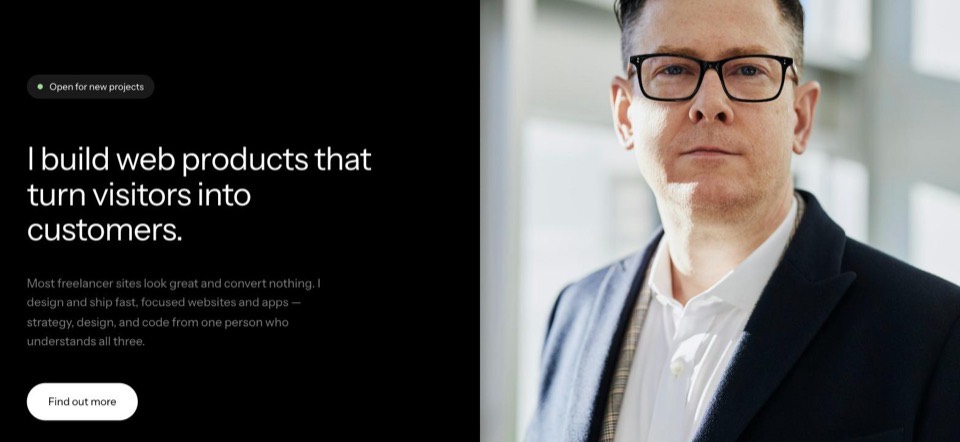
Noir
Pure black canvas, coral highlights.
Who it suits: designers and developers who want high contrast and one striking first impression.
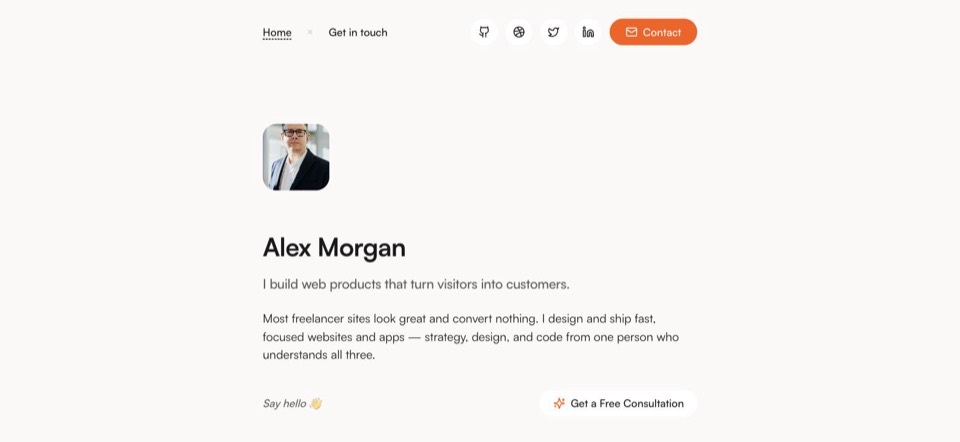
Warm
Soft off-white, warm orange details.
Who it suits: writers, consultants and anyone whose words do more selling than their visuals.
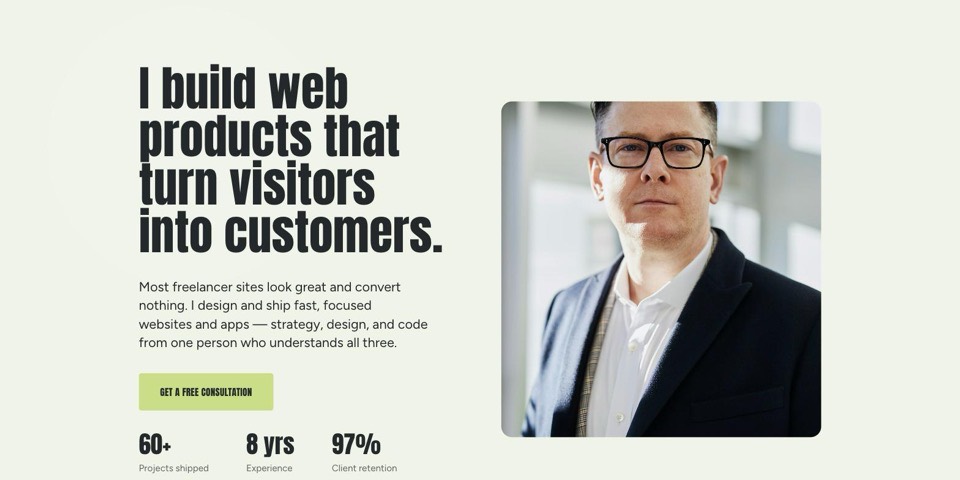
Spotlight
Colour-shifting panels, condensed display type.
Who it suits: agencies and art directors who would rather be memorable than understated.
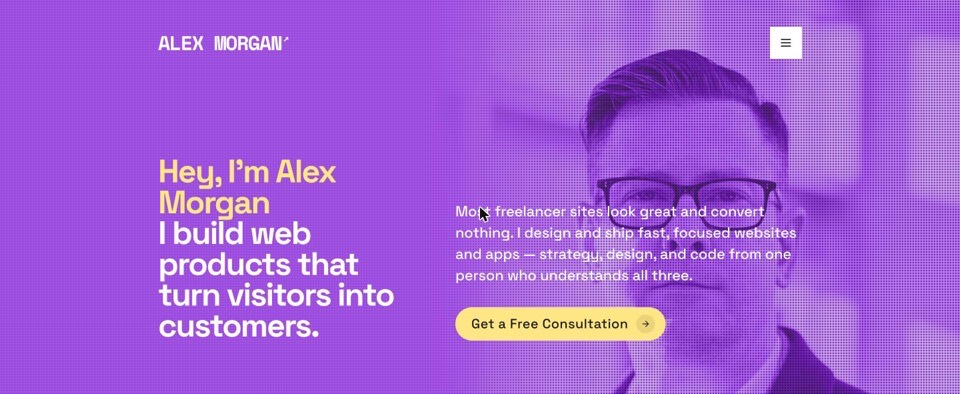
Halftone
Violet halftone hero, oversized uppercase type.
Who it suits: illustrators and graphic designers who want the work to hit first and hardest.
How it works
Three steps to a live site,
and none of them is buying anything.
The slow part of a portfolio is choosing what to show and writing about it — never the building. With your projects already in mind, this is an evening. The portfolio website builder page walks through each step in more detail.
Sign up with Google or email
01One click with Google, or an email and a password — and no card. Your free subdomain is created during that first sign-in, so you never have to think one up or check whether it is taken.
Paste LinkedIn, or just answer
02Paste a public profile URL and we draft your name, title and about section from it. Skip it and the wizard simply asks instead — photo, tools, skills, projects, contact details. The import is a shortcut, never a requirement.
Pick a template and publish
03Your site is generated from your answers in whichever template you chose. After that the Website page puts a live preview beside a chat box: describe the change you want and it is made to your content.
Who it suits
Five people this fits,
and one it does not.
A free tool that claims to suit everyone is describing nothing. This one is built around a single trade — you give up arranging the page, and you get a finished site tonight — so it fits some people squarely and others not at all.
Freelancers who need an address to send
You are already getting work, and you are sending people to a profile on someone else’s platform. A site of your own is the link that survives a platform changing its rules.
Developers and designers between roles
You want the work in front of a hiring manager this week, not a side project to maintain. There is nothing here to host, deploy or keep patched.
Writers, consultants and coaches
Your words do more selling than your visuals. The Warm template is set for reading rather than for impact, with a serif face and a generous measure.
Students and career changers
You have coursework, self-directed projects or a first few paid jobs, and no budget to point at the problem. Free here means free, not free for fourteen days.
Anyone stalled by a blank canvas
The site builder was never the hard part — choosing what to show and writing about it is. Fixed templates remove the decisions that were not going to make you money anyway.
Not for you if you want to design it yourself
There is no page builder here, and no CSS to edit. If arranging the page is the part you actually want, a tool like Webflow or Framer is genuinely the better answer.
Read next
Worth reading
before you commit to one.
Three guides that go further than a landing page can, including how other builders define the word free and what a portfolio can realistically rank for.
Which free portfolio builders actually include a custom domain?
The six things the word “free” gets used to mean, and the five questions that survive any pricing change.
Adobe Portfolio alternatives, compared honestly
Six places a portfolio can live, compared on how each one charges and what you are left holding when you stop paying.
Portfolio SEO: how to get your portfolio found on Google
What a portfolio site can realistically rank for, the on-page fields that do most of the work, and what is not worth your time.
More of the same on the Bunfolio blog.
Questions
The things people ask
about the word free.
Is a free portfolio website actually free?
Here it is, and here is exactly where the wall sits. Your site lives on a bunfolio.com subdomain that is free permanently — not a trial with a clock on it — and no card is asked for at any point. All four templates are included; none is held back for a paid tier. The single thing we charge for is connecting a domain you already own, and the current options are on the pricing section of our home page.
What is the catch with a free portfolio website?
Ours has two, and both are visible before you sign up. Every published site carries one small “Built with Bunfolio” line in its footer, on free and paid sites alike, and there is no way to remove it. And the templates are fixed: you change your content freely, but not the order of the sections, the typefaces or the palette, and there is no drag-and-drop builder or CSS to edit. That is the trade — a finished site tonight, in exchange for not designing it yourself.
Do I need a credit card to sign up?
No. You sign in with Google — that is the only way in, so there is no password to invent either — and your subdomain is created during that first sign-in. Card details are only ever requested if you choose to connect a domain of your own, which is optional and separate from having a live site.
Can I use my own domain with a free portfolio website?
Yes, and it is worth separating two costs. You buy the domain itself from a registrar — we do not sell domains — and connecting it to your Bunfolio site is our one paid feature. Your free subdomain keeps working alongside it, so the site never depends on the paid part staying paid.
Do free portfolio websites hurt your SEO?
Not by being free, but the address you publish on does matter over time. Every site here is served with its title, description, social preview card and a Person structured-data block written into the HTML itself rather than added by JavaScript, and each site gets its own sitemap.xml — so a free subdomain is properly crawlable from day one. What a subdomain cannot do is carry authority with you: anything you build up lives at our domain, whereas a domain you own is an address you keep. If you are writing regularly and playing a long game, that is the reason to connect one.
Can I change template later?
Yes, at any time, and you lose nothing by doing it. Your content is stored separately from the design, so switching re-renders the same projects, bio and contact details in a different look. It takes one click and it is reversible — which is why choosing one now is a low-stakes decision rather than a commitment.
How long does it take to build a free portfolio website?
An evening, if you already know which projects you want to show. Choosing and writing about the work is the slow part; the building is not. You sign in, paste a public LinkedIn URL or answer a short set of questions, pick a template, and publish. There is nothing to install, host or deploy.
What happens to my site if I stop paying for a domain?
It stays online. The free subdomain runs alongside a connected domain rather than being replaced by it, so if a domain connection lapses or the DNS breaks, your site is still reachable at its bunfolio.com address with all of your content intact. Nothing you have written is held hostage by a payment.
Get started
Nothing to pay,
and nothing to cancel.
Sign up with Google or email and your subdomain is waiting for you before you have answered a single question. Pick a template, fill the site in, publish it — and connect a domain later only if you decide you want one.
Google or email sign-up. No card, and no trial period to remember to cancel.