
July 21, 2026 · 20 min read · Updated September 25, 2026
Adobe Portfolio Alternatives, Compared Honestly
What Adobe Portfolio actually is, whether you already own it without knowing, and the six places a portfolio can live — compared on how each one charges and what you are left holding when you stop paying.
If you pay for Creative Cloud, there is a fair chance you already have an Adobe Portfolio website sitting unused in your account, and nobody has ever told you. That is the strangest thing about this product: a large share of the people searching for it are searching for something they already own. So this guide starts by answering the plain questions — what it is, whether you have it, whether it is free — and only then gets to the harder one, which is whether it is the right place to keep your work for the next five years.
We should be straight about the conflict of interest before you read another paragraph. Bunfolio builds portfolio sites, so we are one of the options compared further down. That is precisely why this piece spends time on the readers who should stay exactly where they are, and why we refuse to quote a single competitor price. A comparison written by a competitor is only worth reading if it is willing to lose.
What an Adobe Portfolio website actually is
Adobe Portfolio is a template-driven site builder that Adobe includes with a Creative Cloud subscription. You choose a layout, drop your work in, adjust type and spacing within the limits the template allows, and publish. It lives at portfolio.adobe.com, which is also where you sign in to find out whether you already have one.
Two structural facts explain most of its behaviour. The first is that Adobe owns Behance, and the two products are designed to work together — work you have on Behance can feed the site, and the site is positioned as the owned address that sits alongside your community profile. The second is that it is a subscription feature rather than a separate product. It exists inside the Creative Cloud arrangement, and it behaves accordingly.
What you get is deliberately narrow, and that narrowness is a feature. There is no page builder with a hundred blocks, no plugin marketplace, no theme store with thousands of entries. There are a handful of templates built for showing images well, some control over type, colour and grid, project pages, a small set of standard page types, and support for connecting your own custom domain. If you have used a general-purpose website builder and found yourself lost in options, the constraint will feel like relief.
How to find out if you already have one
Sign in at portfolio.adobe.com with the Adobe ID you use for Photoshop, Lightroom or Illustrator. If your subscription includes it, you will land in the editor rather than on a sales page. People search for "my Adobe Portfolio" or "portfolio Adobe" precisely because the product does not advertise itself inside the desktop apps, and it is easy to have paid for something for years without seeing it once.
If you have published a site before and cannot remember the address, it will be listed in that same dashboard, along with whichever domain it is currently serving from. Worth checking before you build anything new — an abandoned site with four-year-old work on a live address is doing you no favours, and either updating or unpublishing it takes minutes.
Is Adobe Portfolio free?
The honest answer is: free if you already pay for Creative Cloud, and not free otherwise. It is bundled, not free-standing. You cannot sensibly separate its cost from the subscription it arrives in, which means the real question is not "what does Adobe Portfolio cost" but "am I paying for Creative Cloud anyway, for other reasons".
If you are a photographer who lives in Lightroom, or a designer whose whole working day happens in Adobe apps, then the marginal cost of the site is genuinely nothing and the maths is easy. If you are considering a subscription in order to get the site, the maths is completely different, and you would be paying a professional software fee for a website. That is rarely the right trade unless you wanted the software too.
We are not going to print a figure here. Adobe's bundling and plan structure change, and a stale number in a comparison article is worse than no number. Check Adobe's own plans page for what is included in which plan today, and confirm on portfolio.adobe.com that the plan you hold covers it. Treat anything you read elsewhere — including this article — as possibly out of date on that point.
The word "free" is doing a lot of work in this category generally. A free portfolio website usually means one of three arrangements: free with ads or heavy platform branding, free on the platform's own subdomain with paid upgrades for a custom domain, or free as a bundled feature of something else you pay for. Adobe Portfolio is the third kind. Knowing which kind you are on tells you what happens when circumstances change, which is the subject of the next section and the most important thing in this guide.
The subscription-coupling problem
Here is the argument nobody makes clearly enough, and it applies to far more than Adobe.
When your portfolio lives inside a subscription, the site's lifespan is tied to a decision you will make for unrelated reasons. You do not cancel Creative Cloud because you dislike your website. You cancel it because you moved to different tools, or you took a salaried job, or you had a thin quarter and cut every recurring charge, or you simply stopped needing the apps. And on that day, a thing you did not consider — the address people use to find your work — is caught up in a decision that was about software.
This is not an accusation against Adobe. Every bundled feature works this way, and Adobe is transparent that Portfolio is part of the subscription. It is a description of the arrangement, and the same coupling exists at Squarespace, at Wix, at Canva, and at Bunfolio. The difference between platforms is not whether the coupling exists. It is how much you lose on the day it bites.
What you lose splits into three parts, and they are not equally recoverable. Your files are the least of it: you have the source images, and if you do not, back them up this week regardless of what else you decide. Your layout is annoying but cheap to redo, and honestly most portfolios benefit from a rebuild every few years. The expensive loss is the address — every link anyone has ever sent, every mention in an old email thread, every business card, every search result that accumulated slowly under your name, every profile bio pointing at it.
Which produces the single most useful piece of advice in this article: the fix is not choosing the platform that will never disappear. The fix is owning the address. If your portfolio is served on a domain you registered yourself, then changing platforms is a DNS edit and an afternoon of rebuilding. Every link keeps working. Nobody has to be told anything. If your portfolio is on something.someplatform.com, then changing platforms means everything that pointed at you now points at nothing, and there is no way to fix it retroactively.
Adobe Portfolio supports custom domains, so this is entirely achievable there. Most serious builders do. The reason to raise it is that a great many people never bother, and the cost of not bothering only becomes visible at the exact moment it can no longer be undone. Our guide to connecting a custom domain to your portfolio covers the two DNS records involved and the handful of ways people get them wrong; it is a half-hour job and it is the closest thing to insurance this trade offers.
What to do about your domain today
Three steps, in this order, whatever platform you end up choosing.
- Register a domain in your own name, at a registrar you log into yourself. Not through an agency, not through a client, not on an account belonging to a partner or a previous employer. Your name is the most durable choice, because it survives every change of speciality.
- Point it at whatever you are using now, including Adobe Portfolio. The platform is a tenant on your address, not the owner of it.
- Use that address everywhere — email signature, social bios, invoices, Behance profile, CV. Never circulate the platform subdomain once the domain works, because every link that goes to the subdomain is one you cannot redirect later.
Do that, and the rest of this article becomes low stakes. You can change your mind about platforms as often as you like, and each change costs you an afternoon rather than your accumulated reputation.
Who Adobe Portfolio genuinely suits
It would be easy for a competitor to skip this section. It is also where the piece earns any credibility it has, so here is the honest case.
You already pay for Creative Cloud and expect to keep paying. If Adobe apps are how you earn your living, the subscription is not a portfolio cost at all — it is a tool cost you were paying anyway. Adding another monthly charge for a site builder when a capable one is already sitting in your account is a decision you would need a reason for.
Your work is images. Photography, illustration, graphic design, motion stills, product shots. The templates are built by people who understand how images should be presented, and they present them well. If your portfolio is essentially a well-sequenced gallery with a short about page, the fit is close to exact. Our guides to a photography portfolio website and a graphic design portfolio both apply directly whatever platform you are on.
You already live in Behance. If posting to Behance is part of your routine and it brings you attention, the tie between the two products removes friction that would otherwise be manual. We have written separately about the difference between a community profile and your own site — the short version is that they do different jobs and most working designers want both, which is exactly the arrangement Adobe has built.
You want to be finished this evening. A constrained template with sensible defaults gets you to a published site faster than any tool with real flexibility. Flexibility is what turns a Saturday afternoon into three weekends of adjusting spacing.
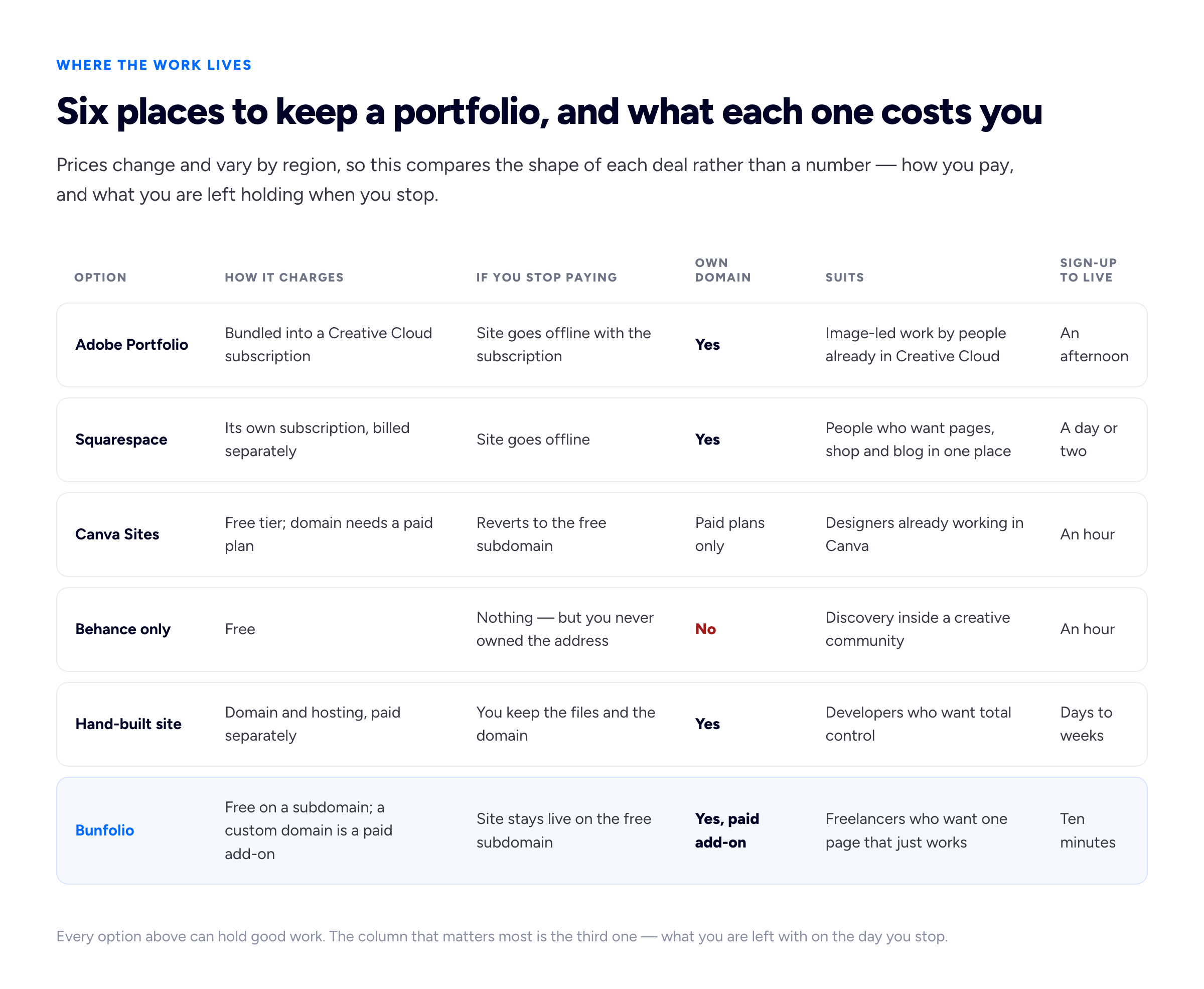
Every cell here is deliberately qualitative. The moment a comparison table starts quoting figures it begins going out of date, and the structural differences are the ones that will still be true next year.
Who it does not suit
Four situations, and they are not edge cases.
You will not be paying for Creative Cloud in two years. If you are a student on an education plan, between contracts, moving to other tools, or generally cost-cutting, then building your portfolio inside the subscription is building it on a timer. Not a disaster if you own the domain. A genuine problem if you do not.
You are not a designer. Adobe's account system, terminology and product surface assume you are in the creative-professional world. A copywriter, a developer, a marketing consultant or a virtual assistant will find themselves paying professional creative-software rates for a website, navigating an interface designed around someone else's workflow. The improvised answer in that position is usually a public Notion page, which is quicker and costs less, and gives up a different set of things — we checked which, against Notion's own documentation, in what a published Notion page gives up as a portfolio.
Your work is not primarily visual. This is the mismatch we see most. Image-led templates want images. If your best work is a campaign that lifted a conversion rate, a piece of infrastructure that stopped falling over, a rewritten onboarding flow, or twenty published articles, a beautiful gallery grid is a hostile container. You end up manufacturing screenshots to fill space that would be better used by two paragraphs explaining what you did. Writers, developers and strategists usually want a text-forward layout — see what hiring managers actually look for in a developer portfolio for how different those expectations are.
You need pages that are not galleries. A services page with real detail, a proper written case study with constraints and outcomes, a blog you post to regularly, a considered about page. All are possible on most builders with enough effort, but if that is the bulk of your site, you are working against a tool optimised for something else.
What Adobe Portfolio examples have in common
Search for Adobe Portfolio examples and you will find a lot of galleries of finished sites. They are worth looking at, but not for the reason most people look at them. Nobody hires you because your grid gutters match a site you admired. What is worth stealing is the structure, and the good examples share a structure so consistently that it functions as a template in its own right.
Across the strong ones, the pattern is roughly this. One full-width piece of work as the first thing you see, chosen to be representative rather than most-liked. A short line saying who you are and what you do, in plain words, near the top. A tight grid of projects — often fewer than a dozen — each opening onto its own page. Project pages that lead with the finished work and put the explanation underneath. One typeface, used at two or three sizes. A great deal of white or black space. An about page with an actual photograph of a human being. A contact route that is visible without hunting.
What the good examples do not have is equally instructive. No carousel of client logos you have never heard of. No skill bars claiming you are eighty-two per cent proficient in something. No thirty projects. No animation that delays your first look at the work. No paragraph of adjectives about passion. The restraint is the design.
You can build every one of those decisions on any platform in this article, which is the point. When you copy an example, copy the sequencing and the ruthlessness of the edit, not the styling. If you are unsure how much to include, our guide on how many projects a portfolio should hold lands on a smaller number than most people expect, and the good examples agree.
The alternatives, compared honestly
Six options, including ours, on the axes that matter rather than the ones that flatter anybody. We run the same exercise over a wider field, on the same axes and with the same refusal to print a price, in our comparison of the best portfolio website builders. Self-hosted WordPress is deliberately not one of the six, because it is a different kind of commitment rather than another builder; we weigh it on its own terms, theme by theme, in our guide to free WordPress portfolio themes.
Squarespace
The most capable general-purpose option here. A Squarespace portfolio website can be a shop, a booking system, a blog and a gallery at once, the templates are genuinely well made, and the editor is mature. If your site needs to do commerce or scheduling as well as show work, this is the obvious answer and we would not argue with it. The trade is that it is a paid subscription with no free tier for a live site, it takes longer to set up than a constrained portfolio website builder, and the flexibility that makes it powerful is also what turns a one-evening job into a project. Check their own site for what is currently included; we are not quoting plans.
Canva
A Canva portfolio website is the fastest path from nothing to something on this list, and for someone with no design confidence the templates prevent most self-inflicted wounds. It is a reasonable choice for a student, a career changer or anyone who needs a presentable page this week. The reservations are that Canva is a design tool with a website feature rather than a website product, the output is document-shaped in a way that is hard to unsee, and a portfolio built there tends to be difficult to grow into a real site later. Their site has the current details of what the website feature includes.
Behance only
A Behance portfolio website — meaning the profile itself, with no separate site — is a completely legitimate choice for a great many designers, and we would rather say so than pretend otherwise. It is free, it requires no maintenance, it has an audience already inside it, and recruiters are comfortable there. If you are employed and posting for craft and community, that may be the whole answer. The limits are structural rather than fixable: the address belongs to Behance, the ordering follows the platform's logic rather than your argument, and the container rewards work that reads in a thumbnail over work that needs explaining.
Hand-rolled
Building it yourself gives you total control, no subscription for the site itself, and — if you are a developer — a portfolio piece that is also the portfolio. For developers this is often the right call. For everyone else, be honest about the maintenance. The hand-built sites we see are either immaculate or two years stale, with very little in between, and a neglected site with dead links and old work does active harm.
Wix
Broadly the same shape of decision as Squarespace: a large general-purpose builder with a lot of templates and a lot of options. Worth a look if you want maximum layout freedom without writing code, with the same caveat about how long a very flexible editor can absorb.
Bunfolio
Ours, so weigh it accordingly. You sign in with Google, fill in a form or import a public LinkedIn profile, and get a live site on a free subdomain such as jane.bunfolio.com; connecting a custom domain you own is an optional paid add-on. There are four templates to choose between, all with the same fixed set of sections — home, about, services, skills and tools, portfolio, testimonials, contact — which is the honest limitation and also the point. If you want to design your own layout, arrange a page, or express a visual identity through your site's design, this is the wrong tool and Squarespace is a better answer. If your work is not primarily images and you want a text-capable site published in an evening, it fits. It is a single-page structure by design; our note on one-page versus multi-page portfolios explains when that is the wrong shape.
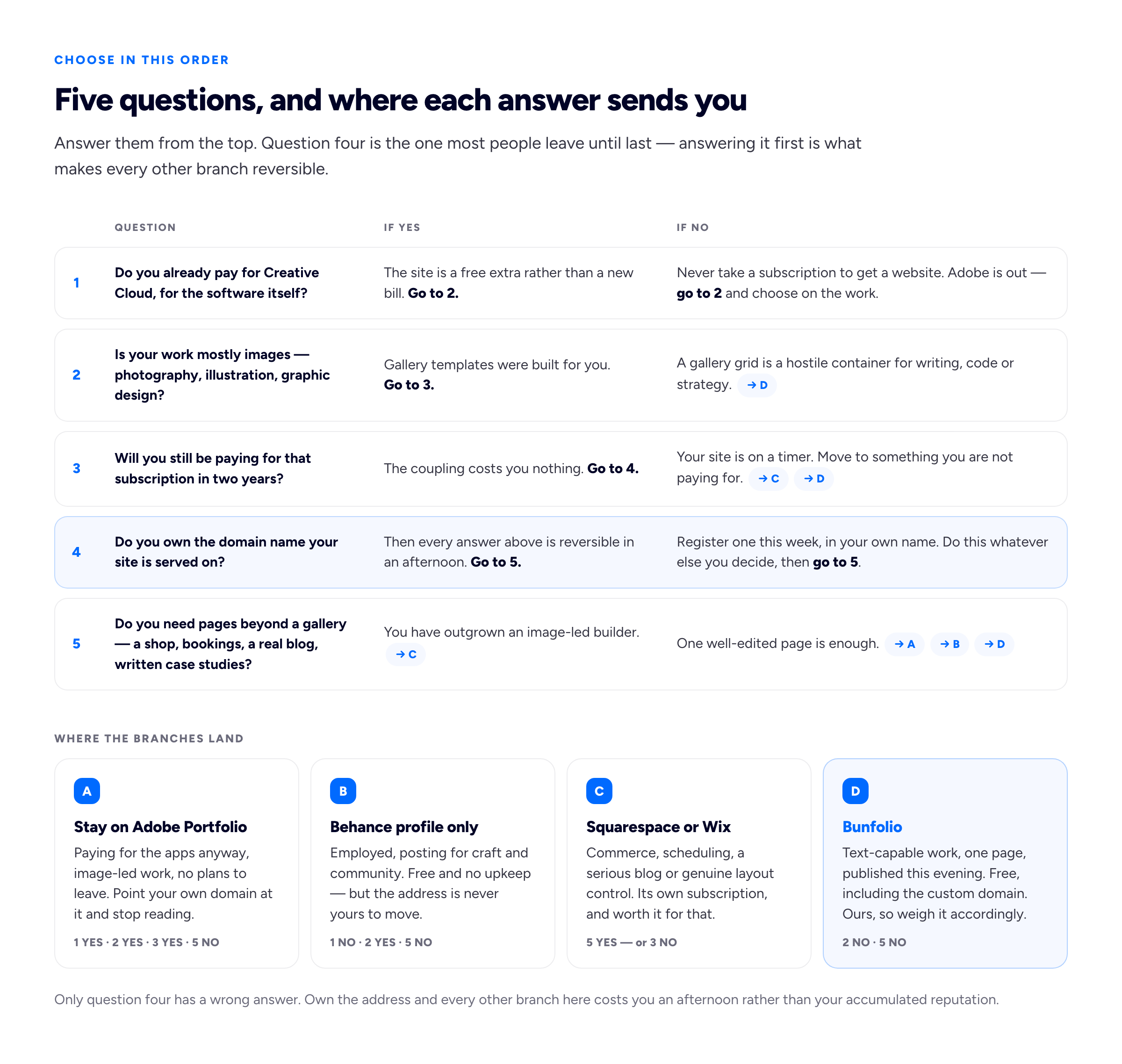
The most consequential branch is the domain question, and it is the one people answer last. Answer it first and every other branch becomes reversible.
When you should stay on Adobe Portfolio and stop reading
Stay if all of the following are true, and treat the rest of this article as not applying to you.
You pay for Creative Cloud for reasons that have nothing to do with a website, and you expect that to continue. Your work is images, and a well-sequenced gallery with a short about page is a fair representation of what you do. You have a site there already, it is current, and it gets you enquiries. And you have pointed a domain you own at it, or you will do that this week.
If that describes you, moving is a waste of a weekend. The best portfolio platform is overwhelmingly the one where your work is already published, up to date and reachable, and switching tools is one of the most reliable forms of productive procrastination available to a freelancer. The site you already have, updated with your last two projects and a current availability line, will outperform the one you are planning to build.
The only item on that list we would push on is the domain. Even if you never leave Adobe, own the address. It costs very little, it takes half an hour, and it converts a decision you might regret into one you can reverse.
Frequently asked questions
Can I use Adobe Portfolio without a Creative Cloud subscription?
It is tied to the subscription rather than sold separately, so the practical answer is no — but plan structures change, and the only reliable source is Adobe's plans page and portfolio.adobe.com itself. Do not take a figure from any article, including this one.
What happens to my Adobe Portfolio site if I cancel?
Check Adobe's own documentation for the current behaviour, because the details of grace periods and what stays accessible are exactly the kind of thing that changes. Plan on the assumption that the site stops serving. If your custom domain is pointed there, you can repoint it elsewhere and keep every link working, which is the whole argument for owning it.
Is Adobe Portfolio good for SEO?
It produces normal, indexable web pages, which is most of the battle. The things that actually decide whether you are found — a domain you own, sensible page titles, real text on the page rather than text baked into images, and a page that loads quickly on a phone — are mostly your decisions rather than the platform's. Our portfolio SEO guide covers the short list that matters.
Should I use Adobe Portfolio or Squarespace?
If you already pay for Creative Cloud and your site is a gallery with an about page, Adobe Portfolio, because you are not adding a bill. If you need commerce, bookings, a serious blog or real layout control, Squarespace, because it is built for that and the other is not.
Is a free portfolio website taken less seriously by clients?
In our experience clients notice content, not hosting. What they do notice is a stale site, a broken contact route, and work that does not resemble the job they are hiring for. A free site that is current beats a paid site that is two years old, every time.
How we put this guide together
The conflict of interest here is direct and we would rather state it twice than bury it: Bunfolio is one of the six options compared above, this article is published by Bunfolio, and you should read our conclusions with that in mind. What we did to keep it usable anyway: we recommended Adobe Portfolio outright for the readers it genuinely suits, and wrote a section telling those readers to stop reading; we recommended Squarespace over our own product for anyone needing commerce, bookings or real layout control, and Behance-only for designers whose needs a profile already meets; we described our own fixed templates as a limitation rather than a philosophy; and we chose comparison axes — what happens when you stop paying, whether you own the address, what kind of work the tool suits — that do not uniquely favour us.
The judgement calls in this piece are ours and are opinions with reasons attached rather than measurements. The subscription-coupling argument, the decision flow in the second diagram, the "when you should stay" section, and the claim that structure rather than styling is what to copy from example portfolios are all Bunfolio's own view, formed from hosting portfolio sites and from watching which sites go stale and why. The structural facts about Adobe Portfolio — that it is included with a Creative Cloud subscription rather than sold as a standalone product, that it is template-driven, that Adobe owns Behance and the two are built to work together, and that it supports a custom domain — come from Adobe's own pages: portfolio.adobe.com and the Creative Cloud plans page. Where we describe other products, the sources are their own sites: Squarespace, Canva and Behance. The SEO points are consistent with Google's own guidance in its SEO starter guide.
We deliberately quoted no prices, no plan names, no storage limits and no feature counts for any product mentioned, including our own competitors. Those change without notice, and an out-of-date figure inside a comparison is worse than no figure: it looks authoritative while being wrong, and readers make decisions on it. For anything involving money, go to the source — Adobe, Squarespace, Canva — and read it there on the day you decide. We are not affiliated with, endorsed by or partnered with any of these companies, and no marketing copy has been reproduced from any of them. Any example person, site or scenario in this guide is invented for illustration.
Related reading: how to connect a custom domain to your portfolio, Behance and Dribbble versus your own portfolio website, and how to build a photography portfolio website.
More from the blog
August 12, 2026 · 22 min read
Marketing Portfolio Examples: How to Show Results You Can Prove
A marketing portfolio is an evidence problem, not a gallery problem. The five parts of a single entry, how to write a result an experienced reader believes, and what to do about the numbers you are no...
August 21, 2026 · 18 min read
Model Portfolio Website: Building a Book That Books Work
Your book is a technical document with a conventional structure, read quickly and rejected faster. The eight shots it needs, why stats accuracy is not optional, and which direction the money should al...
July 10, 2026 · 18 min read
Do Freelancers Actually Need a Website? An Honest Answer
Written by a company that sells websites, so it starts with the freelancers who genuinely do not need one. What a site does that a profile structurally cannot, the minimum version worth publishing, an...