
August 25, 2026 · 13 min read
Turn Your LinkedIn Profile Into a Portfolio Website
Which profile fields transfer cleanly, which need rewriting, and the two things you have to write from scratch — with an evening-long plan for getting a real portfolio live.
"Just send me your LinkedIn" is a sentence that costs freelancers work. Not because LinkedIn is bad — it is excellent at what it does — but because it is a directory listing, and a directory listing is a fundamentally different document from a portfolio.
A LinkedIn profile is optimised to be filtered. Its structure, its field lengths, and its incentives all point at recruiters running searches. A portfolio is optimised to be decided on. It has one visitor at a time, no competing feed, and no character limits, and its job is to close.
The good news is that your profile already contains most of the raw material. This guide covers exactly what transfers, what needs rewriting, and the two things you will have to write from scratch — plus a realistic evening-long plan for getting it done.
What LinkedIn is good at, and where it stops
Keep the profile. It genuinely earns its place: it is where recruiters search, it carries social proof through your network, and it ranks well for your name. None of that is replaced by having your own site.
Where it stops is the moment someone has already decided to consider you. At that point they want depth — how you think, what you decided, what happened — and LinkedIn has nowhere to put any of it. There is no case study field. Project outcomes have no home. Your work sits behind the same layout as every other profile, interrupted by a feed, a paywall prompt, and a sidebar of other people who do what you do.
That last one is worth sitting with. LinkedIn shows visitors a list of your competitors while they are reading about you. Your own site does not.
What transfers, and what does not
Most of a profile maps onto a portfolio with light editing. The parts that do not are, predictably, the parts that decide whether someone hires you.
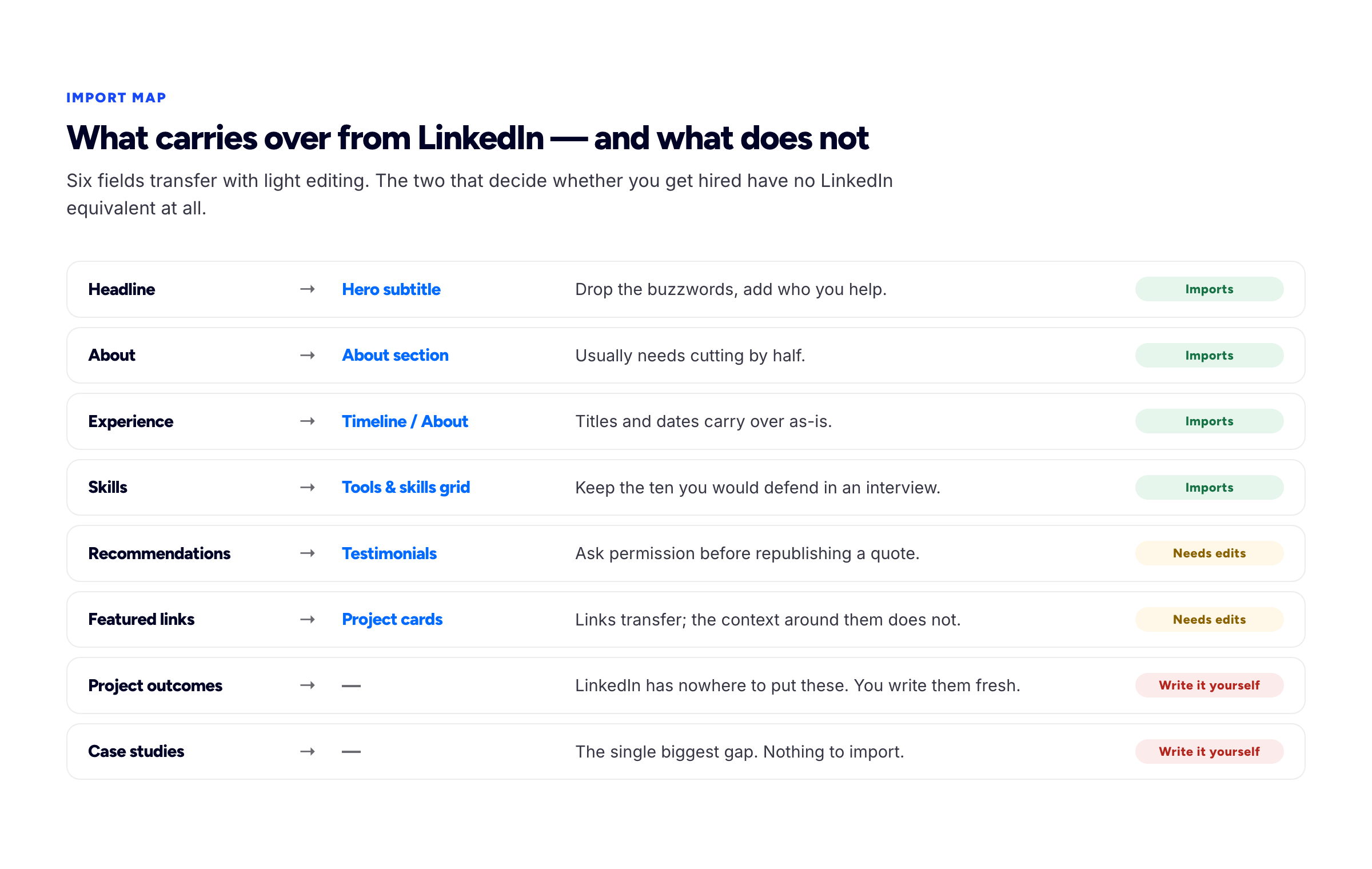
Six fields carry across. The two that close a deal have no LinkedIn equivalent.
Headline, About, Experience and Skills all move over with editing. Recommendations and Featured links move with a permission check and some added context. Project outcomes and case studies do not exist on LinkedIn at all — there is no field for them, so you have never written them.
That is the actual work of this exercise. Everything else is copying.
Rewriting the headline
Your LinkedIn headline was written for a search filter. Your portfolio hero is read by a person who has to make a decision. They should not be the same sentence.
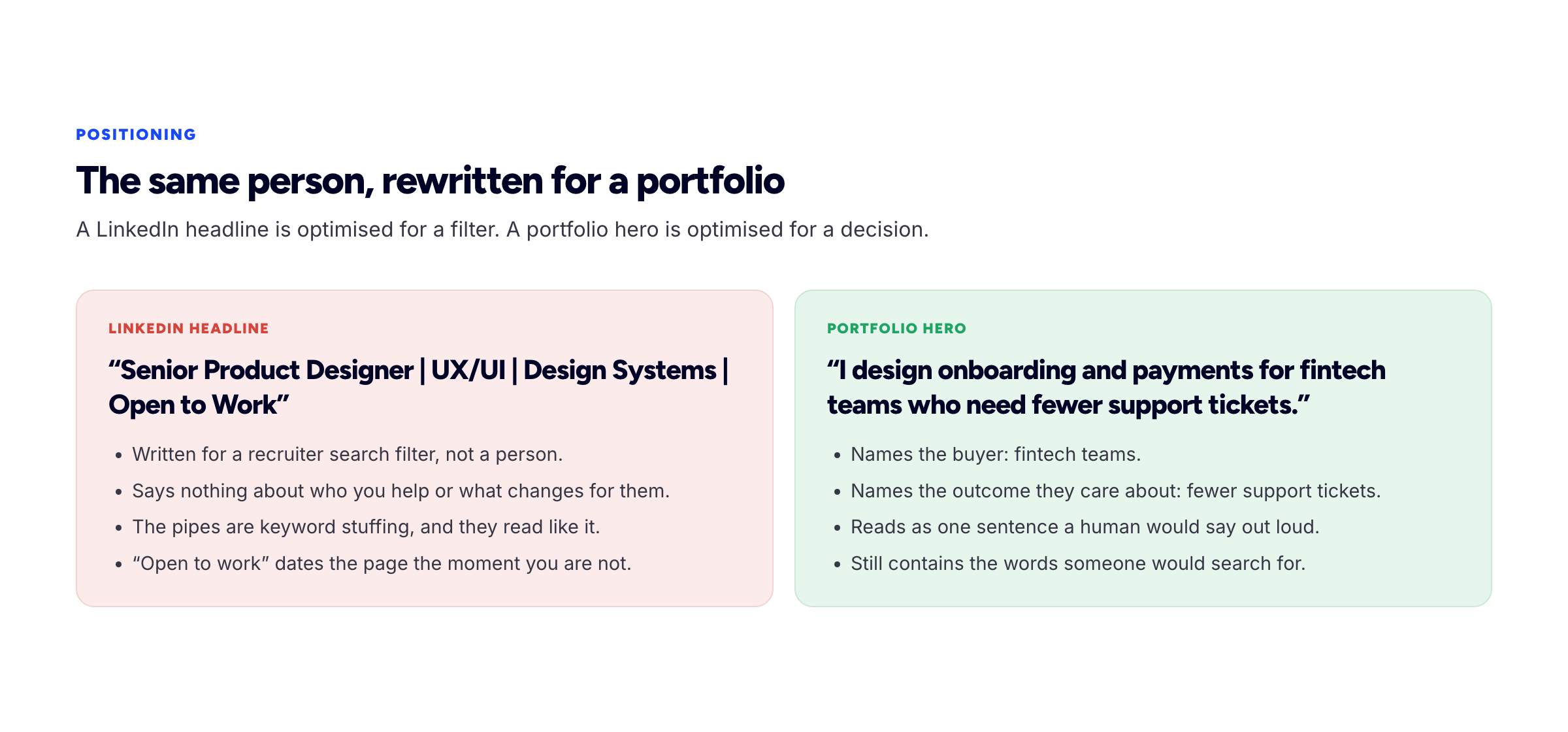
The same person, rewritten for a different reader.
The pipe-separated keyword headline — Senior Product Designer | UX/UI | Design Systems | Open to Work — is arguably correct on LinkedIn, where it feeds a matching algorithm. Dropped onto a portfolio it reads as a list of tags, says nothing about who you help, and dates the page the moment you are no longer open to work.
The portfolio version is one sentence naming a buyer and an outcome: "I design onboarding and payments for fintech teams who need fewer support tickets." It still contains the words someone would search for. It just contains them in an order a human would say out loud.
A workable formula: I help [specific who] to [specific outcome]. Write it five times, pick the least clever one. If none of the five come, our headline generator will write them from your role and one proof point, and the about me generator does the same job for the paragraph underneath it.
Cutting the About section in half
LinkedIn About sections tend to run long and drift into third person, because they are written under the eye of your entire professional network — every former manager and current colleague. That audience produces careful, slightly inflated prose.
On your own site the audience is one prospective client. Three changes:
- Switch to first person. "Jane is a passionate design leader" becomes "I've spent ten years on onboarding flows". Nobody has ever described themselves in the third person out loud.
- Cut it by half. Most About sections have one genuinely interesting paragraph and two of positioning. Keep the interesting one.
- Add one specific human detail. What you are good at that is slightly unusual, the kind of team you work well with, something true. This is the sentence people remember.
Turning Experience bullets into project cards
Experience entries are organised by employer and time. Portfolios are organised by problem, because that is how a client recognises their own situation.
So do not copy the job history across as a timeline. Go through it and pull out the individual pieces of work worth showing, then rebuild each as a project card: what it was, your role, one decision or constraint, and an outcome.
A LinkedIn bullet like "Led redesign of the customer portal, improving usability" becomes a card that says what the portal did, that you were the sole designer across a nine-week engagement, that the constraint was leaving the existing authentication untouched, and that support tickets about login dropped afterwards. Same fact, ten times the evidentiary weight.
Three to five of these is the right number. The rest of your job history can live in a short text timeline, or be left on LinkedIn where it already is.
Recommendations become testimonials — with permission
LinkedIn recommendations are close to portfolio-ready: they are named, attributed, and tied to a real role. Two caveats.
Ask first. A recommendation was written for LinkedIn's context, and republishing it on a commercial site is a different use. A short message — "I'm building a portfolio site, would you mind if I quoted your recommendation?" — is almost always a yes, and it reopens a warm conversation.
Then trim. Recommendations often open with two sentences of preamble before the useful part. Quote the sentence that describes what changed, keep the name, role and company, and cut the rest.
The two things you have to write from scratch
This is the part that takes real effort, and skipping it is why most LinkedIn-to-portfolio conversions end up as a prettier LinkedIn profile.
Project outcomes. LinkedIn trained you to describe responsibilities. A portfolio needs consequences. Go through each project you are showing and answer one question: what was measurably or observably different afterwards? Numbers where you have them; an attributed quote where you do not.
One case study. One project opened all the way up — the problem, the constraint, the decision you were least sure about, what happened. This is the single highest-value page on a freelance portfolio and it has no LinkedIn equivalent whatsoever, which is exactly why it differentiates you. We have a template with word budgets in how to write a portfolio case study.
Doing it in an evening
A realistic sequence, about three hours.
First 30 minutes — extract. Open your profile and copy the headline, About, Experience entries, Skills and any recommendations into a plain document. Do not edit yet. You are just getting the raw material out of the LinkedIn interface, where its formatting keeps influencing you.
Next 45 minutes — rewrite the top. The one-sentence positioning line, then the About section in first person at half the length. These two decide how everything after them reads.
Next 45 minutes — rebuild the work. Pick three to five projects. For each: name, role, one constraint, one outcome. Skip the ones you cannot describe an outcome for.
Last hour — publish, then write one case study. Get the site live first, even though it is incomplete, then spend the remaining time opening up your strongest project.
If you would rather not build the site itself, that is what Bunfolio does — sign in with Google, paste your public LinkedIn URL, and it pre-fills the sections it can from the profile so you are editing rather than starting from an empty form. You get a free portfolio site on your own subdomain, and you can connect a custom domain later. The import is a shortcut for the copying, not for the thinking: the rewriting above is still yours to do, and the Noir template shows what the finished result looks like.
A worked example: one Experience bullet, rebuilt
The gap between the two formats is easiest to see on a single entry. Here is a realistic LinkedIn bullet:
Led the redesign of the customer portal, working cross-functionally with engineering and support to improve usability and drive engagement.
Everything in that sentence is true and none of it is evidence. "Led" is unscoped, "cross-functionally" is filler, "improve usability" is unfalsifiable, and "drive engagement" is a phrase no user has ever cared about. It survives on LinkedIn because it is scanned, not read.
Now the same work as a portfolio project card:
Customer portal redesign — Northwind Freight
Sole designer, nine weeks, working with two engineers and the support lead.Support was fielding around forty tickets a week from customers who could not find their delivery documents. The constraint was that the document storage system could not be changed — it was mid-migration — so the fix had to happen entirely in the interface. I reorganised the portal around shipments rather than document types, which is how customers actually think about their own freight, and put the three most-requested documents on the shipment view itself.
Document-related tickets fell to under ten a week within a month. The support lead's summary: "People stopped calling us to ask where things were."
Same project, same nine weeks, same person. The second version names a number, a constraint, a decision with a reason behind it, and an attributed outcome. It is roughly three times as long, which is the trade you are making — depth for breadth — and it is the entire reason a portfolio outperforms a profile.
Notice also that nothing here required going back to the client. The ticket volume, the constraint, and the reasoning were all things the designer already knew and had simply never written down, because LinkedIn had nowhere to put them.
Five mistakes in the conversion
These are the failure modes we see most often when someone moves a profile onto a site.
- Copying the profile verbatim. The result is a LinkedIn profile with better typography. If the words are the same, you have changed the container and not the argument.
- Keeping the reverse-chronological structure. A portfolio organised as a job history asks the visitor to work out for themselves which entry is relevant to them. Organise by problem and lead with the closest match.
- Bringing the buzzwords along. "Results-driven", "passionate", "cross-functional", "synergies". These words earned their place in a document scanned by recruiters and filters. On your own page they read as someone else's voice.
- Listing every job. Your first three roles are context, not evidence. A short timeline is enough; the detail belongs to the work you want more of.
- Publishing without the outcomes. The most common one. People do the layout, the photo, the colour scheme, and ship a site where every project still describes responsibilities. The design work was the easy half.
If your profile is thin to begin with
Not everyone arrives with ten years of Experience entries to mine. If you are early in your career, mid-switch, or have spent years somewhere that never let you talk publicly about the work, the conversion above gives you very little to copy.
That is an argument for building the site sooner rather than later, not for waiting. A profile with three roles and no detail is invisible in a directory of millions of similar profiles — there is nothing to distinguish it. A small site with one genuinely good case study is not competing in that directory at all.
Practically: pick the single best thing you have done, even if it was unpaid, internal, or small. Write it up properly using the six-part structure. Put your positioning sentence above it. Publish those two things and nothing else. A two-section portfolio that demonstrates real thinking beats an eight-section portfolio padded with placeholder content, and it takes an evening rather than a month.
Keeping both up to date
Two properties means two maintenance jobs, and the second one always gets forgotten. Keep it manageable:
- LinkedIn stays the résumé. Job changes, titles, dates. Update it when your employment changes.
- The portfolio stays the argument. Best work, current positioning, case studies. Update it when your work changes, which is more often.
- Link them both ways. Your portfolio URL goes in the LinkedIn website field and in the About section; your LinkedIn goes in your portfolio footer and in your
sameAsstructured data, which helps search engines recognise the two as the same person. See portfolio SEO for how that works. - Set a quarterly reminder. Ninety minutes, four times a year, is enough to keep both current.
Frequently asked questions
Can I just link my LinkedIn instead of building a portfolio?
You can, and for some salaried applications it is enough. For freelance work it is a handicap: you are asking a buyer to evaluate you inside a page that limits your depth and displays your competitors alongside you.
Can a tool import my LinkedIn profile automatically?
Tools that accept a public profile URL — Bunfolio's portfolio builder among them — can pre-fill the structured parts: name, headline, about, experience, skills. What no importer can produce is the part that matters most, because outcomes and case studies are not in the profile to begin with. Treat any import as a first draft.
Should I copy my About section word for word?
No. Switch to first person and cut it roughly in half. LinkedIn prose is written for a professional network; portfolio prose is written for one buyer.
Do I need permission to reuse a LinkedIn recommendation?
Ask. It is nearly always granted, it is the courteous thing to do, and it gives you a reason to reconnect with a past client.
What if my LinkedIn is thin?
Then the portfolio is more important, not less. A thin profile in a standard template is invisible; a small site with one excellent case study is not.
Should I delete my LinkedIn once the portfolio is live?
No. They do different jobs. LinkedIn is where recruiters search and where your network can see you; the portfolio is where someone decides. Deleting the profile removes a discovery channel and gains you nothing, since maintaining it costs a few minutes a quarter.
What should go in the LinkedIn website field?
Your portfolio home page, with a custom label rather than the default "Company Website" — LinkedIn lets you set the link text, and "See my case studies" outperforms a bare URL. Put the address in your About section as plain text too, since not everyone notices the link in the header.
Will having both split my search traffic?
No. They reinforce each other. Link them in both directions and include sameAs markup so search engines can resolve them to one person.
How we put this guide together
Bunfolio offers LinkedIn profile import, so the mapping above reflects what actually comes across from a public profile and — more usefully — what consistently does not. The recurring gap is the same every time: profiles describe responsibilities, portfolios need outcomes, and no import can invent them.
The note about sameAs markup follows Google's structured data documentation. Advice about what to rewrite is our judgement, presented as such.
Related reading: how to build a freelance portfolio website that wins clients and what hiring managers actually look for in a developer portfolio.
More from the blog
July 30, 2026 · 22 min read
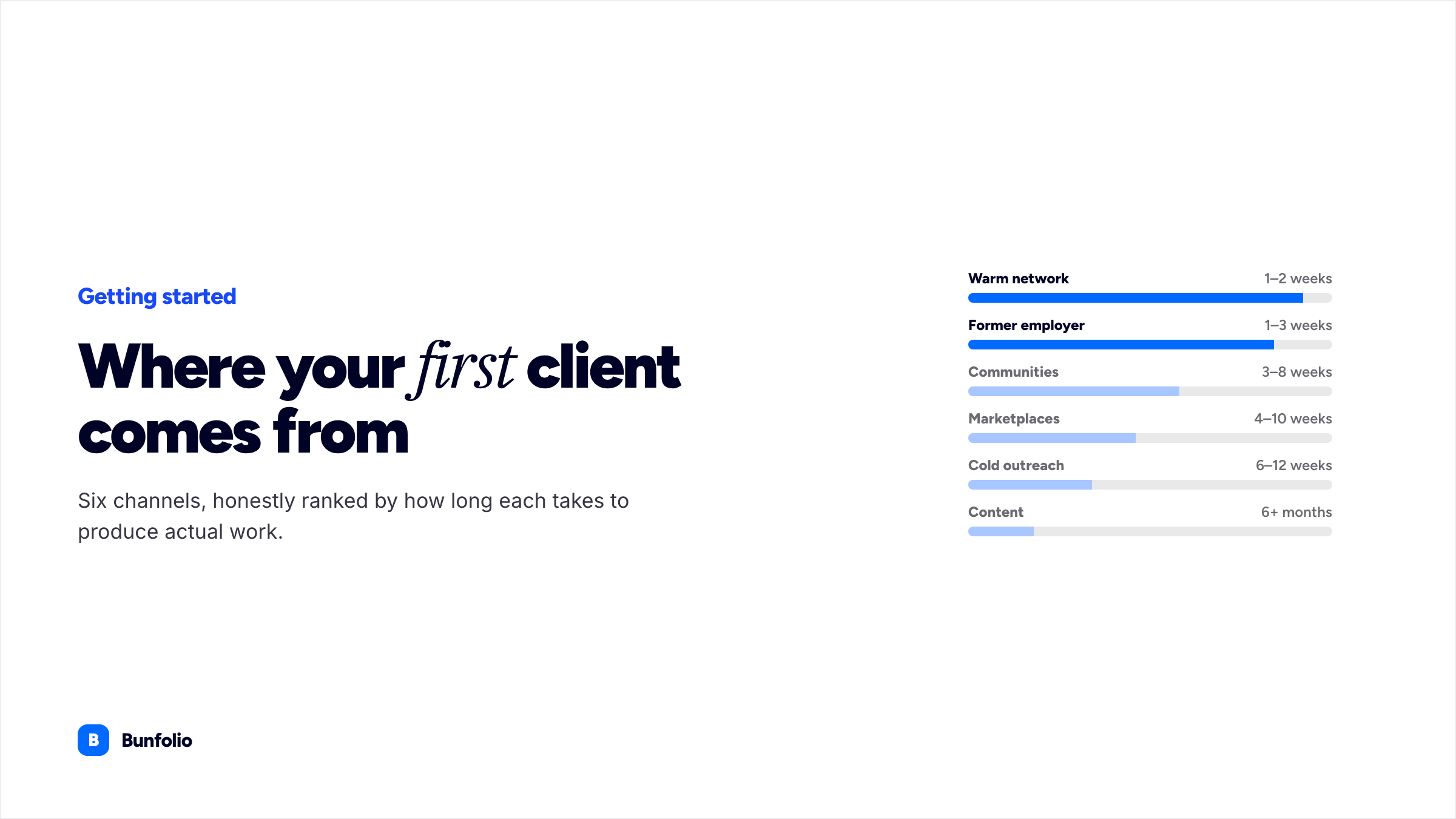
How to Get Your First Freelance Clients
Six channels ranked by how fast each one realistically produces work, cold outreach that earns a reply, and how to turn a first job into the evidence that wins the second.
August 11, 2026 · 23 min read
How to Write a Freelance Proposal That Wins the Work
A seven-part structure with a length budget for each section, the scope split that prevents disputes before they start, and what to send when the client goes quiet.
August 20, 2026 · 25 min read
How to Ask Clients for Testimonials That Actually Persuade
Why an unattributed quote is worth nothing, the narrow window when the ask succeeds, and the questions that produce evidence instead of a compliment — with request emails you can copy.