
July 28, 2026 · 20 min read
Notion as a Portfolio Site: What Breaks, and When to Move Off
Notion is an unusually good place to assemble a portfolio and an unusually bad place to publish one. What actually breaks once the page is public, what Super and Simple.ink really add, and the threshold for moving off.
Notion is an unusually good place to assemble a portfolio and an unusually bad place to publish one. Both halves of that are true at once, which is why the question keeps getting asked and why the answers are so unsatisfying. The work is already in there — project notes, screenshots, half-written case studies — and turning a page you already maintain into a website takes two clicks. That is a real advantage and nothing here takes it away.
What changes the calculation is one word: public. A Notion page shared privately with a client, or kept as an internal index of your own work, behaves exactly as you would want. A page strangers are meant to find in a search engine is doing a different job, and the gap between those jobs is where things break.
We have a conflict of interest and would rather state it here than bury it at the bottom. Bunfolio makes portfolio websites, so we compete with the answer "just use Notion". Every other page ranking for this question is written by a company selling Notion hosting, which makes the entire published discussion people grading their own homework. Ours needs marking too. So: a section below tells some readers to stay on Notion and stop reading, we quote no competitor's prices, and every technical claim was checked against Notion's own documentation or against what a published Notion site returns over HTTP in late August 2026. What we could not confirm, we cut.
What Notion is genuinely good at here
The case for is stronger than a competitor usually admits.
The work is already there. The biggest reason portfolios do not exist is that building one is a separate project from doing the work. Notion collapses that: the portfolio becomes tidying and toggling rather than migrating content into a new tool. A portfolio that exists beats a better one you will build next month, and we have watched enough people never build the better one.
Editing is instant. You fix a typo and it is fixed. No build, no deploy, no second tool.
It handles mixed content well. If your work is not primarily visual — a strategist, a writer, a researcher, a developer whose best work is a decision rather than a screenshot — Notion's document-shaped container is a more honest fit than an image grid. A good portfolio case study is mostly prose, and Notion is a prose tool.
Sharing is granular. You can hand one client one page. That is awkward on most website builders and trivial here.
Hold all of that. The argument below is not that Notion is bad software, but that a published Notion page and a portfolio website are different products with a confusing amount of overlap.
The indexing switch you have to find
Publishing a Notion page and making it findable are two separate actions, and plenty of people do only the first.
Notion describes search engine indexing as something you turn on. The control is called Discoverable on the web, it lives under Share → Publish, and Notion's wording for what it does is to "make your site searchable on the web". Notion's documentation does not state what the switch defaults to, so we will not tell you it is off — go and look at the panel rather than trusting any article, this one included. What is certain is that it is a setting in a submenu, applied after the page is live. A page can be public, linkable and sitting in a dozen emails while asking not to be indexed, and nothing on it tells you which.
The second thing Notion says is worth knowing before you plan around it: "Notion Sites can take up to four weeks to be indexed and appear in search results." That is Notion's own estimate on its web publishing help page. New pages take time everywhere, but a Notion portfolio is not something you set up the week before you start applying for work.
Meta title and meta description
The title and description in a search result are the two most valuable pieces of text on a portfolio: they are what a stranger reads before deciding whether you exist. Editing them independently of the page content is a paid-plan feature. Notion's wording is direct: "If you're on a paid plan, you'll also be able to edit your link title and description for search engine optimization."
On a free plan, your result title is your page title. If the page is called "Portfolio", that is what a stranger sees. Our portfolio SEO guide explains why Name — Role for Audience beats any other line on your site; here you cannot write it separately from your document heading.
What the HTML actually contains
This is the part that matters most and is most often asserted without evidence, so we went and looked.
We requested three published notion.site pages the way an ordinary browser would and read what came back before any JavaScript ran. Each returned about twenty kilobytes of HTML containing no text from the page: no headings, no body, no project names. The document title was Notion. The meta description was Notion's own marketing description of its product. The Open Graph URL pointed at Notion's app. The container the page renders into, <div id="notion-app"></div>, was empty, and a <noscript> block read "JavaScript must be enabled in order to use Notion."
That is a client-rendered page, and it is a normal way to build an application. Notion is an application. The consequence needs stating carefully, because this is where competitor marketing starts inventing penalties.
We are not claiming a ranking penalty. Nobody outside Google knows how Google ranks, and anyone who says otherwise is selling something. Google does render JavaScript. What Google documents, in its JavaScript SEO basics page, is the mechanism: crawling, rendering and indexing are separate stages, pages are queued for rendering, and "the page may stay on this queue for a few seconds, but it can take longer than that", with a headless browser running the JavaScript "once Google's resources allow".
So the honest formulation is this. A server-rendered page arrives with its content in the first response — one step between fetching and understanding. A client-rendered page arrives empty and must be queued for a second, more expensive step before anything can be read. That is a weaker position, not a punished one: it adds a delay to a process you cannot observe, and every crawler or preview-fetcher that does not run JavaScript sees nothing.
You can check that without tooling: paste a published Notion link into Slack or LinkedIn and look at the preview card. That fetcher is not a browser and generally does not run your JavaScript.
Sitemap and robots.txt
Two files sit at the root of a normal website. robots.txt tells crawlers what they may fetch; sitemap.xml hands them a list of your pages. Neither will make you rank, but both are part of owning a site rather than renting a page on one. On a published Notion site, both exist and neither is yours.
Request robots.txt from a notion.site subdomain and you get a short shared file: a blanket allow, plus one Sitemap: line pointing at a Notion-controlled address. We fetched it from two unrelated published sites and got byte-identical responses with matching cache validators — one file served to everybody. You cannot edit it, because it does not belong to your site.
The sitemap is more surprising. Request sitemap.xml from a published Notion site and you do get valid XML — twenty-three URLs, every one on www.notion.so: the pricing page, the teams page, the blog, the web clipper. Not one is a page on the site you asked. A crawler that follows the convention receives a list of Notion's marketing pages.
This is not sabotage; it is what happens when your pages are a view inside someone else's application rather than a site of their own. But if you assumed publishing to Notion gave you the standard scaffolding a website has, it does not, and no setting adds it.
URLs, domains, and what a custom domain involves
A published page's default address is a notion.site subdomain followed by your page title with a thirty-two character identifier stuck on the end — something like studio.notion.site/Operating-Principles-2ed4c2f93c84499b98e3b5389980992e. You can set a cleaner slug, and sites in the wild plainly do; we fetched pages at tidy paths like /faq. So the URL structure is fixable, with one caveat: changing a slug changes the address, and every link already sent points at the old one.
Custom domains are a paid-plan feature and, per Notion's manage your Notion Sites documentation, require purchasing a custom domain add-on. Notion is clear that it "doesn't sell custom domains or replace your current domain provider" — you bring your own — and that a custom domain comes with the option to remove Notion branding.
We will not quote what that costs, in either direction: plan structures change, and a stale number inside a comparison is worse than no number. Read Notion's Sites availability and pricing page on the day you decide. What does not change is the shape: the free tier gives you one notion.site address, and a portfolio on a domain you own means a subscription plus an add-on. That shape is not universal — a handful of builders include the connection on their free plan, and we went through which ones in our guide to a free portfolio website with a custom domain.
The domain point is the one we would push hardest on whatever platform you choose, and it is the subject of our guide to connecting a custom domain to your portfolio. Everything else in this article is reversible; the address is not. If your portfolio lives at you.notion.site, moving later means every old email, profile bio and accumulated search result points at nothing. If it lives on a domain you registered yourself, moving is a DNS edit and an afternoon.
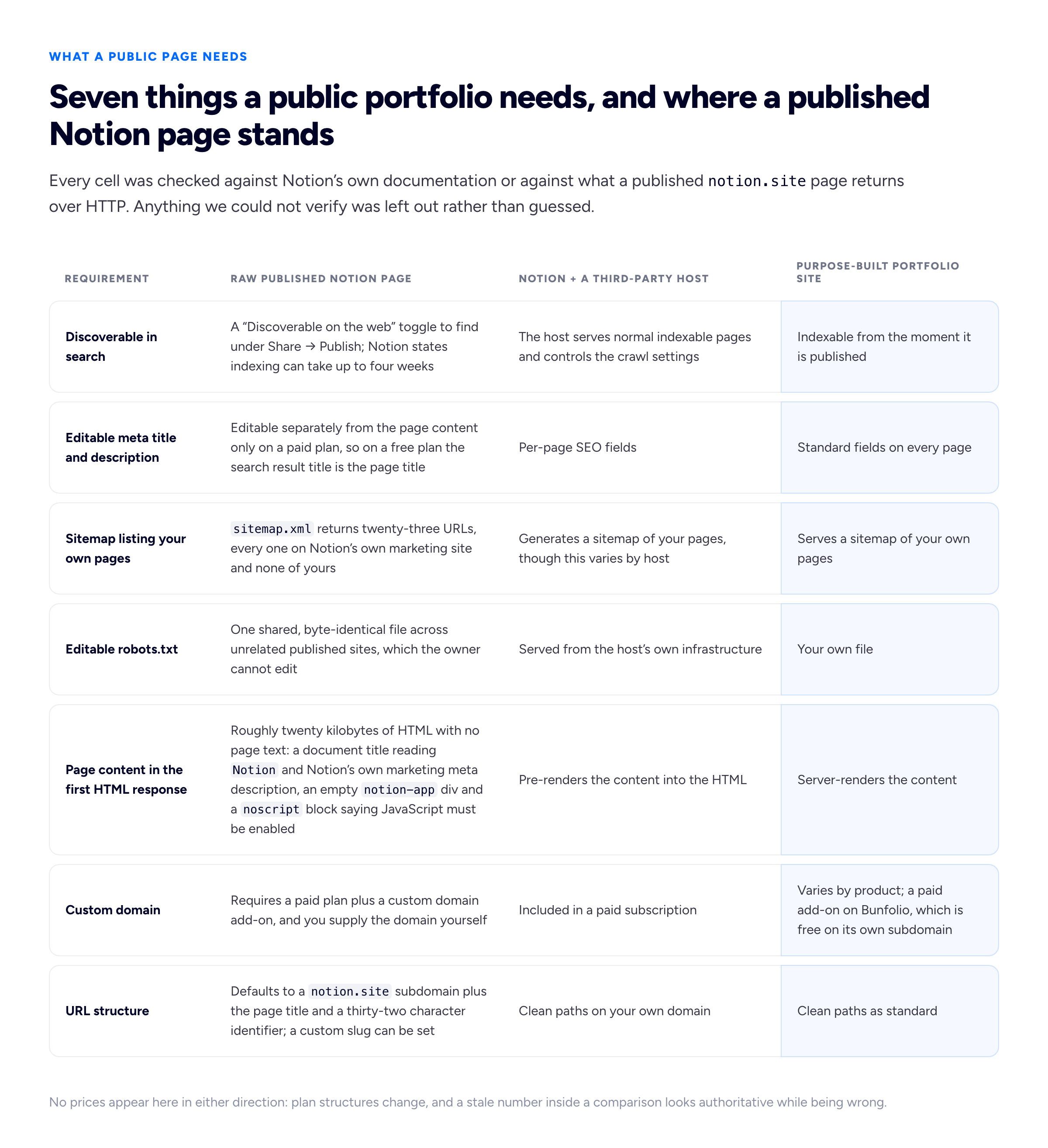
Only rows we could verify against Notion's documentation or against what a published Notion site actually returns over HTTP are included; anything we could not check was left out rather than guessed.
Do you need Super or Simple.ink?
The moment you decide a public Notion portfolio should behave like a website, you arrive where everyone else arrives: Super, Simple.ink, Feather and their neighbours. They exist because the gaps above are real, and it would be dishonest to pretend they do not close them.
What they add, in their own words, is roughly the same list each time: a custom domain, per-page SEO settings, pre-rendered HTML with speed claims attached, custom code and styling, plus extras like password protection, feeds and analytics. Simple.ink advertises "granular SEO settings for every page". Super says a site's "HTML is optimized to use best practices" and that social sharing cards are generated automatically. Feather, blog-shaped rather than portfolio-shaped, names sitemap generation and subdirectory hosting. These are, accurately, the missing pieces.
Two things follow, and neither is a criticism of those products. The first is arithmetic: you now hold a Notion plan and a hosting subscription, both recurring, to publish one portfolio. If you are a heavy Notion user, the marginal cost is one subscription and the convenience is genuine. If you opened a Notion account in order to have a portfolio, you are paying two companies to approximate one product — which is worth setting against what a single purpose-built tool asks of you, and we line those up in our comparison of portfolio website builders.
The second is structural, and people notice it later. You have put a third party between yourself and your own website: your content lives with Notion, your site is served by someone else, and the two are joined by an integration you do not control. When the site breaks, the first question is which of them is responsible. It is a normal trade — everyone hosting anything makes some version of it — but make it deliberately rather than discovering it during a week when someone is trying to look at your work.
Can clients tell it is Notion, and does it matter?
Mostly yes, and whether it costs you anything depends on what you are asking them to conclude. A published Notion page is recognisable — the typography, the block spacing, the toggle chevrons, the grey page furniture — and anyone who uses Notion at work clocks it in a second. On a free plan there is Notion branding on the page; removing it is documented as coming with a custom domain on a paid plan.
For a developer, writer, strategist or operations person, being on Notion reads as pragmatic. Nobody assumes your CSS is your product; the reader is assessing the thinking, and a clean Notion document presents thinking well. Our piece on what hiring managers look for in a developer portfolio is mostly a list of things unrelated to the container.
For design work it is a different conversation, and we would not soften it. When your service is visual judgement, your portfolio is a sample of the service, and a recognisable default template is a sample of someone else's judgement. Not fatal — a designer with excellent case studies on a Notion page beats a designer with thin work on a beautiful site — but you are declining to answer a question the reader is explicitly asking.
The underrated third case: a Notion page reads as a document, not a destination. No navigation you designed, no considered first screen, no sense of arrival. For an internal wiki that is correct. For a page that must make a stranger decide something in fifteen seconds, it opens in the middle of a conversation — and our collection of personal website examples is really a study of what that first screen has to do.
When Notion is the right answer
Four situations where we would tell you to stay put, and we mean them.
A private, client-facing page. One client, one link, work they are allowed to see. Notion beats most portfolio tools here: per-page sharing is native and no public site is involved. If some of what you show is covered by an agreement, our guide to handling confidential work in a portfolio matters far more than your platform.
An internal index of your own work. The master list you keep for yourself: every project, dates, what you did, links to assets, what you would say about it. Notion is an excellent place for it, and the reason rebuilding a portfolio hurts is usually that this index was never kept.
A fast temporary page. Someone asked for examples of your work by Thursday and you have nothing. Build the Notion page, send the link. It beats an apology and a promise to send something later.
A work in progress. Before you know which three projects lead or who you are selling to, building a website is premature. Draft it in Notion until the argument is clear and treat the eventual site as a publishing step, not a discovery process. Deciding how many projects to include is easier in a document than in a page builder.
What unites the four: none depends on a stranger finding you through a search engine, and none is the address you expect to be circulating in three years.
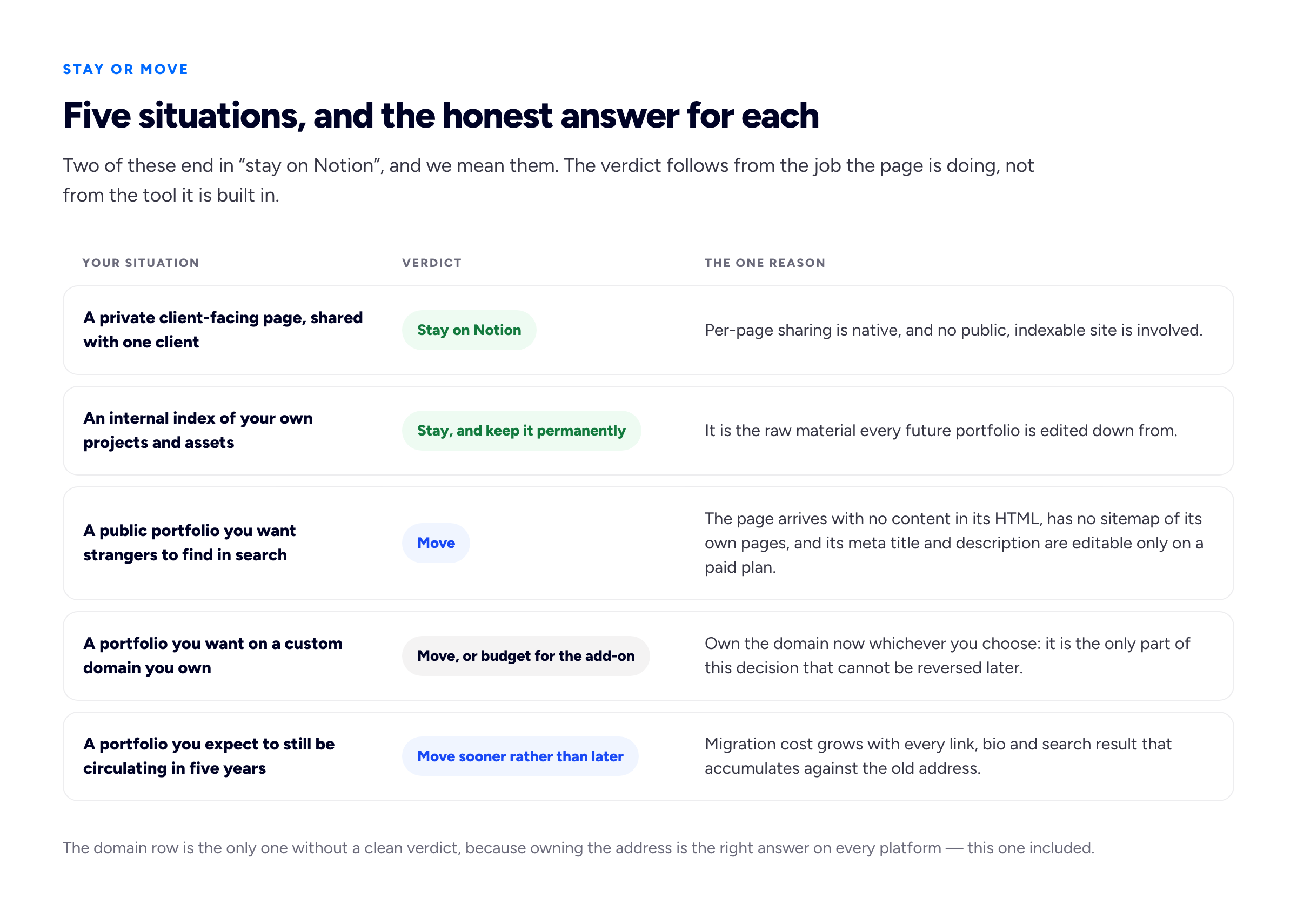
The only row without a clean verdict is the domain row, because owning the address is the right answer on every platform including this one.
The threshold, not the verdict
A line is more useful than a recommendation, because the recommendation depends on facts about you we do not have.
Move when the page needs to be found by someone who does not already have the link. That is the whole threshold, and everything above is downstream of it. Private page, internal index, temporary link, work in progress: you hand the link over yourself, so indexing, sitemaps, meta descriptions and rendering mechanics are irrelevant, and Notion wins on convenience. Public portfolio a stranger should discover: every one of those is now part of the job, which a purpose-built portfolio website builder should handle by default, and a tool that treats them as settings behind a paid plan is working against you.
Two secondary triggers. The first is when you start writing: a single page is fine anywhere, but a portfolio with case studies or notes is a site with structure, and structure is where sitemaps, per-page titles and clean URLs go from theoretical to load-bearing. Our note on one-page versus multi-page portfolios covers when that transition is real and when it is imagined. The second is when the address appears on things you cannot edit — a conference bio, a printed card, someone else's blogroll. Before that, moving is free. After it, moving costs you everything that pointed at the old one.
Moving off, and why early is cheaper
The migration is smaller than people expect. A portfolio is rarely more than a few thousand words and a couple of dozen images, and you already wrote it. Notion can export a page; re-uploading images is dull rather than difficult. An evening, not a project.
What breaks is links, and it breaks in one direction only. If you were on you.notion.site, you cannot redirect: the address is not yours, and there is no way to send visitors from the old URL to the new one. Every link anyone sent points at a page you no longer maintain, and the only remedy is manual. If you were on your own domain, nothing breaks — you repoint DNS and every existing link resolves. That is the entire argument for owning the address, and why the domain row above has no clean verdict.
An order of operations that minimises regret.
- Register a domain in your own name, at a registrar you log into yourself. Do this first, even if you stay on Notion another year.
- Export or copy the content out and keep it somewhere that is not a single platform: text in files, images in a folder.
- Rebuild rather than transplant. A migration is the cheapest moment you will get to cut the weak projects and rewrite the about page.
- Update every profile that links to you in one sitting — LinkedIn, GitHub, email signature, invoice template, community bios, marketplaces. Write the list first; it is longer than you think.
- Keep the Notion page as your private index. It was always the more useful half.
If you are starting from a LinkedIn profile instead, the same content-first logic applies; we wrote that up in turning a LinkedIn profile into a portfolio website. And if the destination you are weighing is a self-hosted WordPress install, the free WordPress portfolio themes are the easy part of that choice; the updates and backups are the decision.
Frequently asked questions
Is Notion good for SEO?
It is a weaker starting position than a server-rendered site, for mechanical rather than mysterious reasons: the page arrives with no content in its HTML and must be rendered in a second, queued step; there is no sitemap of your own pages; the meta title and description are editable only on a paid plan; and indexing is a toggle you must find, with Notion's own estimate of up to four weeks to appear. None of that is a penalty, and none of it stops a Notion page ranking for your name if nothing else competes. It does mean giving away things that are free elsewhere. The fundamentals in our portfolio SEO guide matter more than the platform, but are harder to execute here.
Can I use a custom domain with Notion?
Yes, on a paid plan with the custom domain add-on, and you bring the domain yourself — Notion is explicit that it does not sell domains. Its documentation also notes that a custom domain brings the option to remove Notion branding. Check current plan details on Notion's own page, not in an article.
Do I need Super or Simple.ink?
You need one if you want a public Notion portfolio to behave like a normal website while still editing in Notion. That is a coherent choice. Understand what you are buying: a second recurring subscription and a third party between your content and your site. If the answer to "why Notion" is "because everything else I do lives there", the trade is reasonable. If it is "because it was free", the arithmetic has quietly stopped working.
Is a Notion portfolio professional enough?
For most non-visual work, yes — the page is judged on its contents, and a well-edited Notion document reads as competent. For design work it is a visible abstention from a question the client is asking. In every case what damages you is staleness, not the platform: a page whose last project is two years old costs you more than any template.
Can I keep using Notion after I move?
Yes, and we would. Keep the internal index, the client-facing pages and the drafts. The recommendation here is not "leave Notion", it is "do not use a public Notion page as the address strangers find you at".
How we put this guide together
The conflict of interest is direct and worth stating twice: Bunfolio sells portfolio websites, "use Notion instead" is a competing answer, and this article is published by us. Everything ranking for this question is written by a company that sells Notion hosting, which is why we tried to make this piece checkable rather than persuasive. What we did to keep it usable: we argued that four groups of readers should stay on Notion and meant it; we described what Super, Simple.ink and Feather add in their own words; we refused to claim a ranking penalty, because nobody outside Google knows how Google ranks; and we cut every claim we could not verify.
The documented facts come from Notion's own help centre: publishing a website with Notion Sites for the Discoverable on the web toggle, the up-to-four-weeks indexing estimate and the paid-plan link title and description; managing your Notion Sites for slugs, the custom domain add-on, the statement that Notion does not sell domains, and branding removal; and the Sites availability and pricing page for which tier gets what. The account of how search engines handle JavaScript, including the quoted line about the render queue, comes from Google's JavaScript SEO basics, with the general fundamentals in its SEO starter guide; the sitemaps protocol is the standard that section refers to. Third-party host features are taken from their own marketing pages: Super, Simple.ink and Feather. We are not affiliated with, endorsed by or partnered with any of these companies.
Three claims are ours by direct observation rather than citation, and you can repeat the checks in a terminal. In late August 2026 we requested three unrelated published notion.site pages with an ordinary browser user agent: each returned roughly twenty kilobytes of HTML containing none of the page's text, a document title of Notion, Notion's generic product meta description, an empty notion-app container and a noscript notice. We requested robots.txt from two unrelated published sites and received byte-identical responses with matching cache validators — one shared file, not a per-site one. We requested sitemap.xml from a published site and received twenty-three URLs, all on www.notion.so and none belonging to the site we asked. We have not tested what Notion serves to Google's own crawler, because that cannot be verified from outside Google's network, and we make no claim about it. Notion changes; if your check disagrees with ours, trust yours.
The judgement calls — the threshold of "someone who does not already have the link", the four situations where Notion is right, the argument that a third-party host inserts a dependency, and the order of operations for moving — are Bunfolio's opinions with reasons attached, formed from hosting portfolio sites and watching which ones go stale. We have included no statistics, percentages or survey findings, because we will not print a number we cannot trace to a primary source, and this subject is full of round figures with no origin. We have quoted no prices for any product, our own category included: a stale figure inside a comparison looks authoritative while being wrong. Any example name, page title or scenario used as illustration is invented.
Related reading: the portfolio SEO guide, how to connect a custom domain to your portfolio, one-page versus multi-page portfolios, and how to write a portfolio case study.
More from the blog
September 20, 2026 · 24 min read
ATS-Friendly Resume Format: What Actually Breaks
An applicant tracking system is a database with a form on the front, not a judge. Here is the two-minute test that shows you exactly what the parser sees in your own file, the failures that genuinely...
August 19, 2026 · 18 min read
How to Build a Virtual Assistant Portfolio (With or Without Clients)
The better you do the job, the less there is to show for it. How to turn invisible work into evidence, how to redact client screenshots safely, and how to build the portfolio honestly when you have no...
August 31, 2026 · 19 min read
Which Free Portfolio Builders Actually Include a Custom Domain?
Free tiers move faster than any listicle can track. The six things the word free is used to mean, the five questions that survive every pricing change, and what a handful of named builders offer today...