
September 20, 2026 · 24 min read
ATS-Friendly Resume Format: What Actually Breaks
An applicant tracking system is a database with a form on the front, not a judge. Here is the two-minute test that shows you exactly what the parser sees in your own file, the failures that genuinely break it, and the decade of folklore worth ignoring.

You send a resume into a company's application form and nothing comes back. There is no error, no bounce, no note saying the third job on your work history arrived with no dates attached to it. If something went wrong, the silence looks exactly like the silence of not being what they wanted. That is the whole problem with ATS formatting: the failure mode is invisible to the person it happens to.
Into that silence has poured a decade of folklore. Never use a PDF. Never use two columns. Never use a table. Put the job title in white text at the bottom so the robot sees it. Most of this advice is repeated because it is repeated, and a reasonable amount of it was never true, or stopped being true around the time that the software it described was retired.
Here is the reframe that makes the topic tractable. An applicant tracking system is a database with a form on the front. It takes your file, tries to pull it apart into fields — name, email, employer, job title, start date, end date, school, skills — and stores the result so that a recruiter can search it later. It is not sitting in judgement on your career. It is doing data entry, badly, at speed, on a file it did not design.
So the useful question is not is my resume ATS friendly, which has no answer. It is: when this specific file is pulled apart into fields, what ends up in the wrong field, and what ends up nowhere at all? You can check that yourself, on your own machine, in about two minutes, with no tool, no upload and no scan credit. That test is the centre of this guide, and everything else here is either what it detects or what it cannot.
What an applicant tracking system actually does
Four steps, and they are worth separating because the advice that follows depends on which step you are worried about.
Ingest. Your file arrives, either through an upload field or an email inbox the system watches. At this point it is a PDF or a Word document, and nothing has been read.
Parse. Software pulls the text out of the file and tries to map it onto a schema. This is the step where things break, and it is worth being precise about why. A PDF does not store a document the way you think of a document. It stores instructions for painting glyphs at coordinates on a page. There is no inherent notion of "this is a column", "this is a heading", "these two lines are one paragraph". A parser reconstructs all of that from position, size and spacing, using rules that work well on conventional layouts and less well on ambitious ones. A Word file has more structure, but the parser still has to decide which of your headings means "employment".
Store. The parsed fields go into a record, usually alongside the original file. The original does not disappear. This matters more than most guides let on, and there is a legal reason for it: in the United States, employers covered by the relevant rules have to keep application records. The record-retention requirement at 29 CFR 1602.14 obliges covered employers to preserve personnel records made in connection with an application, and for federal contractors the "internet applicant" rule at 41 CFR 60-1.3 goes further: where a contractor uses a database to look for candidates, it has to retain "the substantive search criteria used" along with the records of who was considered. That is a description of a search tool, written into regulation.
Search. A recruiter opens the system and runs a query, or works down a list sorted by something. Then a human opens your actual file and reads it. Every serious ATS shows the original document; several show it side by side with the parsed fields so the recruiter can correct them.
Hold those last two together, because they settle a lot of arguments. The parse determines whether you turn up in a search and whether your record looks coherent. The original file determines what the human thinks of you thirty seconds later. Advice that optimises only for the parser produces a resume that a person finds unpleasant to read, which is a strange trade to make when the person is the one who decides.
There is a category of software that genuinely does score and rank, and it is treated differently by the law precisely because it is different. New York City's Local Law 144 regulates automated employment decision tools, requiring an annual independent bias audit and notice to candidates before such a tool substantially assists a hiring decision. The existence of a specific rule for tools that decide is a decent indicator that the ordinary parse-and-store pipeline is not one of them.
The two-minute test: read your file the way the parser does
This is the part of the guide to keep. It requires nothing you do not already have, it works on any file, and it detects the majority of real problems.
- Open your finished file and select all the text. In a PDF viewer, click into the document, select everything, copy. In Word, do the same. You are not looking at the page any more; you are grabbing the text layer.
- Paste it into a plain text editor. Notes with formatting off, TextEdit in plain text mode, Notepad, the address bar of a blank browser tab if that is what is to hand. Anywhere that cannot render layout. What appears is close to what the parser receives: the text, in the order the file hands it over, with none of your design holding it together.
- Read the order. This is the single most informative thing on the page. If your resume has two columns, there is a good chance the pasted text alternates between them line by line, so a skill lands in the middle of a job title and your certifications arrive interleaved with your degree. If the order is a mess to you, it is a mess to the parser, and the fields it produces will be a mess too.
- Check your name, email, phone number and links survived. Find each one in the pasted text. If your contact details are missing entirely, they are probably in the page header or footer region, or in a graphic. If they appear at the very end, after everything else, they are in a region the file hands over last — which is survivable, but it means the first thing the parser sees is not your name.
- Check the dates are still next to their employers. Look at each role. Does it read as employer, title, dates, in a recognisable clump? Or have the dates migrated into a column of their own at the top or bottom, orphaned from the job they belong to? Orphaned dates are how a ten-year career gets stored as a set of jobs with no duration.
- Search the pasted text for a word you know is in a graphic. A skills wheel, a logo bar, a badge, a designed sidebar. If the word is not in the paste, that content is an image, and every word inside it is invisible to the parser and to anyone searching the database. Do this for your job title if it sits in a designed banner.
- Look for gibberish. If the paste produces strings like
ěor blank boxes where letters should be, the font in your file has no usable character mapping and the extracted text is genuinely corrupt. Re-export from a different tool or with a common font.
Two things this test cannot see, so that you do not over-trust it. It cannot tell you whether a particular vendor's parser mapped your heading "Professional Journey" to the experience field, because that is a matter of that vendor's rules. And it tells you nothing about whether you are a good candidate. It is a check for damage, not a verdict.
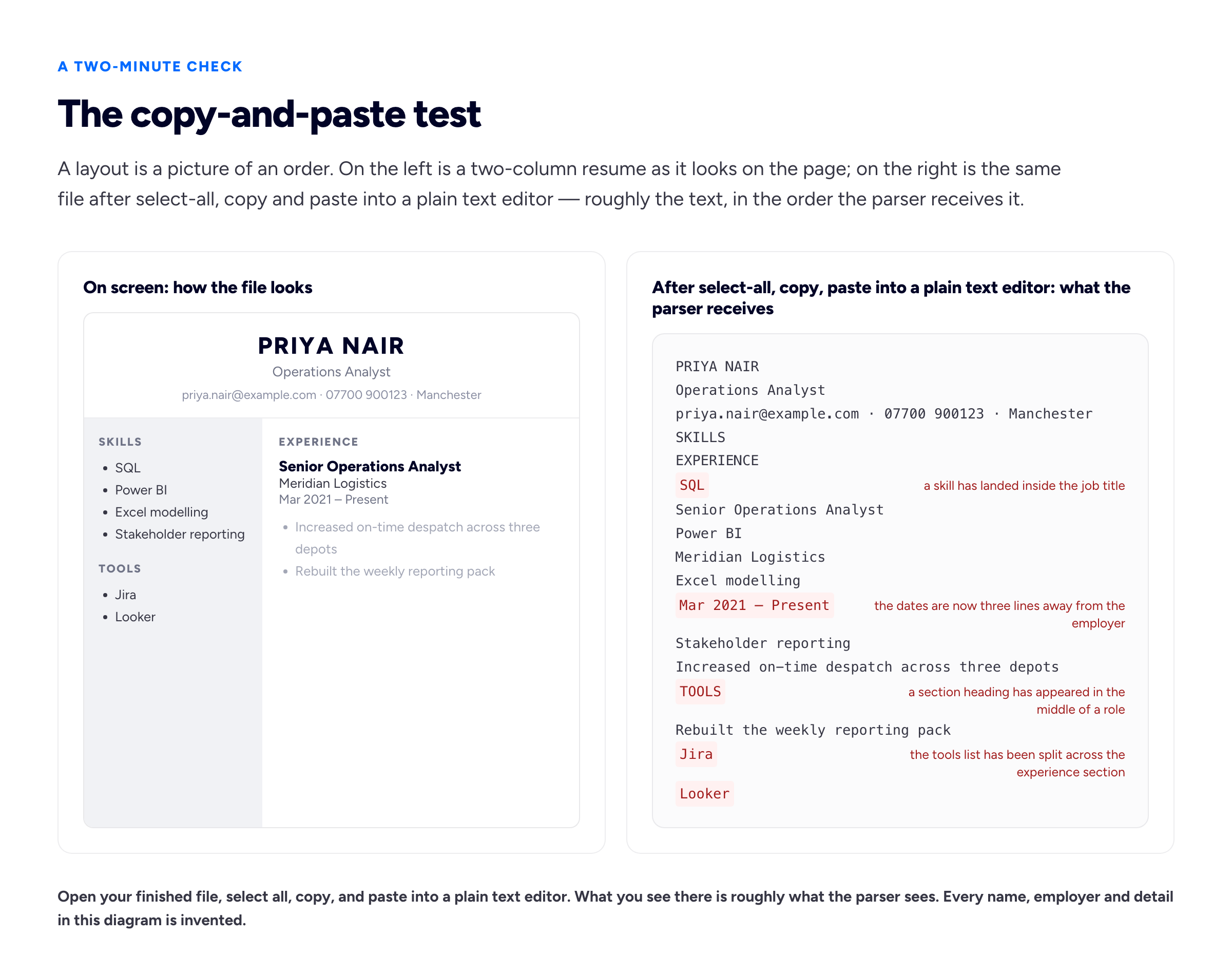
If the pasted text is unreadable to you, the parsed record is unreadable to a recruiter's search.
The things that genuinely break parsing
Each of these has a specific failure mode. Knowing the mode is what lets you judge the risk rather than obey a rule.
Text that is not text
Anything rendered as a picture — a skills infographic, a designed name banner, a screenshot of a table, a resume exported as an image — contains no extractable text. The parser gets an empty region. A recruiter searching the database for your core skill does not find you, even though the word is sitting there in 14pt on the page. This is the same problem accessibility standards have been describing for years; the W3C's guidance on images of text exists because text baked into a picture cannot be resized, restyled, searched or read aloud. A screen reader and a resume parser fail on it for identical reasons.
Text boxes and floating elements
A text box is positioned outside the main flow. Depending on the tool that produced the file, its contents may be handed over first, last, or at a point unrelated to where it appears on the page. It is not that text boxes are forbidden; it is that you no longer control the order, and order is what the parser uses to decide which heading a block of text belongs under.
Headers and footers
Here is the defensible version of advice you have probably seen stated too strongly. Page headers and footers are a separate region of the document. Some producers place them at the end of the text stream, some at the start of each page, and some parsers skip them deliberately because on a multi-page document they are usually repeated boilerplate. Putting decorative page numbers there is fine. Putting your email address and phone number there is a genuine risk, because a skipped header means a record with no way to contact you.
Columns and tables used for layout
The nuance the folklore flattens: the problem is not visual columns, it is the reading order the file produces. A two-column resume where the whole of column one is handed over before column two begins will often parse fine. One where the extraction interleaves the columns line by line will produce nonsense. You cannot tell which you have by looking at the page. You can tell in ten seconds with the paste test. The same applies to tables. A table used to align dates beside employers frequently survives; a table used as the page's underlying grid, with a job description in one cell and the dates in another, tends to separate the two permanently.
If you like a column layout and the paste test comes out clean, keep it. If you cannot be bothered to check, single column is the safe default, and it is also the layout that reads best on a phone screen, which is where a surprising share of first reads happen.
Headings the parser cannot map
Parsers look for conventional section names. "Where I've Been", "My Journey", "Things I'm Good At" and "Chapters" are not on anybody's list. The content under an unrecognised heading does not vanish, but it may be stored as unclassified text rather than as employment history, which means it misses the searches that matter. This is also the rare piece of ATS advice that a human reader endorses without reservation: a recruiter skimming forty files wants to find your work history where work history goes.
Icons standing in for labels
An envelope glyph before your email and a pin before your city look tidy and communicate nothing to a parser. Worse, icon fonts often map to private-use code points, so the paste test shows a blank box or a stray character where the label should be. Keep the icons if you like them, but make sure the text next to them stands on its own without the picture.
Dates the parser cannot read
"Spring '22 to now", "2021-22", "Q3 2019 onwards" and a date written only as a season or a year range are all reasonable English and unreliable data. Use a month and a four-digit year, an en dash or the word "to", and the word "Present" for current roles: Mar 2021 – Present. Unparsed dates are how a role ends up stored with no duration, which quietly removes you from every search filtered on years of experience.
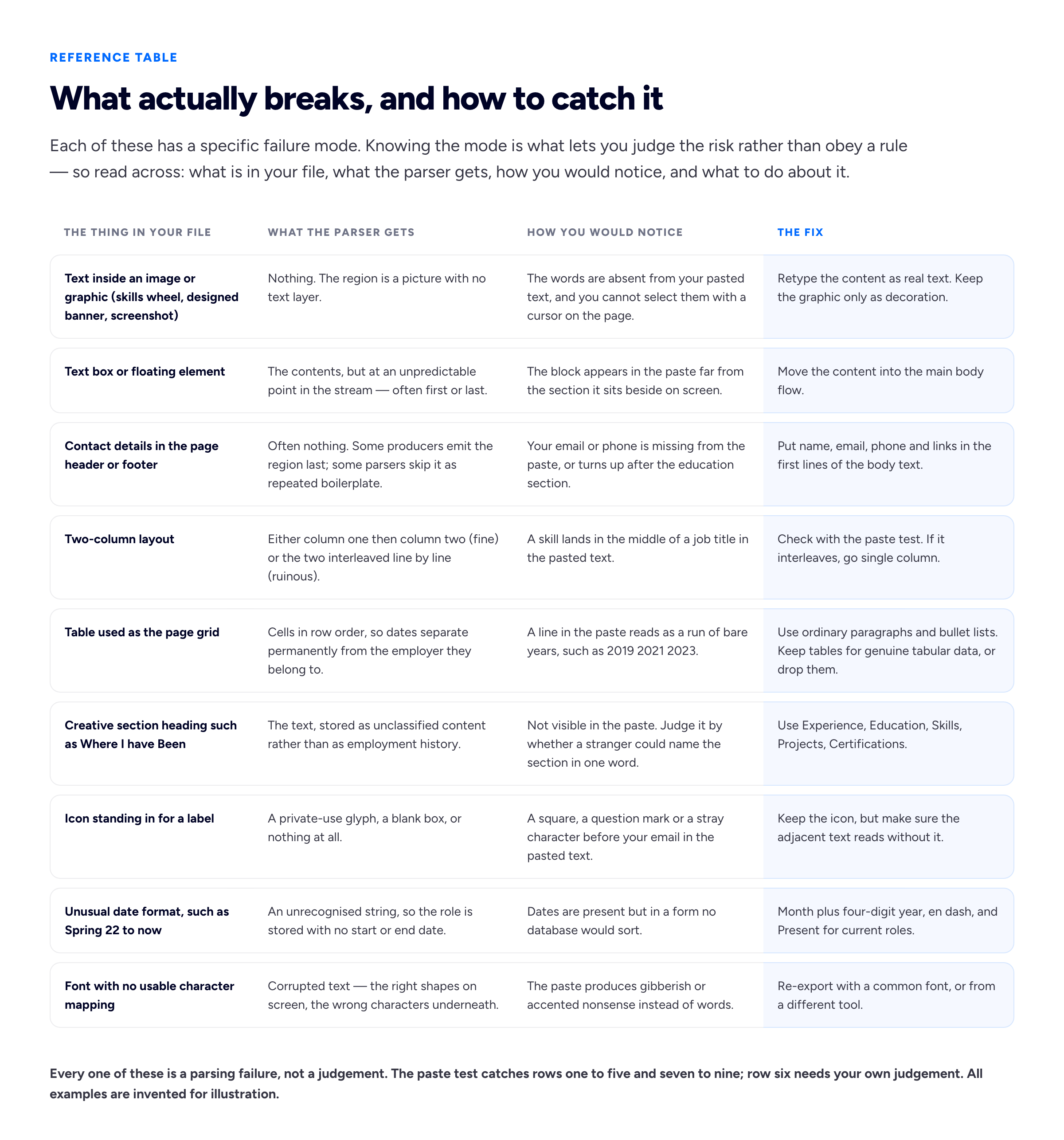
Print this one and run down the middle column with your pasted text beside you.
PDF or Word, honestly
The advice to never submit a PDF is largely obsolete. It dates from a period when a meaningful number of parsers could not extract text from PDFs reliably, and it has outlived that period by a decade. A PDF produced by exporting from a word processor or printing from a browser contains a proper text layer and parses as well as anything else.
There are two real exceptions, and they are worth more than the general rule.
The application form tells you what it wants. Submit that. If the upload field says "DOC, DOCX or TXT", do not upload a PDF and hope. If a recruiter asks for an editable Word file, they usually want it because their agency reformats resumes onto a letterhead before sending them to the client, which is a normal part of how agency recruitment works. This is the one rule in this guide with no exceptions: submit what is asked for.
A PDF with no text layer is worthless. If you scanned a printed resume, photographed it, or exported it as an image, the file is a picture regardless of its extension. The paste test catches this instantly: you will not be able to select a single word.
Beyond that, the choice hardly matters, with one small point in the PDF's favour. A Word file renders differently on a machine that does not have your fonts, so the layout a recruiter opens may not be the layout you saved. A PDF looks the same everywhere. If you have no instruction either way, a PDF exported from a conventional single-column document is a reasonable default. Never submit a Pages file, a Google Docs share link, or anything else that assumes the reader is willing to convert it for you.
Headings and order: be conventional on purpose
The safe set is boring, and boring is the point. Summary or Professional Summary. Experience, Work Experience or Professional Experience. Education. Skills. Projects. Certifications. Publications if you have them. Those map cleanly, and they also tell a reader in one glance where to find what they came for.
Order conventionally too: contact details at the top as plain text, a short summary if you want one, then experience in reverse chronological order, then education and skills. Within a role, put the employer, your title, the location and the dates on their own lines or in one clean line, and keep the bullets beneath. The precision that helps here is small and mechanical — consistent order of employer and title, consistent date format, no role missing its end date.
If you would rather not assemble that yourself, the layout in our free resume builder uses exactly this set of headings in this order, which is one fewer decision to get wrong.
Freelancers have a specific version of this problem, because a freelance career is not a list of employers and shoehorning it into one produces either a wall of two-month engagements or a single vague line covering four years. We have written that up separately in how to put freelance work on a resume, including how to group client work under one heading without it reading as a cover-up.
Keywords, done without lying
Mirroring the language of the job posting is legitimate, useful, and not a trick. If the posting says "stakeholder management" and your resume says "worked with the business", you have described the same thing in a vocabulary that does not match the search. Changing your wording to the employer's wording — where it is true — helps the parse, helps the search, and helps the human, who is checking your resume against a requirements list written in exactly those words.
What does not work is the family of tricks built on the idea that a machine is the only reader.
Keyword stuffing — a block of forty skills you have not used, or the same phrase repeated down the margin — survives the parse and then reaches the person, who reads a resume that makes no sense. Skills in a database are also the thing a recruiter screens you on in the first phone call. A record that claims fluency in something you touched once produces a conversation you cannot win.
The white-text trick fails harder than people expect. Text set to white on white is still text: it copies, it searches, it parses, and it appears in every preview pane that renders the document as plain text — which is what many systems show the recruiter first. Select-all in a PDF viewer highlights it in an obvious block. Beyond the mechanics, it is straightforwardly deceptive, and the person who finds it is the person deciding whether to interview you.
The honest version takes about ten minutes. Read the posting, list the eight or ten phrases that describe the actual work, and check each one against your own resume. Where the thing is true and you have said it differently, adopt their phrase. Where it is true and missing, add it to the role where you did it. Where it is not true, leave it out. That is the entire technique.
Fixing a broken file without starting again
If the paste test showed damage, the repair is usually smaller than a rebuild. Move contact details out of the header and into the first lines of the body. Replace any graphic containing words with real text. Collapse the layout to a single column if the columns interleaved. Rename creative headings. Normalise every date to month and year. Re-export and run the test again. Most files pass on the second attempt.
If the file is beyond repair, or if it was built in a design tool that produces a picture rather than a document, it is quicker to retype the content into something that produces clean output. Our free resume builder exists partly for this: it lays out one column, uses the conventional section names, and produces the PDF through the browser's own print-to-PDF, so what comes out is real selectable text rather than a rendering. You can run the paste test on its output and see exactly that. It is free with no account step, and one thing to know before you export rather than at the moment you export: the finished PDF carries a small "Created with Bunfolio" credit at the foot of the page, which is what pays for the tool being free.
Whatever you use, run the test on the file you are actually going to send, not on a draft. Export settings change things.
The covering note is a separate job with separate failure modes, and it is not parsed into fields in the same way — most systems store it as a blob of text or as a form field. If you are writing several and stalling on the opening line each time, our cover letter generator will give you a draft to argue with, which is usually faster than a blank page.
What ATS formatting cannot do for you
This is the part the guides that end in a paid scan tend to leave out.
Passing the parse is a hygiene threshold, not an advantage. Once your file produces a clean record, further formatting effort returns nothing. There is no score to climb, no additional compliance to buy, and the difference between a resume that parses cleanly and one that parses cleanly in a nicer font is zero. The time is far better spent on what the bullets say.
Nor does a clean parse get you read. It gets you findable and legible. What happens next is a person deciding whether your experience matches a requirement, and that is a judgement about evidence. For most freelance and creative roles the evidence does not fit on the resume at all — it lives in the work, which is why the link matters more than the layout. We covered where to put it and what a hiring manager does with it in putting your portfolio link on your resume, and what they look for once they arrive in what hiring managers actually look for in a developer portfolio. If the portfolio itself is the thin part, writing one project up properly as a case study will do more for you than any amount of resume formatting, and building a portfolio with no professional experience covers the case where there is nothing to write up yet.
And be careful about attributing every silence to the machine. Applications go unanswered because the role was filled internally, because the budget moved, because two hundred other people applied, or because someone read your resume carefully and chose somebody else. The parse is one of the few parts of that you can verify, which makes it tempting to treat as the explanation for all of it. Verify it, fix what is broken, and then stop thinking about it.
Frequently asked questions
Will my resume pass ATS?
There is no single system to pass, so the question can only be answered about your file rather than in general. Run the copy-and-paste test above: if the text comes out in a sensible order, your contact details are present, the dates sit next to their employers, and nothing you can see on the page is missing from the paste, your resume will parse correctly in the great majority of systems. That is as close to a yes as anyone can honestly give you.
Does a two-column resume work with ATS?
Sometimes, and you can find out in ten seconds rather than guessing. The risk is not the columns as such — it is the order the text comes out in. Copy the whole document and paste it into a plain text editor. If column one appears in full before column two begins, the layout is fine. If the two interleave line by line, so that a skill lands inside a job title, the parsed record will be scrambled and you should go single column.
Is a PDF safe to submit, or should I use a Word document?
A PDF with a real text layer is parsed reliably by modern systems, and the blanket warning against PDFs is out of date. Two exceptions override that: submit whatever format the application form asks for, and never submit a scanned or image-based PDF, which contains no text at all. If a recruitment agency asks for an editable Word file, it is usually because they reformat resumes onto their own letterhead. Any word processor's export gives you a real text layer, as does a browser's print-to-PDF, which is how our resume builder produces its file.
Are ATS resume checkers worth paying for?
They are worth knowing what they do. A checker uploads your file, parses it, shows you the extracted fields, and compares your wording against a job description. The parsing half you can approximate for free with the paste test. The keyword half is a comparison you can do yourself by reading the posting and checking each requirement against your resume. If a paid scan makes you actually do the comparison, that is a real benefit. Just be clear that no tool speaks for the employer's system, and a score out of a hundred from a third party is that vendor's opinion.
Do applicant tracking systems automatically reject resumes?
The ordinary parse-and-store pipeline does not reject anything — it stores your record and waits for a recruiter to search. Knockout questions on the application form can filter you out automatically, and those are visible to you: a required certification, a right-to-work answer, a minimum years-of-experience field. Some employers do use scoring tools, and where those substantially assist a decision they are increasingly regulated as automated employment decision tools rather than treated as part of the tracking system.
Does putting keywords in white text work?
No, and it is one of the worse ideas in circulation. White text is extracted like any other text, so it reaches the human who opens your file, appears in any plain-text preview and highlights visibly when the page is selected. The technique assumes a machine is the last reader. A person is the last reader.
What section headings are safest?
Summary, Experience, Education, Skills, Projects, Certifications and Publications. They map to standard fields, and a recruiter skimming quickly finds what they came for. Save the inventive headings for your portfolio's about page, where personality is the point and no parser is involved.
Should my resume be one page?
Length is a reading question, not a parsing one — parsers are indifferent to page count. One page suits early-career candidates; two is normal once you have a decade behind you. What genuinely costs you is a second page that repeats the first at greater length.
How we put this guide together
Bunfolio builds portfolio sites and runs a set of free career tools, so we spend a lot of time on the mechanics of files people send to strangers. What is sourced fact here is narrow and flagged: how PDFs store text rather than structure, and the record-keeping and disclosure rules cited below. Everything else is our own judgement and should be weighed as such — the framing of an ATS as a database rather than a judge, the seven-step copy-and-paste test, the claim that the paste test catches most real damage, the safe heading set, and the argument that formatting effort stops returning anything once a file parses cleanly. The test itself is simply the cheapest available approximation of what a parser receives; it is not a simulation of any particular vendor's software, and we have said where it is blind.
We have not repeated the best-known statistic in this topic: the claim, stated in various forms as 75%, 70% or "three-quarters", that applicant tracking systems automatically reject that share of resumes before a human sees them. It appears in an enormous number of articles, usually without a citation, and where a citation exists it leads to another article, a vendor blog post, or a company that no longer exists. We could not trace it to a published study with a stated method and sample, which means we cannot tell you what was measured, when, in which systems or against what definition of "reject". The figure survives because it is memorable, because it flatters a tool vendor's pitch and because it explains a painful silence. A guide arguing that you should verify your own file rather than trust folklore cannot open by repeating an untraceable number, so the gap stays. If you find a primary source for it, it is worth reading closely before believing.
Where a factual claim is made it points at a primary document. Record retention for US employers is set out at 29 CFR 1602.14; the federal contractor "internet applicant" definition, including the requirement to retain the substantive search criteria used against a candidate database, is at 41 CFR 60-1.3. The distinction we draw between a parser and a decision tool follows New York City's rules on automated employment decision tools, which require a bias audit and candidate notice where software substantially assists a hiring decision. The reasoning about text baked into images is the same reasoning behind the W3C's guidance on images of text. These are United States and international sources; readers elsewhere should not assume the regulatory detail transfers, though the technical behaviour of parsers does. None of this is legal advice.
Every example, name, employer, contact detail and date used above is invented for illustration, including everything in both diagrams — Priya Nair, Meridian Logistics, the skills list, the phone number and the interleaved paste are all fabricated to show the shape of a parsing failure, not drawn from a real file or a real system's output. No vendor's parser was tested to produce them. Treat them as a demonstration of the pattern, not as evidence about any named product.
Related reading: where to put your portfolio link on your resume for the line that connects this file to your actual work, putting freelance work on a resume for the structure problem a client list creates, building a career portfolio for the longer-term version of the same evidence problem, and turning a LinkedIn profile into a portfolio website if the material you need is already written and in the wrong place.
More from the blog
November 1, 2026 · 19 min read
Cover Letter vs Resume: What Goes in Each, and When You Need Both
The resume is the record; the cover letter is the argument for this role. What belongs in each and what must never be repeated, when a letter is really needed, how the two should point at each other,...
October 28, 2026 · 19 min read
References on a Resume: Should You List Them, and How?
Usually not on the resume itself, and never "available on request". When references do belong on the application, how to choose referees who will actually help, how to ask and brief them, the referenc...
October 16, 2026 · 16 min read
CV vs Resume: The Difference and Which One to Send
In the US a CV is an academic record and a resume is the short document; in the UK and most of the world, "CV" is the name for that short document.