
September 16, 2026 · 20 min read
How to Put Your Portfolio Link on a Resume
Everyone tells you to put the link in your header and label it clearly. Nobody tells you what happens next — that the hyperlink often dies in the PDF export, that an applicant tracking system may never see it, and that the page it lands on has about five seconds to justify the click.
Every other line on a resume is self-contained. A job title sits there on the page, the reader takes it in, and the line has done its work. The portfolio link is the only line whose entire job is to be somewhere else. It is a promise that the evidence exists, plus an instruction for reaching it, and for anyone whose work is the argument it is the most valuable line on the document.
Which makes it odd how little of the advice about it survives contact with reality. Almost every guide answers this as a formatting problem: put the link in your header, label it clearly, done. That is correct, and it is roughly a fifth of the job. It describes what the link looks like in the editor you typed it into, and says nothing about what happens afterwards.
What happens afterwards is a chain of handovers. The document is exported, usually to PDF, sometimes by a route that quietly discards hyperlinks. It is uploaded into an applicant tracking system, which extracts the text and throws the layout away. It is opened on a phone. It is printed. Somewhere near the end a person spends a few seconds deciding whether clicking is worth it, and if they decide yes, they land on a page that either answers their question or does not.
Your link has to survive all of that. This guide is about the chain, because the formatting advice is already everywhere and the failures are not in the formatting.
What a portfolio link means
A portfolio link is a web address on your resume, cover letter or application form that takes the reader to examples of your work. It means "the evidence for what this document claims is here": a personal site, a single case study, a page of published articles, a code repository or a shared folder. When a job advert or an application form asks for a portfolio link, it is asking for that address, typed in full, so a reviewer can open it in one click.
It does not have to point at a designer's gallery. For a developer it might be a GitHub profile with a written summary; for a writer, a page of bylines; for a teacher or analyst, a short PDF or page of anonymised examples. What makes it a portfolio link is that the reader lands on work rather than on another description of you. If you are not sure what belongs behind it, portfolio vs resume sets out what each document is for, and how to build a resume website covers the page itself.
Where the link goes on the page
The default answer is the contact line at the top, and it is usually right. The contact block is the one region of a resume that every reader, every parser and every printed copy treats the same way: a short run of plain text near the top, read first, extracted reliably.
But "put it in the header" hides an ambiguity that costs people their link. There are two things called a header. One is the top of the first page as you see it, which is text in the body of the document. The other is the page header, the repeating region above the top margin that Word, Pages and Google Docs treat as a separate layer. Putting your contact details up there looks tidy and is a common way to lose them entirely, because a fair number of parsers read the main text flow and ignore that layer. If your name, email and URL all live in it, the system about to summarise you may have none of them.
So: top of the first page, in the body, on the same line as your email. Our guide to resume formats that survive an ATS covers the rest of that layer problem, including the two-column trap.
The case for a second placement
One link at the top makes a single undifferentiated offer: here is everything I have done, go and find the relevant part. A reader three resumes into a shortlist will not go and find it. A per-role link makes a specific offer instead — under the bullet describing the migration you led, a link straight to the write-up of that migration is a click with a known destination and a known payoff, for the same reason a labelled door beats a corridor. The failure mode is obvious once stated: a resume with nine links reads as a link farm and the eye stops registering them. Two or three deep links, aimed at what you most want examined, is the useful range.
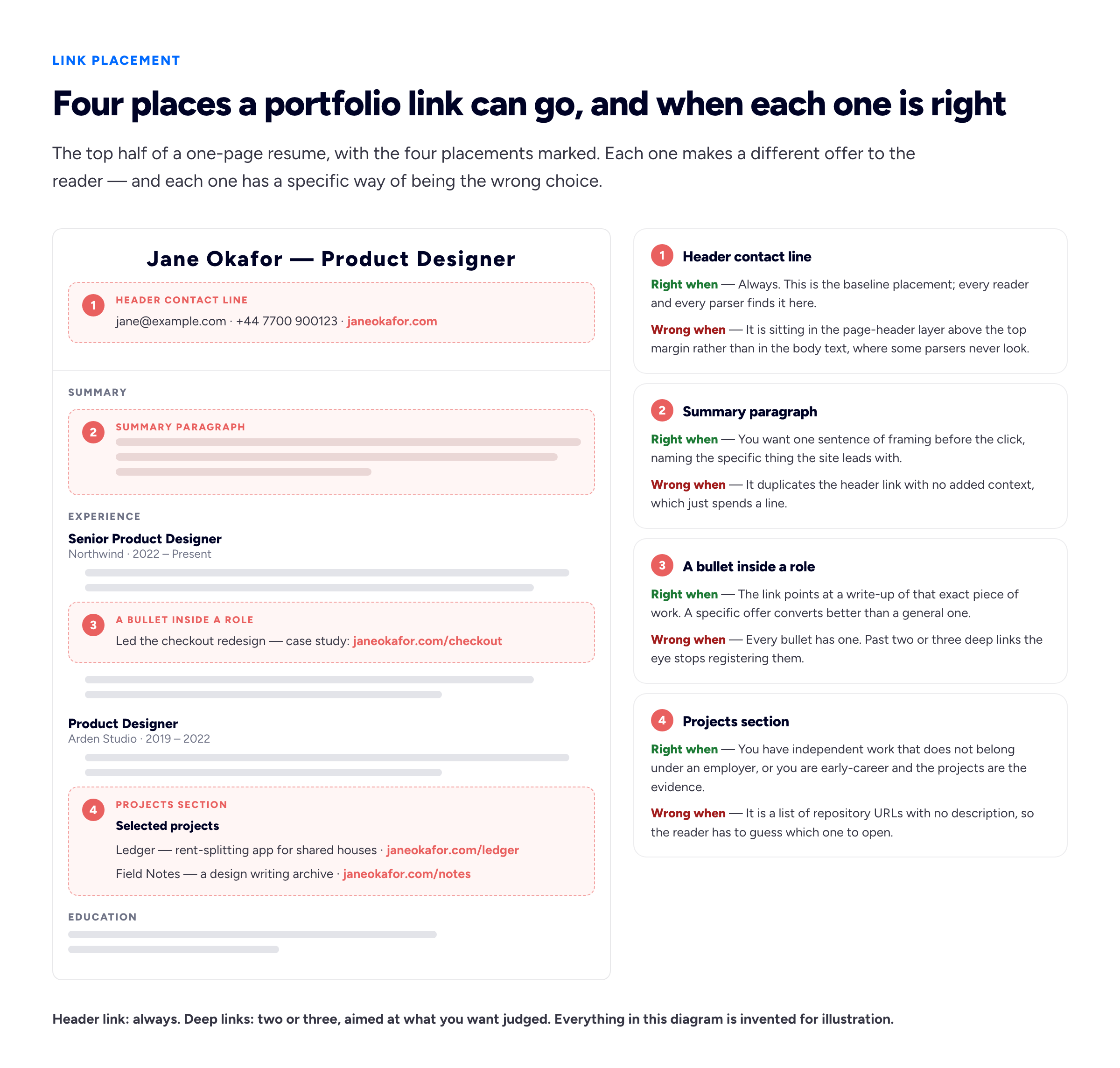
The header link says you have a portfolio. A deep link says which part of it you would like examined, which is a stronger offer.
What the link should say
There is a clear ranking here, and it is not the one most people use.
Best: your own domain, written out. janeokafor.com. Short enough to read, short enough to retype, it tells the reader who they are about to visit, and it is the same string whether the hyperlink works or not. A subdomain such as jane.bunfolio.com behaves identically.
Acceptable: a descriptive word carrying the link. "Portfolio", "Case studies", "Selected work". This satisfies the rule that link text should make sense on its own — the W3C's criterion on link purpose in context is the formal version, WebAIM's guidance on hypertext links the practical one. On a resume it has one large problem: if the hyperlink does not survive, the word "Portfolio" in coral text leaves the reader nothing to type. Use it alongside the visible URL, never instead of it.
Tolerable: a bare long URL. Ugly, and it wraps badly, but it works. Strip the scheme and the www for a human reader; RFC 3986 may define the full form, but every browser alive resolves janeokafor.com correctly.
Avoid: a shortener. bit.ly/3xK9pQ looks neat and is the worst option on the list. It hides the destination, which is exactly why shorteners are a staple of phishing and why some corporate filters block those domains outright. It adds a second company that has to stay in business for your link to work, and a resume circulates for years. It cannot be retyped from paper: six random case-sensitive characters with nothing to anchor them. And it signals that you are counting clicks, which is a conversation about you rather than about the work.
The visible text and the destination must match
If the page shows janeokafor.com but the hyperlink underneath points at tracking.somesite.io/r/92hf8, you have built, byte for byte, the pattern every corporate security course teaches people to distrust. The UK NCSC's phishing guidance names that mismatch as a thing to check for, recruiters at larger organisations sit through that training annually, and some of them hover. It usually happens by accident: you paste a tracked link, tidy the visible text, and forget the href underneath. Check both, in the exported file rather than in the editor.
The PDF hyperlink problem
Here is the part nobody writes about, and the part that actually breaks.
A hyperlink in a PDF is not text formatting. It is a separate object — a link annotation with a rectangle and an action, and in a properly tagged file a /Link structure element, which is what the W3C's PDF11 technique describes. Blue underlined text is a visual style. The clickability is layered on top of it, and the two can come apart. When they do, the document still looks perfect. The text is still blue. Still underlined. It just does nothing.
- Print to PDF. The big one. "Print → Save as PDF" sends your document through a print pipeline, and a printer has no concept of a link, so what comes out is very often a flat page with blue underlined text and no annotations at all. Use the application's own Export or Save as PDF command instead. This one distinction saves more links than anything else in this guide.
- Links inside a text box, shape or grouped graphic. Design-led templates often place the contact block inside a frame, and depending on the export path a URL in a frame can render as artwork rather than as text with an annotation. If the type has been outlined it is not even selectable to copy.
- Links in the page header or footer layer. The region parsers skip is also handled inconsistently on export by some templates. Two reasons to keep the URL out of it.
- Autocorrect quietly editing the URL. Editors capitalise after a full stop and convert hyphens to typographic ones.
jane-okafor.comwith a non-breaking hyphen looks identical and resolves to nothing when retyped. Paste URLs as plain text. - Re-saving through a third tool. Compressors and some "optimise for web" passes drop annotations. A link is a separate object layered over the page rather than part of the text, which is exactly why a tool that rewrites the page can discard it while everything still looks right.
All of which produces one rule, and it is the rule this guide exists to deliver:
Write the URL in visible text and make it a hyperlink. Never rely on the hyperlink alone. A dead link over the word "Portfolio" leaves the reader with nothing to type; a dead link over
janeokafor.comcosts them three seconds.
Then verify. Export, open the file in a plain viewer rather than the editor that made it, and click the link. Open the same PDF on a phone and check the URL is legible without zooming. Two minutes, once, per version of the document.
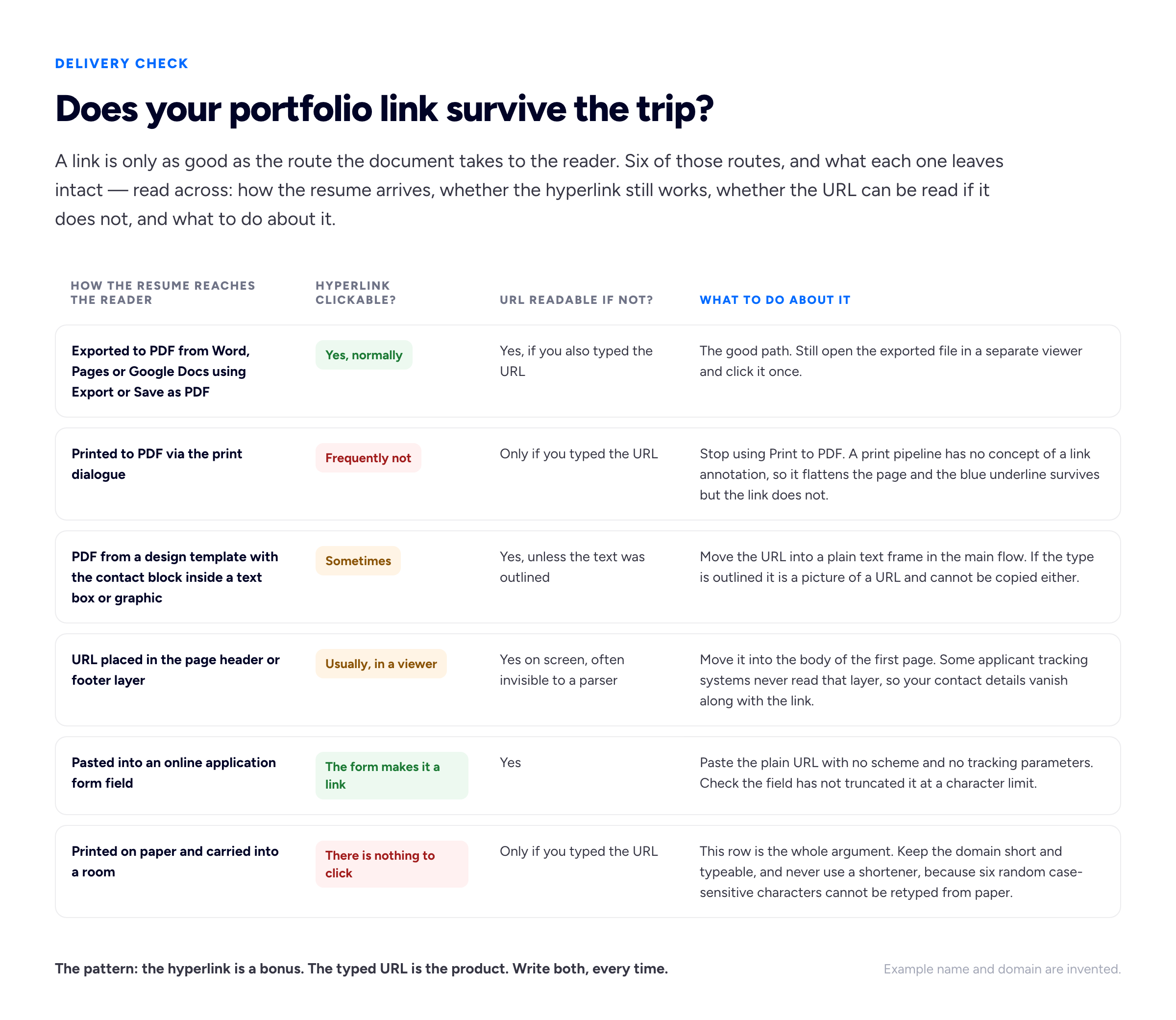
Four of these six routes can leave you with blue underlined text that does nothing. In all four, a visible URL is the only thing that saves the click.
What an ATS does to a link
An applicant tracking system does not read your resume. It extracts text, maps that text onto fields, and shows a recruiter a reconstructed version. Everything you know about how the document looks is discarded at that step.
Four things go wrong with links. Links in the page header or footer layer may never be extracted. Links inside a two-column layout can be interleaved with the other column, so your URL arrives spliced through an unrelated line and no longer resolves. A link that is an image — a logo, a QR code, a graphic contact block — contains no text, so it extracts as nothing. And a URL broken across a line break can come back with the break preserved, arriving as two useless fragments.
The mitigations are the ones you have already read: single column, body text, plain URL, short enough not to wrap. The layout question in full is in our guide to ATS-safe resume formats, and if your history is contract rather than salaried, how to put freelance work on a resume covers the structural problem that creates. If you would rather not argue with a word processor about any of it, our free resume builder puts the contact line in the body text with the URL both typed and linked, because those are the defaults that stop breaking things. Its PDF carries one small "Created with Bunfolio" credit in the footer, better said here than discovered at export.
Where the link should point
Assume you have won the click. It is scarce, expensive and does not repeat. What does the reader land on?
Most people point at the home page, because that is the address they have. That is a reasonable default only if the home page does the work of a landing page: within one screen it says what you do, shows something, and offers a route to more. If it is a splash screen with your name in large type and a scroll prompt, you have spent the click on a doormat. The stronger move, which little advice mentions, is to point at the thing you want judged. If the role is a checkout redesign and you have a checkout case study, link the case study. A reader who arrives at relevant work has had their question answered before they had to search; a reader who arrives at a grid of twelve thumbnails has to decide which one you meant, and may decide nothing.
Three things then determine whether the deep link earns its place. Keep the path typeable — janeokafor.com/checkout is fine, a four-segment dated slug will wrap and become unreadable on paper. Make sure the page loads fast on a phone. And do not gate it: no password, no "request access". If the work genuinely cannot be shown, our guide to portfolios under an NDA covers describing it instead, and what the landing page should contain is set out in how to write a portfolio case study and, for engineers, what hiring managers actually look at in a developer portfolio.
Which address you own, and what happens when you do not
Resumes outlive jobs. One sent in March gets forwarded in November, kept in a talent pool, re-read when a role reopens eighteen months later. Every link on it is a bet that a particular address still resolves on a date you cannot predict. A link on the agency's domain dies the week you leave, or worse, keeps working and shows the work under someone else's name. A free host on a plan you stopped paying for becomes a parking page. An abandoned profile gets deactivated, or the platform reorganises its URLs. In each case the failure is silent, and the resume keeps circulating.
The fix is boring. Own one address — a domain you control, or a subdomain on a service where you keep the account — and point everything through it. If you move hosts later, the address printed on three years of PDFs keeps working. It is why every Bunfolio account gets a free subdomain at sign-in: yourname.bunfolio.com is a fixed point you can print, and it keeps working alongside a custom domain if you add one. Starting from blank, the template examples will get you to a live URL faster than choosing a layout will.
Platform links versus your own site
Behance or Dribbble are strong for visual disciplines where the reader already lives there, and a single project link makes a decent deep link. They are weak as a primary address: long URLs, ranked under the platform's name rather than yours, your work surrounded by other people's. The trade is in portfolio platforms versus your own website. GitHub is expected for engineers, but a bare profile link is not a portfolio link — it is an invitation to browse forty repositories and some dotfiles, so link specific ones with real README files. Notion is fine as an interim, with hash-laden URLs and sharing settings one click away from breaking; its limits are in using Notion as a portfolio site.
Google Drive or Dropbox is the weakest option and still common: permissions break, the reader may be signed into a work account that cannot open it, and a 40MB PDF loading in a browser tab is a poor first impression. Keep that file for when procurement asks for it. LinkedIn belongs on a separate line rather than as the portfolio link, because they are different claims. If your history lives there and nowhere else, turning a LinkedIn profile into a portfolio site is the shortest path to a real address, and a single links page is tidier to print than four separate URLs.
Should you track clicks on it?
Mostly no, and the reasoning is worth more than the answer.
Knowing whether an application was opened is genuinely useful, but the mechanisms are all bad on a resume. A shortener carries every problem listed earlier. Query parameters — janeokafor.com/?utm_source=resume&utm_campaign=acme_apr — turn a clean address into visible machinery, tell the reader you are running a campaign against them, and break the moment someone retypes the URL by hand. A per-employer unique URL is wrong for whoever the copy is forwarded to internally. And a recruiter who notices tracking learns something about your priorities at the exact moment you wanted them thinking about your work.
Take the signal from your own site analytics in aggregate instead: traffic rose the week you applied somewhere. The one defensible exception is a clean deep path that happens to be distinctive, because janeokafor.com/checkout tells you which application produced a visit without looking like tracking. It is just where the case study lives.
When "portfolio" does not mean a portfolio
Most writing on this assumes a designer. For everyone else the question is not where the link goes but whether it should exist, and it usually should — the format is just different.
Developers need repositories plus a site that explains them; a README stating the problem, the decision and the trade-off is worth more than five more repositories. Data analysts have the opposite problem, because notebooks are evidence and are unreadable to a hiring manager on a phone, so the link should point at a written summary with the charts embedded and the notebook underneath, as building a data analyst portfolio sets out. Writers need clips with context, not a folder of PDFs. For nurses, teachers, project managers and operations staff, the word is unfamiliar and the underlying thing is not: a page holding certifications, a programme you designed, a policy you wrote, outcomes you can describe. It is worth having precisely because so few applicants in those fields have one — what a career portfolio is sets out the structure, and building a portfolio with no experience is the starting point when the evidence does not exist yet.
The delivery rules are identical in every case. Typed URL plus hyperlink, body text not page header, single column, own the address, point at the thing you want judged.
Frequently asked questions
How do I add a portfolio link to my resume?
Put it in the contact block at the top of the first page, written out as a visible URL — yourname.com — and also set as a hyperlink. Export to PDF using the application's Export or Save as PDF command rather than printing to PDF, then open the exported file and click the link once to confirm. Add one or two deep links lower down against the work you most want read.
Where exactly should the portfolio link go?
On the same line or in the same block as your email address, at the top. That region is read first by people, extracted reliably by parsers, and treated consistently in print. Avoid the repeating page header and footer area, which some applicant tracking systems never read.
What is a portfolio link on a job application?
It is a URL pointing to evidence of your work: a personal site, a case study, a repository, a page of published pieces. On a form it is usually a field labelled "portfolio", "website" or "other URL". Paste the plain address with no tracking parameters, and check the field has not truncated it.
Why did my resume hyperlink stop working in the PDF?
Almost always because the file went through a print pipeline rather than an export. "Print → Save as PDF" flattens the page, so the blue underlined styling survives but the link annotation does not. Other causes: the URL sits inside a text box or outlined graphic, the file was re-saved through a compressor that dropped annotations, or autocorrect changed a character in the address.
Can I use a bit.ly link on my resume?
Better not to. It hides the destination, which is why some corporate filters block shortener domains; it adds a second service that must stay online for your link to work; it cannot be retyped from a printed page; and it reads as click tracking. A short domain of your own does the same job and tells the reader who they are visiting.
Should I put a QR code on my resume instead?
As well as, never instead of. A QR code is useful on a printed copy handed over in person, and it is invisible to every text parser and useless in a PDF being read on the same screen. Keep the typed URL next to it. If you need somewhere to start, you can build the resume itself free and add the code afterwards.
How we put this guide together
Bunfolio hosts portfolio sites, so we see the other end of this problem constantly: the traffic that arrives at a portfolio from a resume, and the traffic that does not. The recommendations here are our own judgement rather than anybody's standard — the ranking of link text from own-domain down to shortener, the structure of one header link plus two or three deep links, the argument that the click should land on the thing you want judged, the position that click tracking on a resume costs more than it returns, and the instruction to always write the URL visibly as well as linking it. Weigh those as opinions with reasons attached. The underlying mechanics, that a PDF hyperlink is a separate annotation object rather than text formatting and that print pipelines do not carry annotations, are how the format works rather than our view of it.
We have cited no numbers, and there were two obvious candidates. The first is the widely repeated claim that around three quarters of resumes are rejected by applicant tracking systems before a human sees them; it appears in hundreds of articles, traces back to a vendor's marketing from over a decade ago rather than to any published methodology, and describes software that has changed substantially since. The second is the figure, usually given as seven-and-a-bit seconds, for how long a recruiter spends on a resume — it comes from a small commercial eye-tracking study by a job board, and the decimal place does more work in the retelling than the sample supports. Neither is load-bearing here, so both are left out rather than laundered through another citation.
Where this guide states a fact it points at a primary source. Link text and accessibility come from the W3C's criterion on link purpose in context and WebAIM's guidance on hypertext links. The structure of a link inside a PDF is described in the W3C's PDF11 technique, covering the /Link structure element. We have deliberately not cited a vendor help page alongside it: the one we first reached for had already been moved to a new address, which is the argument of this guide happening to our own sources. URL syntax is RFC 3986, and the mismatch between visible link text and destination is named as a phishing indicator in the UK National Cyber Security Centre's phishing guidance. Applicant tracking systems vary by product and version, so we have described the general extraction failure modes rather than naming vendors we cannot test.
Every name, domain, URL, employer and job title used as an example above is invented for illustration, including everything inside both diagrams: Jane Okafor, janeokafor.com, the checkout redesign, the phone number and the example paths refer to no real person, site or project. The status ratings in the survival table are our assessment of common behaviour across the main word processors and export routes rather than measurements of a specific software version, so verify your own export by opening the file and clicking the link.
Related reading: ATS-safe resume formats for the layout rules that keep the whole document parseable, putting freelance work on a resume if your history is contracts rather than employers, how to write a portfolio case study for what the reader should find when they arrive, and what pages a portfolio website needs for the structure behind the address you are printing.
More from the blog
September 18, 2026 · 22 min read
How to Put Freelance Work on a Resume
Nobody rejects a resume because the applicant freelanced. They reject it because they could not work out what they were looking at. The one decision that sets your layout, what to call yourself, and h...
September 12, 2026 · 22 min read
What to Put in the Skills Section of a Resume
Every guide on this is a list of a hundred skills to copy, which is exactly why the section is the one a reader trusts least. The three kinds of skill people conflate, where each of them actually belo...
November 1, 2026 · 19 min read
Cover Letter vs Resume: What Goes in Each, and When You Need Both
The resume is the record; the cover letter is the argument for this role. What belongs in each and what must never be repeated, when a letter is really needed, how the two should point at each other,...