
August 27, 2026 · 23 min read · Updated September 25, 2026
How to Connect a Custom Domain to Your Portfolio
Choosing and buying a domain, the two DNS records that get it live, why a CNAME is forbidden at the zone root, and a troubleshooting list for when it stubbornly will not resolve.
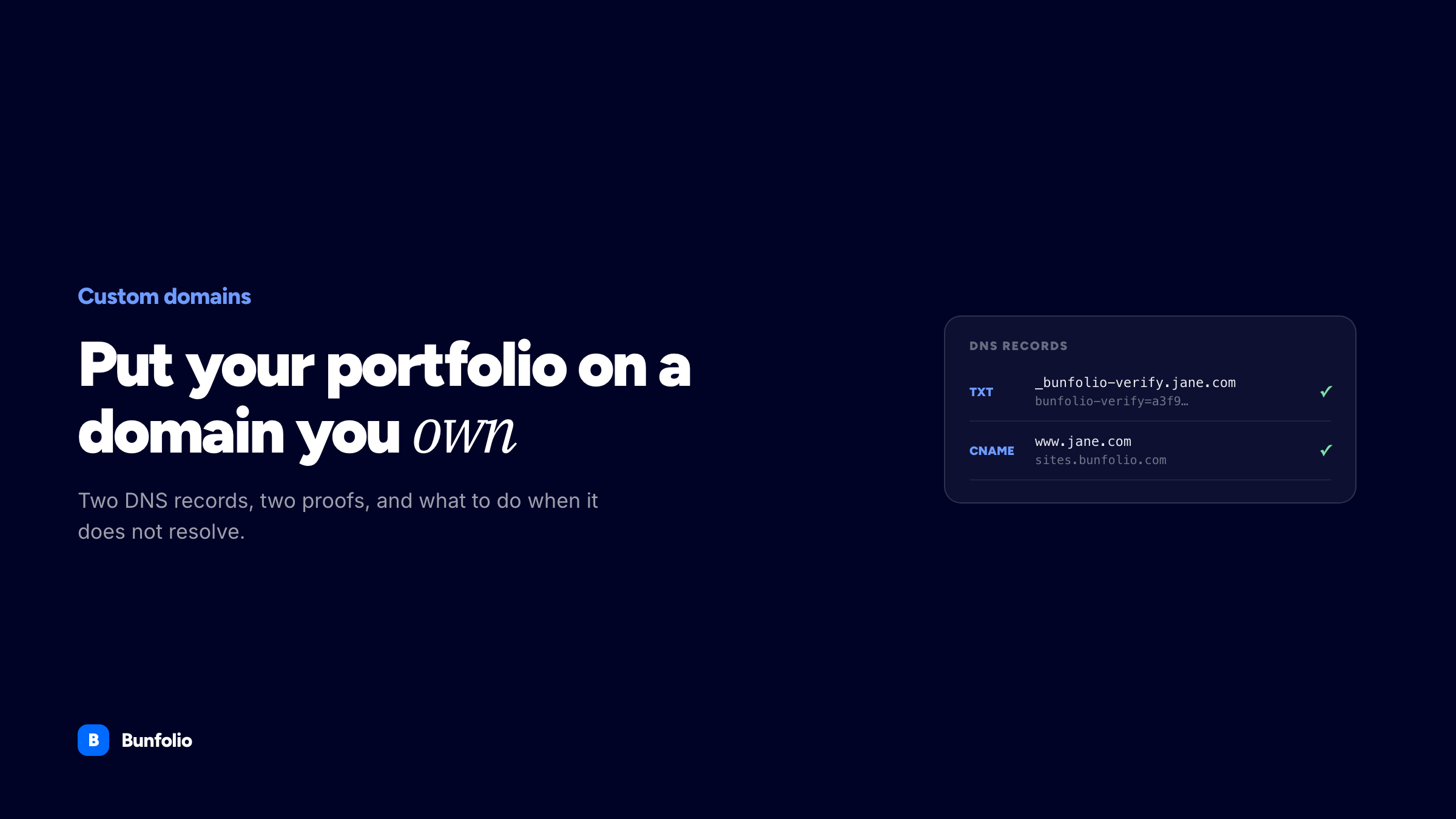
Connecting a custom domain is the one piece of portfolio setup that reliably goes wrong. Everything else — writing the copy, choosing the projects, publishing the page — happens inside one tool that tells you immediately whether it worked. DNS is different. You type a value into a registrar's control panel, save it, and then nothing appears to happen for an amount of time nobody will commit to in advance.
It is not actually difficult. There are two records, each with one job, and a small number of ways people get them wrong — and almost everyone gets them wrong the same way. Once you understand what each record is for, the troubleshooting stops being guesswork.
This guide covers whether you need a custom domain at all, how to buy one without walking into the usual traps, the two records and what each proves, the apex-versus-subdomain distinction that decides which record type you use, a step-by-step walkthrough, what "propagation" actually means, and a proper troubleshooting section for when it does not work. The DNS parts apply to any host. Where Bunfolio does something specific, it is called out as such.
Do you actually need a custom domain?
Not on day one. A free portfolio website on a subdomain — jane.bunfolio.com — is a real, indexable, perfectly respectable address. It is fine on a business card, fine in an email signature, and it lets you publish this afternoon instead of after a purchase, a DNS edit and a wait.
The honest argument for your own domain is not that it ranks better, and it is not that clients judge you for a subdomain. Most of them will not notice. The argument is portability. A domain you registered is an asset you control. If you change tools in three years — to a different builder, to a static site you write yourself, to an agency site when you stop freelancing alone — the address comes with you. Everyone who bookmarked you, every link in every old email thread, every search result that accumulated, keeps working, because you can point the same name somewhere new.
A subdomain belongs to the platform. That is not sinister, and a decent platform will not take it from you, but if you leave, the address does not come along.
There is also a search-side consideration once you have both addresses live at once, which is a genuinely important detail and is covered properly in our portfolio SEO guide — canonical URLs, redirects, and why running identical content on two live addresses is the one configuration that actively costs you. We will not repeat that argument here; read it before you leave both addresses running.
So: start on the subdomain, buy the domain when you are ready, connect it later. Nothing has to be rebuilt. Here the site stays free and connecting the domain is an optional paid add-on, as it is on a good many builders — the connection is often the thing behind the paywall, which we went through name by name in which free builders let you use a domain you own — and it is what we would advise most freelancers to do.
Buying a domain without the usual traps
What actually matters
Three things, in order.
- It can be said out loud. You will read this domain over a phone, into a microphone at a meetup, and to a client who is typing it while you talk. Hyphens, ambiguous spellings and doubled letters (
webbdesign) all fail this test. - It is short enough to type without checking. Roughly: your name, or your name plus one word.
janeokafor.com,okafordesign.com,jane.design. - It will still fit you in five years. Naming yourself after a tool or a service is a fast way to guarantee a rebrand.
jane-webflow-expert.comages badly and, worse, includes someone else's trade mark.
Your own name is the single most durable choice a freelancer can make. It survives every change of specialism, and it is the phrase clients will search when a referral sends them looking for you.
What does not matter
Keywords in the domain. There is a persistent belief that freelance-web-designer-london.com gives you a search advantage. It does not do much of anything, and it reads like a directory listing. Pick the name a person would remember.
The registrar's brand, mostly. Domains are a commodity. What differs is price, interface quality and how aggressively they upsell.
The .com question
.com is still the default assumption in most people's heads, which means if you take janeokafor.design and someone else holds janeokafor.com, a fraction of your traffic will type the wrong one and land on a stranger. That is the only real cost, and for most freelancers it is small.
Weigh it against availability. A clean, memorable .design, .dev, .studio or country domain beats a mangled .com with hyphens and misspellings. If your national domain is what your clients expect — .co.uk, .de, .com.au — take that; local buyers read it as a local business rather than a downgrade.
One practical warning about newer extensions: check the renewal price, not just the first-year price, and check whether the registry has a history of raising it. Some extensions are cheap to enter and expensive to keep.
The renewal trap, and the transfer lock
The advertised price is almost always a first-year promotion. The number that matters is the renewal, which can be several times higher, and you will be paying it every year for as long as the site exists. Look it up before you buy, not eleven months later when the invoice arrives.
Two more things worth knowing when you register:
- Turn on auto-renew and keep the billing card current. An expired domain is the worst outcome in this entire guide. Your site vanishes, your email breaks if it is on that domain, and expired names in any way desirable get bought within minutes of dropping.
- You cannot move a domain to another registrar immediately. Under ICANN's transfer policy a newly registered or newly transferred domain is locked for a period, so registering somewhere cheap with the intention of moving it the next day does not work. This does not affect connecting it to a host — you can point DNS wherever you like from day one.
Also check that WHOIS privacy is included rather than sold as an add-on. It usually is now, and it keeps your home address out of a public database.
Keep the registrar separate from the host
This is the structural advice in this section. Buy your domain from a registrar; host your site with whoever you like; keep those two relationships separate.
Bundling them is convenient right up to the moment you want to leave, at which point the company you are leaving controls the address you are trying to take with you. Separation costs you one extra login and buys you the ability to change your mind at any time without touching your domain. It is exactly the same argument as the one for owning a domain in the first place, applied one level down.
The two records, and what each one is for
Connecting a domain to any modern host means publishing two DNS records. They do different jobs and they fail independently, which is why understanding the split makes troubleshooting so much faster.
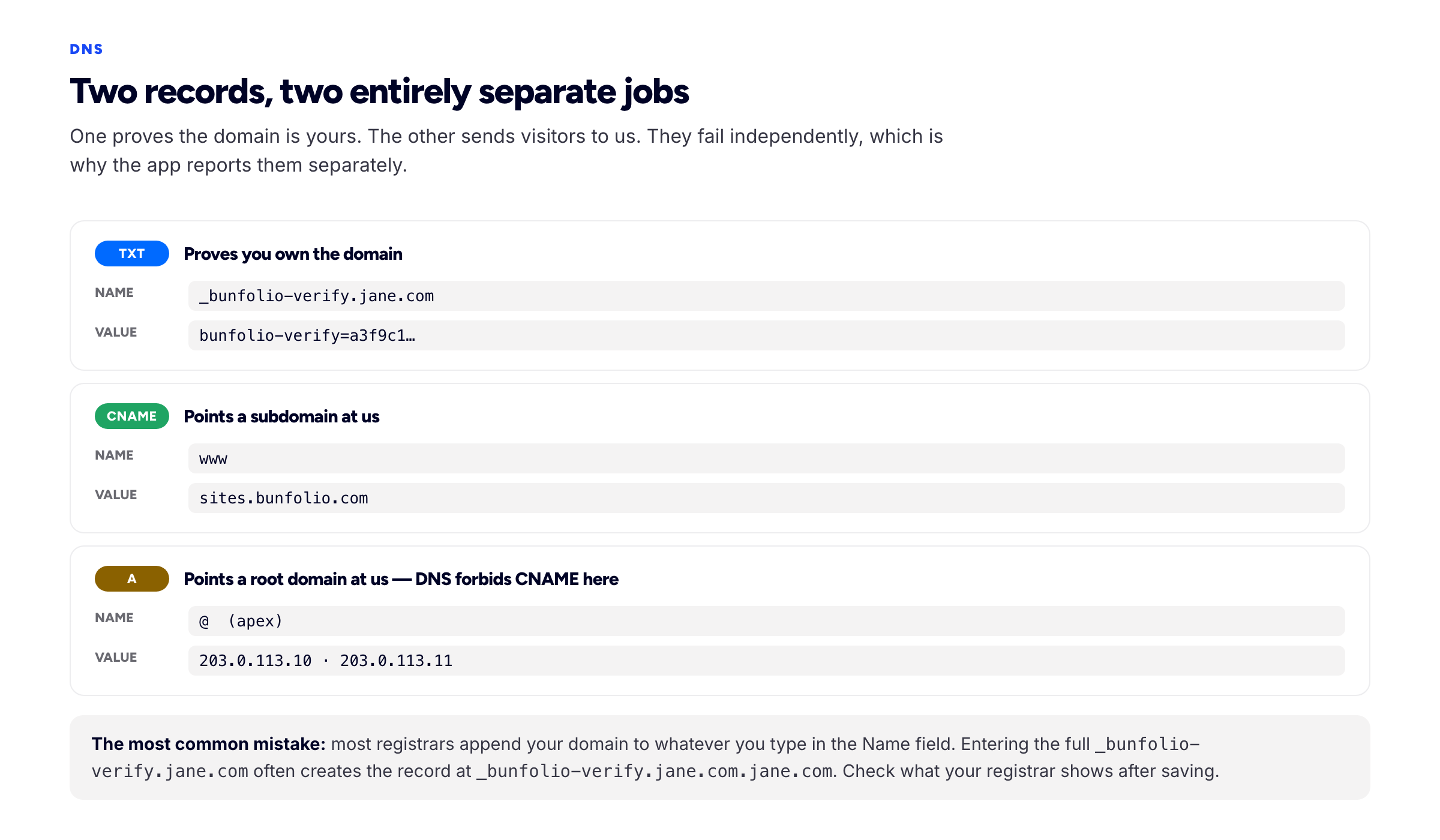
Two records, two jobs: one proves you own it, one points it at us.
The ownership record — a TXT
A TXT record holds arbitrary text in your domain's zone. Because only someone who controls the zone can create one, publishing a value the host gave you proves you control the domain. It is the same mechanism Google Search Console and every email provider use for domain verification.
The obvious question is why this is needed at all when the second record already points the domain at the host. The answer is that pointing is not ownership. Domains get abandoned while still pointing somewhere; without an ownership proof, whoever noticed could claim someone else's hostname on the platform. The TXT record closes that hole.
In Bunfolio, that record lives at _bunfolio-verify.yourdomain.com and carries the value bunfolio-verify= followed by a 40-character token shown on the Website page. The token is unique to your account and that hostname — two different accounts asking for the same domain are handed different tokens, so one cannot verify with the other's record.
The connection record — a CNAME, or A records
The second record is what actually routes visitors. It answers the question "when a browser looks up this name, where should it go?"
For a subdomain such as www.yourdomain.com, that is a CNAME: an alias saying "this name is really that name". You point it at the target hostname your host displays, and from then on the host can change its own infrastructure — new IP addresses, new region — without you touching anything. That is why hosts prefer CNAMEs and why you should too.
For a bare apex domain such as yourdomain.com, a CNAME is not allowed, and you use A records instead. That restriction is the subject of the next section, because it is the point where most people get stuck.
Apex or subdomain: the distinction that changes everything
An apex domain (also called the root, the naked domain, or the zone apex) is yourdomain.com with nothing in front of it. A subdomain is anything with a label in front: www.yourdomain.com, portfolio.yourdomain.com, hire.yourdomain.com.
DNS forbids a CNAME at the apex. This is not a registrar limitation or a host's preference — it follows from the specification. A CNAME means "this name is an alias for that name, so ask about that name instead", and the rule in RFC 1034, clarified in RFC 2181, is that a name with a CNAME cannot carry any other record type. The apex of a zone must carry SOA and NS records — that is what makes it a zone — so it can never carry a CNAME. Any registrar interface that appears to accept one is doing something else underneath.
Which gives you three workable options.
- Use a subdomain. Put your site on
www.yourdomain.comand set the apex to redirect there. Registrars almost all offer a free redirect or forwarding feature for this. It is the least fragile setup, andwwwin front of a domain costs you nothing. - Use A records at the apex. Point the apex at the IP addresses your host publishes. This works, and it is what Bunfolio shows you when the domain you entered is an apex — the app detects that and lists the addresses to use rather than the CNAME target. The trade-off is that if the host's IPs ever change you have to update them.
- Use a DNS provider that flattens. Some DNS providers implement a synthetic apex alias — variously
ALIAS,ANAME, or Cloudflare's CNAME flattening — where you enter a CNAME at the apex and the provider resolves it to current IPs at query time. This is the best of both, if your provider supports it.
Whichever you pick, decide which address is the real one and make the other redirect. Having yourdomain.com and www.yourdomain.com both serve the site independently is the duplicate-address problem again.
Connecting it, step by step
The shape of this is the same everywhere. The Bunfolio specifics are marked.
- Publish the site first. A domain pointing at an unpublished site is a confusing way to debug DNS. Get the site live on its free address, confirm it looks right, then connect the domain. In Bunfolio, publishing is a toggle on the Website page.
- Enter the hostname in your host's settings. On the Website page, type the exact hostname you want —
yourdomain.comorwww.yourdomain.com. Pick one and be consistent; they are different names to DNS. The app will then show you the records to create. - Find where your DNS is actually hosted. Usually the registrar you bought from, but not always — if you have ever moved nameservers to Cloudflare, Route 53 or similar, the records must be created there, and edits at the registrar will do nothing. Check which nameservers the domain is using and go to that provider.
- Create the TXT record. Name
_bunfolio-verify, valuebunfolio-verify=plus your token. Read the next section on the name field before you save this — it is where the mistakes happen. - Create the connection record. For a subdomain, a CNAME with the label (
www) pointing at the target hostname the app shows. For an apex, A records for@pointing at each listed IP address. - Wait a few minutes, then check. Come back to the Website page and use "check records". Bunfolio also checks once automatically when you first save the hostname, which is often enough if you set up DNS beforehand.
- Update your links once it is live. Your email signature, LinkedIn, GitHub, marketplace profiles, invoices.
Verification, status, and what happens after
Both proofs have to pass before anything is served on your domain. Ownership without connection means the domain is yours but is not pointing here. Connection without ownership means it points here but you have not proved it is yours. Neither is enough on its own.
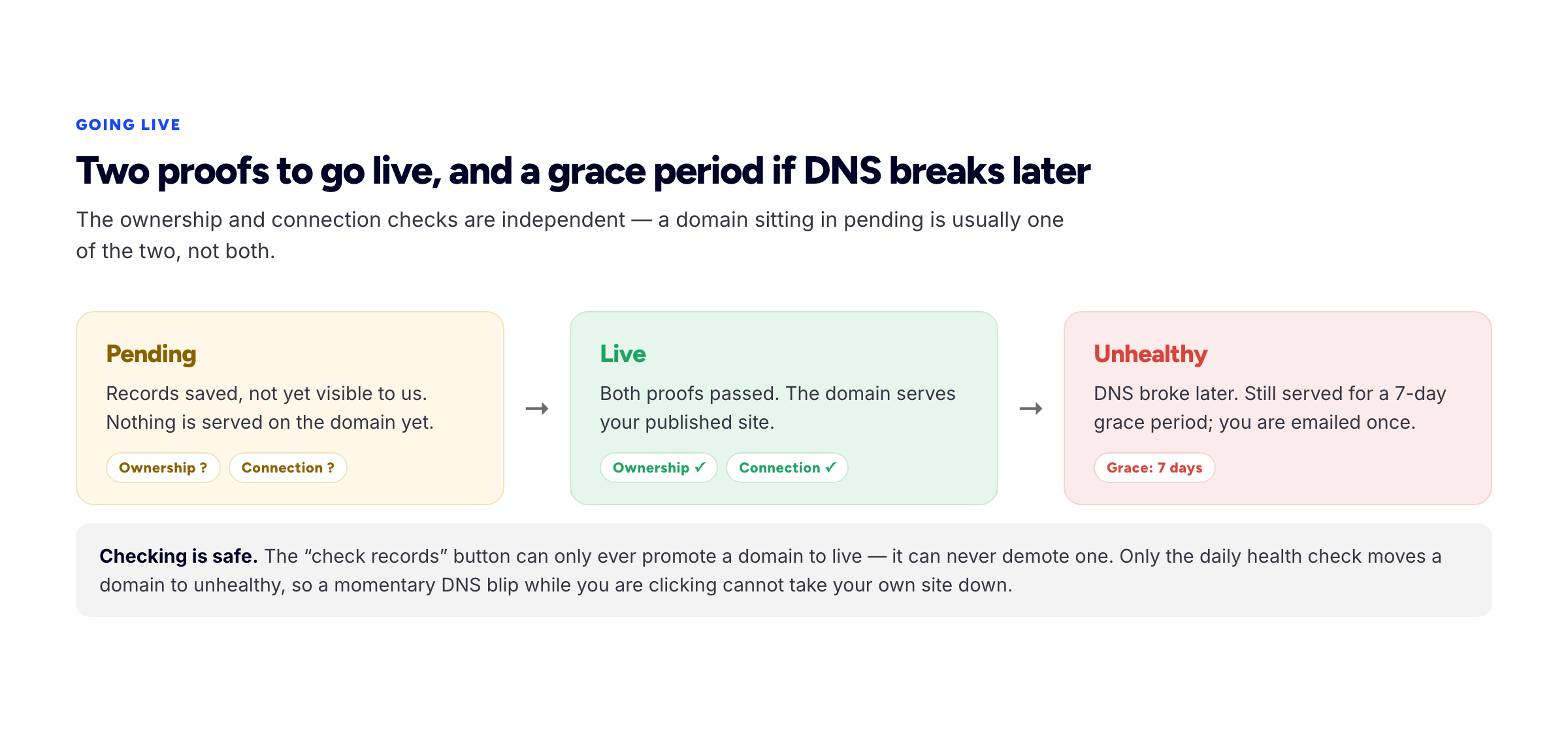
Two proofs to go live. A seven-day grace period if DNS breaks later.
In Bunfolio a connected domain sits at pending until both proofs pass, at which point it becomes live and starts serving. The Website page shows the two checks separately, so you can see which half is missing rather than staring at a single red cross.
Two behaviours are worth knowing about, because they are deliberate.
A manual check can only ever promote. Clicking "check records" can move a domain from pending to live. It can never take a live domain down. Demotion is exclusively the job of the scheduled daily health check. The reason is that DNS lookups fail transiently for reasons that have nothing to do with your configuration, and it would be a poor design if clicking a button during a momentary blip knocked your own site offline.
A broken domain degrades slowly, not instantly. If the daily health check finds that a previously live domain no longer points here — nameservers changed, a record deleted by accident, a domain that lapsed — the domain is marked unhealthy and the owner is emailed once. It keeps serving for a seven-day grace period. That window exists so a DNS problem is something you fix over a week rather than an outage you discover from a client. Your free subdomain is never affected by any of this; it keeps working throughout.
Once a domain is live you have up to three addresses for the same site: the in-app path /u/yourname, the free subdomain, and your own domain. Decide which one is canonical and treat the others as aliases — again, the SEO guide covers the mechanics.
One restriction to be aware of: platform hostnames and their subdomains are refused as custom domains. You cannot connect bunfolio.com or something under it as if it were your own — the free subdomain is how you get an address there.
TTL and propagation: what the waiting actually is
"Propagation" is a misleading word. Nothing propagates. Your records are live on your authoritative nameservers the moment you save them — you can query for them and see the new value immediately.
What takes time is caching. When a resolver — your ISP's, your company's, a public one like 8.8.8.8 — looks up a name, it keeps the answer for the duration of that record's TTL, the time-to-live value in seconds. Until that expires, it serves the cached answer and does not re-ask. Different resolvers cached at different moments, so they expire at different moments, which is why a domain can work for you and not for a friend for a few hours.
Two consequences follow.
- A new record is usually visible quickly. If a name had no record before, there is often nothing cached, so a lookup goes to your nameservers and gets the new answer. This is why a fresh TXT record frequently verifies within a minute or two.
- A changed record takes as long as the old TTL. If a record was set to 86400 seconds and you edit it, resolvers holding the old value may serve it for up to a day. If you know you are about to change something, drop the TTL to 300 a day beforehand, make the change, then put it back.
The standard answer of "up to 48 hours" is a conservative outer bound covering the worst caches. In practice, most connections complete in minutes and nearly all within a few hours. If nothing has happened after 24 hours, the cause is almost never propagation — it is a wrong record, and the next section is where to look.
When it does not work
Work through these in order. The first one accounts for more failures than everything else combined.
The record is saved at the wrong name
Most registrar control panels automatically append your domain to whatever you type in the "Name" or "Host" field. So typing _bunfolio-verify.yourdomain.com creates a record at _bunfolio-verify.yourdomain.com.yourdomain.com, which nothing will ever find.
The rule: enter the relative label only. For the verification record on yourdomain.com, type _bunfolio-verify. For a CNAME on www.yourdomain.com, type www. For records at the apex, type @ — the conventional shorthand for "this domain itself" — or leave the field blank if the panel prefers that.
A minority of panels want the full name instead. Tell them apart by looking at an existing record in the same zone and matching its style. Bunfolio shows the relative label it expects for your specific hostname, which removes the guess.
Trailing dots cause the same class of problem. Some panels require a trailing dot on a CNAME target (target.example.com.) to mean "this is absolute, do not append anything". If your panel shows existing records with trailing dots, use one.
The value got mangled
Copy the token rather than retyping it — 40 characters retyped by hand will eventually contain an error. Some panels add quotation marks around TXT values automatically; if yours does, do not add your own as well, or the stored value will contain literal quote characters. Watch for a leading or trailing space picked up during the copy.
There is already a conflicting record
If a name already has a record, adding a second one may quietly fail, get rejected, or produce an ambiguous result.
- An existing CNAME cannot coexist with anything else at the same name — the RFC 1034 rule again. If
wwwalready has a CNAME to an old host, delete it before adding the new one. - Old A records at the apex from a previous host will keep sending some visitors there. Remove them; do not add alongside them.
- Parking pages and redirects. Many registrars point a new domain at their own parking page by default, and that setting can override records you add. Turn off forwarding or parking first.
- Multiple TXT records are fine. A name can hold several TXT values, so an existing Google or email verification record does not conflict. Do not delete those to make room.
Your DNS is not where you think it is
Editing records at the registrar does nothing if your nameservers point somewhere else. If you moved the domain to Cloudflare, Route 53, DigitalOcean or your old developer's account, the zone lives there and the registrar's DNS panel is inert. Check the domain's nameservers and edit records at whichever provider they name.
Proxying is hiding your records
If your DNS is on Cloudflare with the proxy enabled — the orange cloud — the record you created is not what the world sees. A lookup returns Cloudflare's IPs rather than your CNAME target, and a host checking whether your domain points at it may not be able to tell that it does. It can also produce redirect loops or certificate errors depending on your SSL mode.
The usual fix is to set the record to DNS-only (grey cloud) while connecting, and to leave it that way unless you specifically want Cloudflare in front. Note that the proxy only affects the connection record — TXT records are never proxied, so verification is unaffected.
DNSSEC is failing validation
If DNSSEC is enabled and something is inconsistent — commonly after moving nameservers without updating the DS record at the registrar — validating resolvers will refuse to return any answer for your domain rather than return an unsigned one. The symptom is distinctive: the domain appears totally dead for some people while working fine for others, and record edits change nothing.
Check DNSSEC status at your registrar. If you recently moved DNS providers, either remove the old DS record or complete the handover properly at the new provider.
You are looking at a cached answer
Once you have checked a domain a few times, your own machine and network hold the failing answer. Before concluding it is broken, query a resolver directly: dig TXT _bunfolio-verify.yourdomain.com @8.8.8.8, or nslookup -type=TXT _bunfolio-verify.yourdomain.com 8.8.8.8 on Windows. That bypasses your local cache and shows what a third party sees.
The same applies to the site itself. A browser that has seen a redirect or an error will often keep showing it. Test in a private window, or on mobile data with your Wi-Fi off, before assuming the connection failed.
It resolves but the site is not yours
If your domain loads a "not found" or placeholder page from the right host, DNS is working and the problem is on the application side — usually the site is not published yet, the hostname was entered with a typo, or the ownership proof has not passed so nothing is being served on that name. Check the two proofs on the Website page separately.
HTTPS: why the padlock arrives a little after DNS
A certificate for your domain can only be issued once your domain points at the host — the issuing authority verifies control at the moment of issuance, typically over HTTP or DNS, as described in the ACME challenge types. That is a strict ordering: DNS first, then certificate. A brief window where the domain resolves but HTTPS warns is normal and resolves itself, usually within minutes.
If a certificate warning persists for more than an hour or so, the likely causes are a CAA record on your domain that does not permit the issuing authority, a proxy sitting in front with its own SSL mode misconfigured, or a certificate issued for www while you are visiting the apex. Check CAA records first if you have ever set them.
Do not disable HTTPS to make a warning go away. A portfolio served over plain HTTP is flagged as not secure in every mainstream browser, which is a worse first impression than a few minutes of waiting.
What to do with your old address
Once the custom domain is live, decide what the old address does. The wrong answer is to leave both fully live and forget about it.
The clean options are to redirect the old address to the new one with a permanent (301) redirect, which is Google's recommended way to signal a move, or to keep both reachable while declaring one canonical so search engines consolidate them. Either is fine; both is unnecessary; neither is the mistake.
Whatever you choose, do not let the old address disappear entirely. Old links, old email threads and old business cards keep pointing at it for years, and a redirect costs nothing to maintain. In Bunfolio the free subdomain keeps working regardless of what your custom domain is doing, which is deliberate — it is the address that cannot break.
And update the places you control. The links on LinkedIn, GitHub, your marketplace profiles and your email signature are the ones that send real visitors. That housekeeping is part of the same job as everything else in the portfolio guide: making it effortless for someone who wants to hire you to find the current version of your work.
Frequently asked questions
How long does it take to connect a custom domain?
The records take about five minutes to create. Verification is often complete within a minute or two of saving them, because a name that had no record before is rarely cached anywhere. The honest outer bound is up to 48 hours if you are replacing an existing record with a long TTL. If nothing has changed after a day, it is a configuration error rather than propagation.
Should I use my domain with or without www?
Either works. www is slightly easier technically, because a subdomain can use a CNAME and the apex cannot. The apex looks marginally cleaner. Pick one, point the other at it with a redirect, and do not run both as independent sites.
Can I connect a domain I bought years ago and already use for email?
Yes. Web records and mail records are separate — your MX records are untouched by adding a CNAME on www or A records at the apex. The one thing to avoid is deleting existing records to "clean up" while you are in the panel. Add what you need; leave the rest alone.
Do I have to move my domain to the host to use it?
No, and we would advise against it. Leave the domain at your registrar and simply point DNS at the host. Keeping registration and hosting separate is what makes moving hosts later a fifteen-minute job rather than a negotiation.
My domain went to "unhealthy" — is my site down?
Not immediately. Unhealthy means a scheduled check could no longer see the domain pointing here. The site keeps serving through a seven-day grace period and the owner gets one email. Fix the records within that window and it returns to live automatically. Your free subdomain stays up either way.
Can I use a subdomain of a domain I already use for something else?
Yes, and it is a common setup — keep your main site where it is and put portfolio.yourdomain.com or work.yourdomain.com on the portfolio host. It is a CNAME on that label, and it does not affect anything else in the zone.
How we put this guide together
The DNS behaviour described here is specification, not opinion, and it is cited to primary sources rather than to secondary summaries: the rule that a CNAME cannot coexist with other records at the same name — which is why an apex domain cannot use one — is in RFC 1034 and clarified in RFC 2181. The transfer lock on newly registered domains comes from ICANN's transfer policy. Certificate issuance ordering follows the ACME challenge types, and the redirect guidance from Google Search Central.
The Bunfolio-specific mechanics — the _bunfolio-verify TXT record, the two independent proofs, the pending and live statuses, the daily health check with its seven-day grace period, and the rule that a manual check can only promote a domain and never demote it — are described from the product itself rather than from documentation about it.
We have not quoted any statistics about domains or conversion rates. The ordering of the troubleshooting section is our judgement, based on which failures we see most: the wrong record name is first because it is, by a wide margin, the most common.
Related reading: the portfolio SEO guide for canonical URLs and what to do once you have more than one live address, and how to build a freelance portfolio website that wins clients for what belongs on the site the domain points at.
More from the blog
August 31, 2026 · 19 min read
Which Free Portfolio Builders Actually Include a Custom Domain?
Free tiers move faster than any listicle can track. The six things the word free is used to mean, the five questions that survive every pricing change, and what a handful of named builders offer today...

July 20, 2026 · 25 min read
How to Build a Graphic Design Portfolio
Your portfolio is itself a work sample. Four shots that present a project properly, where to publish besides your own site, and the image weight that quietly ruins design portfolios.

August 2, 2026 · 20 min read
How to Write the About Page on Your Portfolio
The page that decides whether someone likes you, not whether you are capable. Six blocks, about three hundred words, and why writing in the third person gives you away.