
August 31, 2026 · 19 min read · Updated September 25, 2026
Which Free Portfolio Builders Actually Include a Custom Domain?
Free tiers move faster than any listicle can track. The six things the word free is used to mean, the five questions that survive every pricing change, and what a handful of named builders offer today, each claim linked to its source.
Search for a free portfolio website builder with a custom domain and you are handed a stack of listicles, most written years ago and never touched since. In a category that stood still that would be a minor annoyance. Here it is close to useless, because free tiers are the fastest-moving part of any website product. They are a marketing budget: capped, re-shaped and relabelled whenever a company's numbers change. And the feature that moves most often is the custom domain, because the custom domain is the thing people will pay for.
So this guide does two jobs. It tells you what a handful of named builders offer today, every claim checked against that company's own pricing or documentation page and linked at the bottom so you can re-check it. And it teaches you the five questions that reveal any builder's real offer, including builders that did not exist when this was written. The second job matters more: every fact here has a shelf life, and the questions do not.
The conflict of interest should be stated before you read another line. Bunfolio is a portfolio builder and we are one of the options below: the site is free on a subdomain, and connecting a custom domain is the one thing we charge for. Writing about a question your own product has a commercial stake in is uncomfortable, so we have tried to earn your trust the only way available: by naming the readers who should use something else, by writing our own limitations up as limitations, and by refusing to quote a single price, ours or anyone else's.
Six things the word "free" is being used to mean
"Free" here is not one offer. It is at least six, and they behave completely differently on the day something goes wrong.
Free on a platform subdomain, with the platform's advertising. A working site at yourname.someplatform.com, with the platform's promotional material on your pages. Free in the honest sense — no card, no clock — and paid for by turning your visitors into an advertising audience.
Free on a subdomain, no adverts, with a domain paywall. The same arrangement minus the adverts, plus a locked door. The site works, the subdomain works, and the moment you want your own address the upgrade prompt appears. The most common shape among modern builders, and the reason the query you searched for exists.
Free until the trial ends. Not a free tier at all. You build a site, get attached to it, and it stops serving unless you subscribe. Nothing wrong with a trial, but a trial is a sales process with a deadline and does not belong alongside a permanent free plan.
Free within a hard cap. Permanent but small: a fixed number of pages, a bandwidth ceiling, a limit on form submissions. You are free until you are successful, at which point the cap becomes a bill or a broken site. Caps are the most honest conversion mechanism, because you can read them in advance.
Free for non-commercial use only. The least discussed shape, and the one that catches freelancers. Generous hosting, custom domain included, nothing capped you would notice — and terms saying the free tier is for personal, non-commercial projects. A portfolio built to win paid work is not obviously personal. There is a section on this below.
Free as a feature of something you already pay for. A builder bundled into a creative subscription. The marginal cost is nothing if you were paying anyway, and the site's lifespan is tied to a decision you will make for unrelated reasons — a coupling we covered in our piece on Adobe Portfolio alternatives.
The five questions that survive every pricing change
Ask these of any builder before you spend an evening filling one in. Each takes two minutes on the company's own pricing page, and together they tell you more than any comparison article, including this one.
One: can I connect a domain I already own, on the free plan, with no card? Not "does it support custom domains" — nearly everything does, somewhere. Look for the words "custom domain" in the feature list of the cheapest column. If they first appear in the second column, the answer is no, whatever the marketing page says.
Two: what does the platform put on my pages? Adverts, a badge, a footer credit, a mobile banner. Ask whether it appears on the published site or only in the editor, and whether removing it costs money. A client landing on a page that sells them something else is a different experience from a small "made with" mark in a footer.
Three: what are the hard numbers I could hit? Pages, bandwidth, storage, form submissions, monthly visits. Portfolios are small, so most caps are irrelevant — but a page cap of two is not, if you wanted separate case study pages, and a form-submission cap matters when your contact form is your only enquiry route.
Four: does the licence allow commercial use? Read the fair-use or acceptable-use terms, not the pricing table. If the free tier is for personal projects only and your portfolio exists to get you hired, you are relying on the platform not to look closely.
Five: what happens on the day I stop? Does the site go offline, go read-only, revert to a subdomain, or get deleted? And — the question that decides the damage — is the address you have circulated for two years yours or theirs?
A worked example. Sam is an illustrator with a dozen pieces, an about page and a contact form. Question one rules out most well-known builders in one pass. Question three rules out a developer-oriented option, because two static pages will not hold the three case studies Sam wants. Question four rules out another, because Sam is obviously doing this for money. Three candidates remain, in under fifteen minutes.
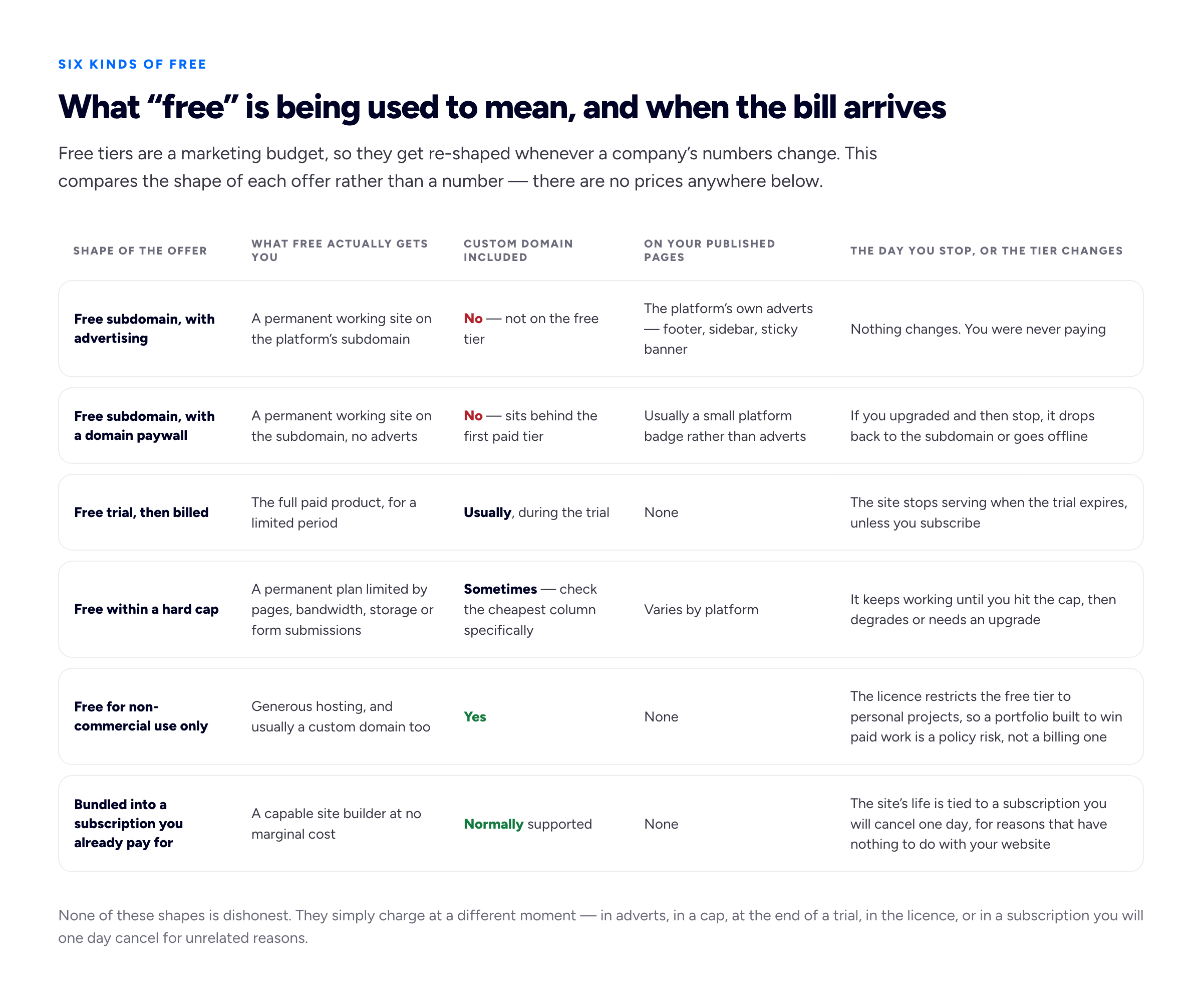
The rows differ in what they cost you, but they differ far more in when the cost arrives — and the last column is the one people read only after it has already happened.
What free tiers actually withhold
Across the builders we checked, the paywall almost never sits on the thing that would make a site unusable. It sits on the things that make the site yours: the custom domain, removal of branding or adverts, pages beyond a small allowance, bandwidth and storage headroom, form submissions past a monthly count, and support involving a human being.
Two deserve more attention. The first is the page cap, because portfolio advice pushes people toward individual case study pages and a two-page allowance cannot hold them. On a capped plan, one well-structured page carrying case studies as sections is the workaround, and a good structure in its own right — see one-page versus multi-page portfolios.
The second is indexing. Free sites are generally indexable, and we can find no support for the belief that a free plan is invisible to search engines. What is true is that a subdomain you do not own earns its authority for the platform's domain, and none of it moves with you. Our portfolio SEO guide covers the rest.
The licence trap: free hosting that quietly forbids earning a living
Developer hosting platforms have superb free tiers: fast, custom domains and certificates included, no branding on your pages, and for a static portfolio they will never charge you. The catch is not in the pricing table. It is in the terms, which is why this is the section we would most like people to take away.
Vercel's own documentation for the Hobby plan states that "the Hobby plan restricts users to non-commercial, personal use only", pointing at its fair use guidelines. A freelance portfolio is not a hobby project in any ordinary reading — its purpose is to obtain paid work. Plenty of freelancers host portfolios there without incident, so nobody is coming for your site tomorrow. But you are building on a permission you do not clearly have, and if that ever resolves it resolves as an account problem rather than an invoice you can choose to pay.
GitHub Pages draws the line somewhere more forgiving. Its usage limits page says Pages "is not intended for or allowed to be used as a free web-hosting service to run your online business, e-commerce site, or any other website that is primarily directed at either facilitating commercial transactions or providing commercial software as a service". A portfolio that shows work and offers a contact form is not primarily directed at facilitating transactions, so it sits inside that wording in a way it does not inside Vercel's. Pages is free, supports custom domains, and is available in public repositories on GitHub Free, with a documented site size limit and soft bandwidth and build limits.
The lesson: on developer platforms, read the acceptable-use terms as carefully as the pricing table, because that is where the restriction lives. On consumer builders it is the reverse.
What the named builders actually do
Every claim below was checked against the company's own page, and each page is linked in the closer. We describe rules rather than numbers wherever we can, so this section ages slowly.
Webflow
The free Starter site plan publishes to a webflow.io address and allows two static pages, with limited CMS and bandwidth and form-submission allowances. Custom domain does not appear in the Starter column at all; it appears first in the cheapest paid site plan. Webflow is the domain paywall with a page cap bolted on: genuinely free, genuinely permanent, and not a custom-domain option unless you pay.
Canva
Canva publishes websites free on a Canva-hosted address. Its help centre states that connecting a domain you already own requires a paid Canva plan — Pro, Teams or Business — and that those accounts can connect up to five existing domains at a time. The domain paywall again, with an unusual cap on how many domains an account may connect.
Wix
Free Wix sites serve on a wixsite.com address and carry Wix's own adverts. Wix's support documentation is admirably direct about the rest: a Premium or Studio site plan "allows you to connect your own domain, remove the Wix ads, and much more", and to connect your own domain you must purchase two separate things — a domain, and a site plan. That is the clearest statement of the two-purchase reality on this list.
WordPress.com
The free plan gives you a wordpress.com subdomain and shows WordPress.com's adverts to your visitors. Its plan comparison describes the first paid tier as where you "use a domain, go ad-free" — a compact summary of the whole category. Both the domain and the advert removal sit behind the same door. The self-hosted route is a different arrangement again, where the theme is genuinely free and the hosting, updates and backups are yours — we set out what that involves in our guide to free WordPress portfolio themes.
Squarespace
Squarespace does not offer a free tier. It offers a time-limited trial, then a subscription. It remains a good product, and if your site needs commerce or scheduling as well as a portfolio we would still point you there — but it does not belong in an article about free plans, and listicles that include it mislead by category error.
Netlify, Cloudflare Pages and GitHub Pages
The developer-oriented hosts are where custom domains genuinely are free. Netlify's pricing page lists custom domains with SSL on its free tier; Cloudflare Pages documents custom-domain limits under the Cloudflare free plan; GitHub Pages supports custom domains on free accounts with public repositories. All three expect you to arrive with a built site — files, a repository, a deploy step. If you write HTML, this is arguably the best answer in the article. If you do not, the free custom domain sits behind a wall made of skills rather than money, and it is taller than an upgrade button.
Bunfolio
Ours, so discount it accordingly. You sign in with Google, fill in a short wizard or import a public LinkedIn profile, and publish to a free subdomain such as jane.bunfolio.com. There are no adverts and no page cap. Connecting a domain you own is an optional paid add-on, and the free subdomain keeps working alongside it — in the terms of the list above, that makes us the second shape: free on a subdomain, no adverts, with a price on the door to your own address. What the free plan does and does not include is written out in full elsewhere; we will state it once here and let the table argue the rest.
The limitations, stated as limitations: four templates, a fixed set of sections. You can choose between the four, but you cannot design your own layout, rearrange the page, or express a visual identity through the design. If your portfolio is your design work, this is the wrong tool. And a free tier from any company, ours included, is a promise rather than a guarantee. The protection against that is not picking a company you trust. It is the next section.
Connecting a domain and registering one are separate costs
This trips up more people than anything else in the topic, so it is worth being blunt. A domain name is rented from a registrar, annually. That is a separate transaction from connecting it to a website, and no builder makes it disappear. On Bunfolio, what we charge for is the connection; the registration is still paid to a registrar of your choosing. We do not register domains for you — a domain given to you is a domain someone else controls.
Wix's documentation makes the two-purchase structure explicit, and it is the same everywhere: the domain is one subscription, the site plan another. Some builders bundle a first-year registration into an annual plan, which is a discount rather than a gift and quietly makes your website company your registrar too — leaving later then means moving two things instead of one.
Our recommendation, and it is a recommendation rather than a fact: register the domain yourself, at a registrar you log into with your own credentials, before you choose a builder. It is the cheapest recurring cost in your business and the only part of your web presence nobody can take. Use your own name if it is available — it survives every change of speciality.
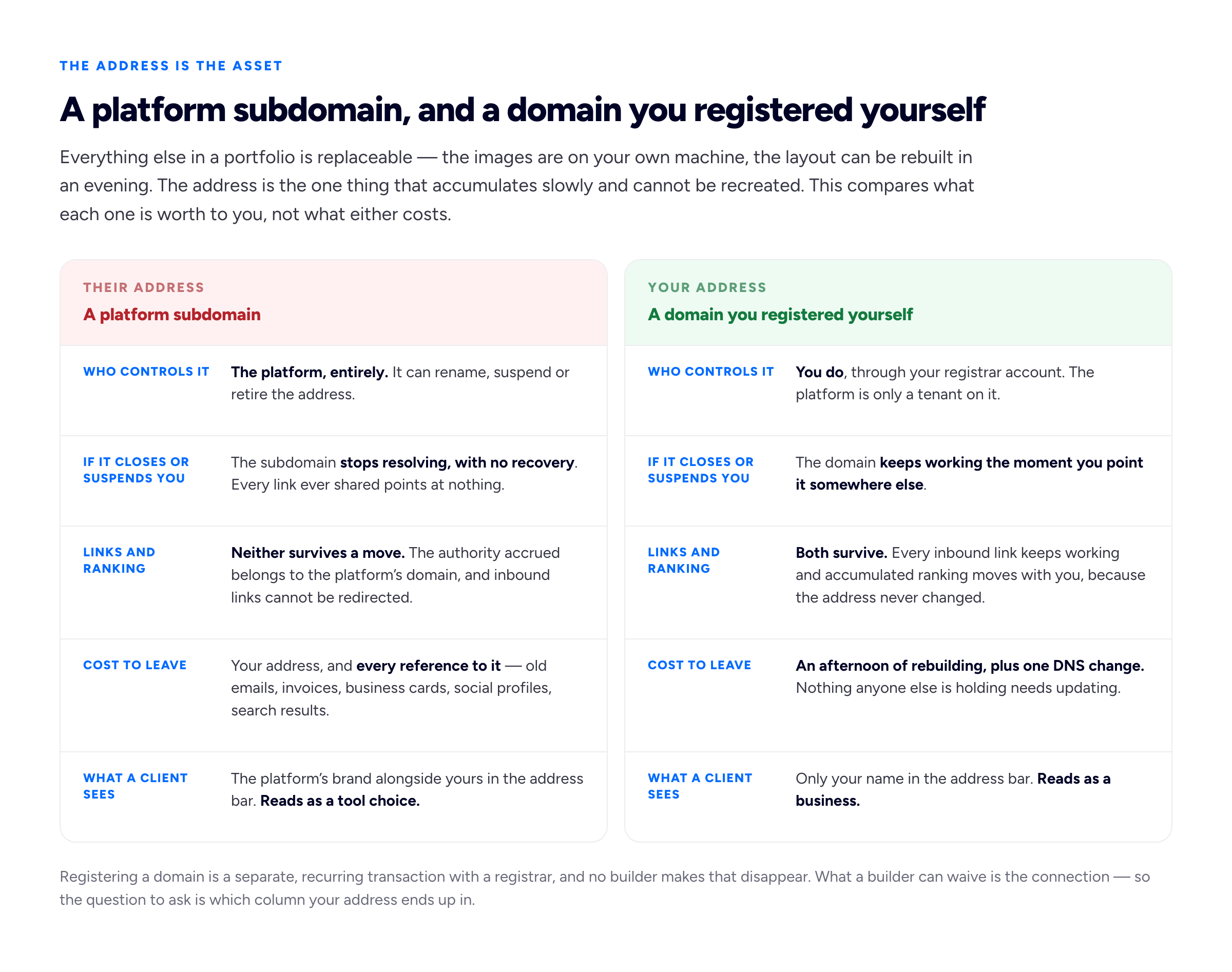
The four rows above the last one are the argument. The last row is the only one people think about when they choose, and it is comfortably the least important.
Why the address is the whole game
Everything else in a portfolio is replaceable. Your images are on your own machine, your layout can be rebuilt in an evening, your copy is a text file. The one thing that accumulates slowly and cannot be recreated is the address people have been sending each other — in old email threads, on a business card in a stranger's drawer, in a directory listing you have forgotten about.
If that address is yourname.someplatform.com, all of it evaporates the day you move, and there is no forwarding address, because forwarding requires control of the old one. If the address is a domain you registered, moving is a DNS edit and everything keeps working. That is why the advice holds whichever builder you pick, and why it is worth following even if you never intend to leave. The mechanics are a half-hour job, written up separately in how to connect a custom domain to your portfolio.
So is there a truly free portfolio builder with no catch?
No, and be suspicious of anything claiming otherwise. Hosting costs money, so every free plan is paid for by something: adverts, a cap that converts you later, a trial that expires, a licence excluding commercial use, a bundle you already buy, or a company deciding free users are a marketing cost worth carrying.
The useful question is not which one has no catch, but which catch you accept. If adverts are acceptable, the advertising-funded builders are genuinely free forever. If you write code, a developer host with clear commercial terms is hard to beat. If you already pay for a creative subscription, use the builder you are funding. If you want your own domain without paying anyone but a registrar, the developer hosts are the honest answer. If you want no adverts and no page cap on a free subdomain, with the option of paying to connect your own domain later, that is the case for us — and the reason we named the others rather than pretend they do not exist. If your shortlist has paid plans on it too, our comparison of how the main portfolio website builders differ covers those on the same axes.
There is also a version of this decision where the right answer is to stop optimising it. A current site on a free subdomain, updated with your last two projects, beats an immaculate plan for a paid site you have not built. What is on the page decides whether you get hired — see our guides to a portfolio that wins clients and how many projects to include — and where it is hosted decides only whether you keep the benefit.
Frequently asked questions
Can I use a custom domain on a free plan?
Sometimes, and checking is the fastest way to sort the market. On most consumer builders — Webflow, Canva, Wix, WordPress.com — it sits on a paid tier. On developer-oriented hosts such as Netlify, Cloudflare Pages and GitHub Pages it is included free, provided you can deploy a built site and the licence permits your use. On Bunfolio it is an optional paid add-on; the site itself stays free on its subdomain. Look for the words in the cheapest column and believe those rather than the headline.
Do I still have to buy the domain name itself?
Yes. Registration is an annual fee to a registrar, separate from connecting the domain, on every platform including ours. A builder can waive the connection fee; nobody waives the registration. Treat any "free domain" offer as a first-year bundle attached to an annual plan, and check who the registrar is.
Will a free portfolio site hurt how I look to clients?
Adverts will. A platform subdomain, in our experience, is noticed far less than freelancers fear — clients look at the work, the clarity of the offer, and whether the contact route works. What reads badly is a site that has obviously been abandoned, and a paid plan does not protect you from that.
What happens to my site if a free tier changes?
Assume it goes away or gets capped; you have no contractual claim on a free service. This is why the domain question matters more than the builder question: if you own the address, a tier change costs an afternoon; if you do not, it costs every link anyone has ever shared.
Is a portfolio allowed on a free developer hosting plan?
It depends on the host, so read the terms rather than guess. Vercel's documentation restricts the Hobby plan to non-commercial, personal use. GitHub Pages prohibits use as free hosting for a site primarily directed at commercial transactions or software as a service, which leaves an ordinary freelance portfolio in bounds. Different rules — and the difference is exactly what a stale listicle will never tell you.
How we put this guide together
The conflict of interest is worth restating rather than burying: Bunfolio is one of the products compared above, this article is published by Bunfolio, and we benefit if you choose us. What we did about it: recommended developer hosts over our own product for anyone who can deploy a static site, named Squarespace as the better answer for sites needing commerce or scheduling, treated advertising-funded builders as legitimately free, wrote our fixed templates up as a limitation, said plainly that connecting a custom domain is what we charge for, said plainly that our own free tier is a promise rather than a guarantee, and chose comparison axes that do not flatter us.
The opinions here are labelled as such. That you should register your own domain before choosing a builder, that these are the right five questions, that the address is the only irreplaceable asset in a portfolio, and that a current free site beats a planned paid one, are Bunfolio's own views, formed from hosting portfolio sites and watching which go stale. The factual claims come from the platforms' own pages, checked at the time of writing: Webflow's pricing page for the Starter plan's webflow.io address, two static pages and absent custom domain; Canva's help article on using your own domains for the paid-plan requirement and five-domain limit; Wix's support article on domains versus site plans for the two-purchase structure and advert removal; WordPress.com's plan features page for the free subdomain, the adverts and the first paid tier; Squarespace's help article on trial sites for the trial rather than free tier; Vercel's Hobby plan documentation and its fair use guidelines for the non-commercial restriction; GitHub Pages usage limits and what GitHub Pages is for prohibited uses, the size and bandwidth limits, and free-account availability; Netlify's pricing page for custom domains with SSL on the free tier; and Cloudflare Pages' documented limits for custom domains under the free plan.
We quoted no prices, plan costs, trial lengths or renewal figures for any product, including competitors: those change by region and date, and an out-of-date number inside a comparison is worse than none, because it looks authoritative while being wrong. Where we describe a limit that is not a price, such as a page count, we have said which page it came from. We also refuse to cite statistics we cannot trace to a primary source, which is why there are no percentages here about how many clients judge a site by its domain or how much traffic a free plan loses; those figures circulate widely and we could find an origin for none of them. We are not affiliated with, endorsed by or partnered with any company named above, and no marketing copy has been reproduced. Sam the illustrator is invented, as is every other example here.
Related reading: how to connect a custom domain to your portfolio, Adobe Portfolio alternatives, compared honestly, the portfolio SEO guide, and building a freelance portfolio website that wins clients.
More from the blog
August 27, 2026 · 23 min read
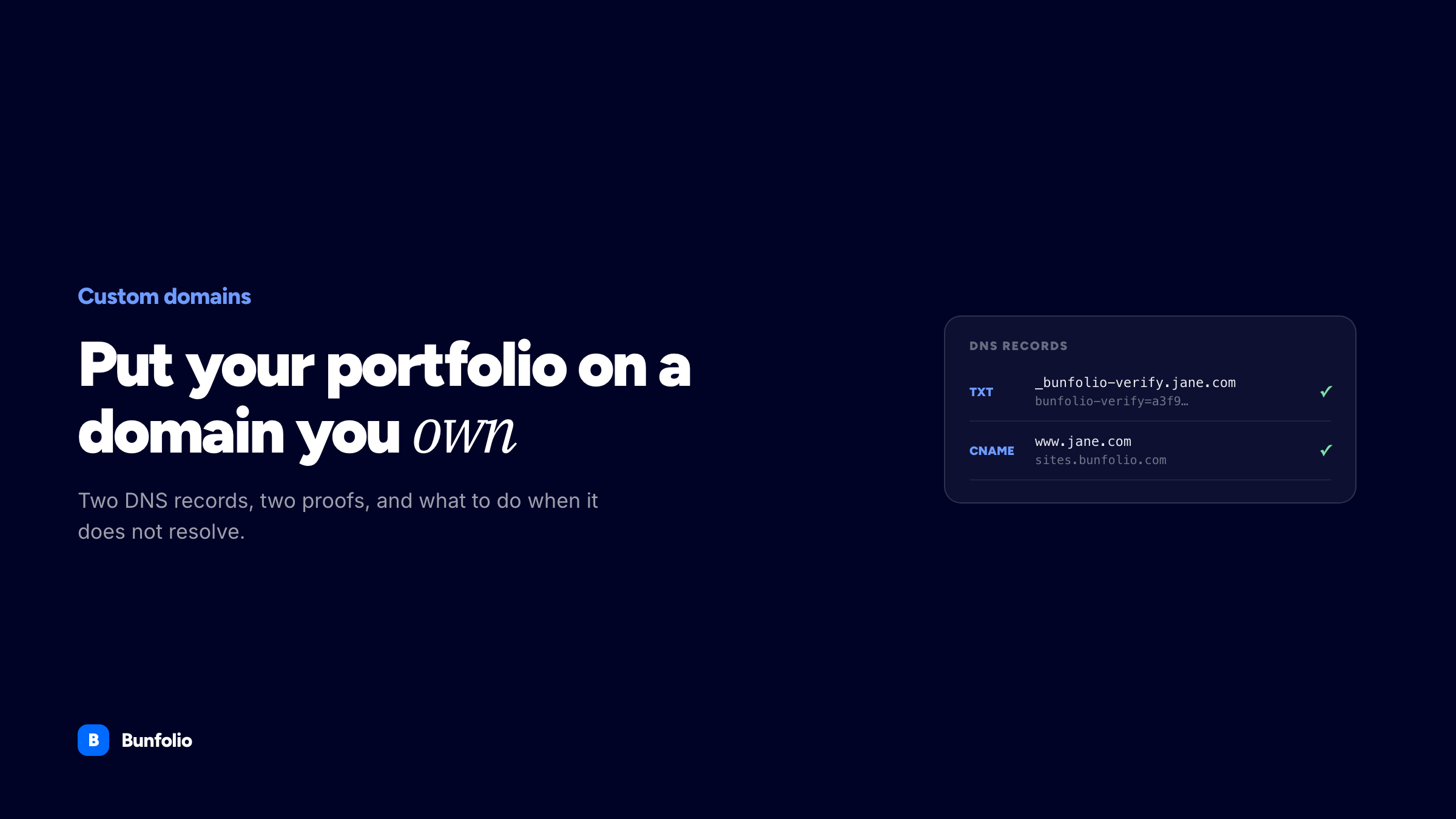
How to Connect a Custom Domain to Your Portfolio
Choosing and buying a domain, the two DNS records that get it live, why a CNAME is forbidden at the zone root, and a troubleshooting list for when it stubbornly will not resolve.
September 26, 2026 · 15 min read
What Is a Freelance Artist? How the Work, Pay and Rights Actually Work
A freelance artist is paid by the job, not by a salary, and keeps the copyright unless they sign it away. How freelancing differs from commission, in-house and gallery work, where the money comes from...
September 23, 2026 · 18 min read
Portfolio vs Resume: Which One You Need, and When
A resume and a portfolio are not two formats of the same thing: one answers the screening question, the other answers "show me". This guide covers who needs which by profession, where the CV fits, and...