
September 4, 2026 · 25 min read
Portfolio Images: Choosing the Thumbnail That Gets a Project Opened
Every visitor sees your grid; only some open a project. Which of the six frames you already have should lead, how to crop for a tile rather than a page, why a consistent grid beats individually better pictures, and what to do when the work is not a picture at all.
Almost every portfolio is built back to front. People spend a week on a case study nobody reaches and thirty seconds picking the image that decides whether anyone reaches it. The thumbnail gets chosen last, from whatever file happened to sort first in the export folder, and then it quietly does more work than anything else on the site.
The arithmetic is not complicated. Every single visitor sees your grid. Only a fraction of them open a project. So the portfolio image on the index page is the one asset that is guaranteed an audience, and the writing you laboured over is the thing that has to be earned. Getting the thumbnail right is the highest-leverage hour available to you, and it is almost entirely a decision about which frame and cropped how — not about camera gear or export settings.
This guide is about that decision. Which of the images you already have should lead a project, how to crop it for a tile rather than for a full-width page, why a consistent grid beats a grid of individually better pictures, and the two conventions — text overlays and device mockups — that look professional and usually are not. The export mechanics live elsewhere: our photography portfolio guide covers formats, colour profiles and compression, and the art portfolio guide covers galleries of work where the image is the piece.
The grid is the only page everyone sees
Think of your portfolio index as a set of trailers. Each tile has to do one job: make a specific person want the next click. Not impress in the abstract, not demonstrate range in isolation — make someone who is looking for a particular kind of help think that one.
This reframes the choice usefully. The best portfolio image is rarely the most beautiful one in the project. It is the most legible one — the frame that transmits the largest amount of "what this is and who it is for" at the size it will actually be displayed, which on a phone is roughly the width of a playing card.
The failure mode this produces is worth naming, because it is epidemic and it is invisible from the inside. A designer picks eight hero shots, all shot the same way, all beautiful, all abstract. The grid looks tasteful and communicates nothing. Every tile says "design happened here". None of them says "e-commerce checkout redesign", "identity for a distillery", "a room I made calm". A reader who wants one of those things cannot find it, so they leave with a general impression of competence and no reason to write to you.
What a thumbnail has to do in about a second
Four things, in this order:
- Say what kind of work this is. Discipline first — a brand identity, an interior, a web product, a film. A reader should not have to consult the caption to know what they are looking at.
- Survive its display size. If the information in the frame disappears when the image is a third of a screen wide, the frame is wrong. This is the test people skip.
- Differ from its neighbours. A tile's job is partly comparative. Eight tiles that are variations on one another are, functionally, one tile.
- Promise something specific. A detail that raises a question — an unusual material, a strange interface state, an unexpected pairing — beats a competent overview, because the overview answers itself and there is no reason to click.
Nothing on that list is about quality in the photographic sense. A technically ordinary image that is unmistakably a bakery's packaging outperforms an exquisite one that is unmistakably a rectangle.
The six frames every project already contains
You almost never need to shoot or render anything new. Nearly every finished project contains the same six kinds of image, and they are not equally good as thumbnails. In rough order of how often they earn the lead position:
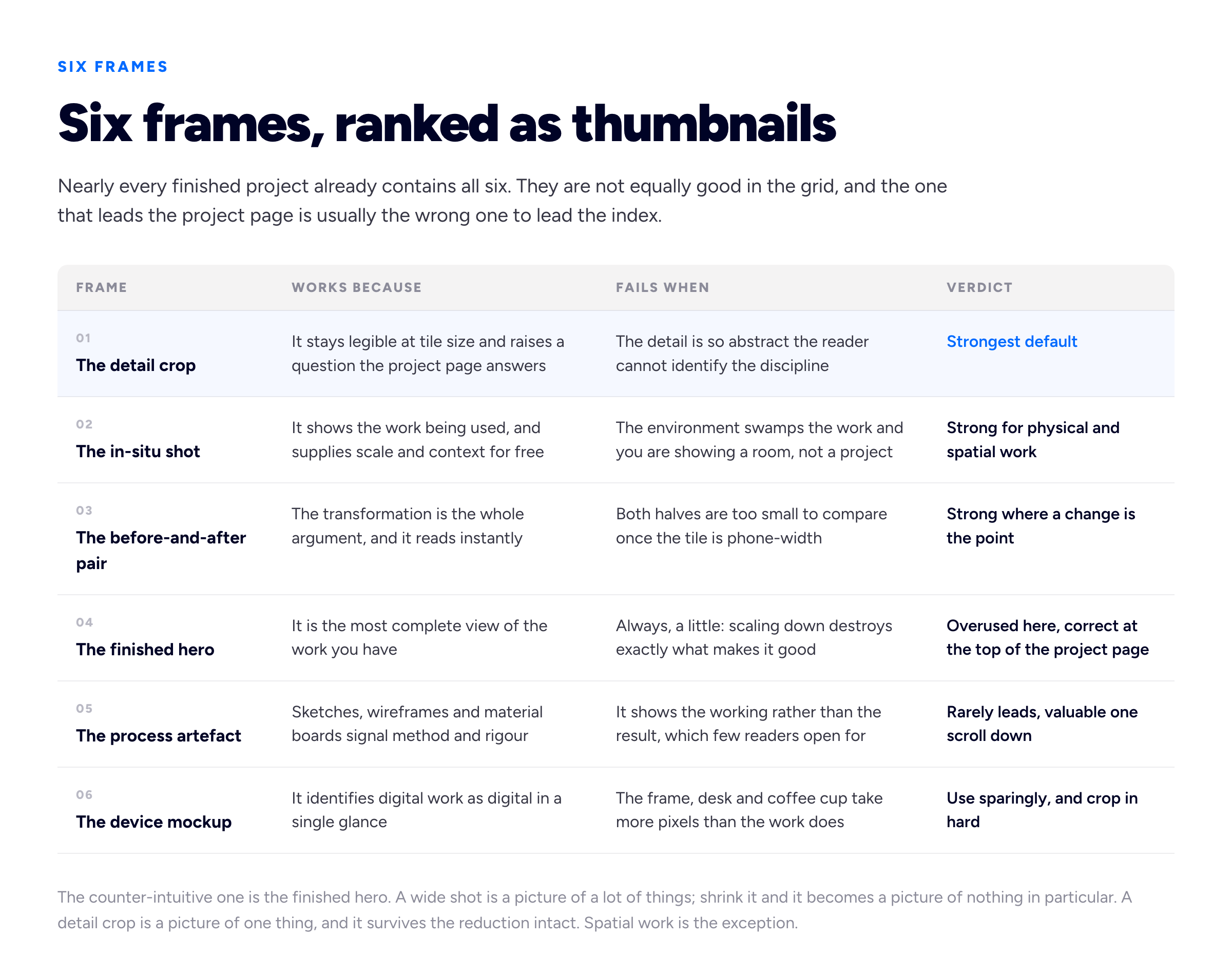
The frame that leads a project page is usually the wrong frame to lead the grid. They are answering different questions.
The counter-intuitive one is the finished hero shot — the big, complete, everything-in-frame image. It is the correct opening image on the project page and a weak thumbnail, because scaling down destroys exactly what makes it good. A wide shot is a picture of a lot of things; shrink it and it becomes a picture of nothing in particular. A detail crop is a picture of one thing, and it survives the shrink intact.
The exception is spatial work. Interiors, architecture and event work often need the wide because the spatial move is the work, and a detail crop of a beautiful skirting board tells a reader nothing about what you did. Our interior design portfolio guide goes into how those shots are made.
Crop for the grid, not for the project page
Here is the single most useful habit in this whole guide, and it takes four seconds: look at your thumbnail at the size it will actually render. Not zoomed to fit your monitor. Not in the file browser at 400 pixels. Open your own portfolio on your own phone and look at the grid.
Most people have genuinely never done this. They choose images in an application that shows them at 1,200 pixels wide and publish them into a layout that shows them at 340. Every judgement made at the first size is worthless at the second.
Once you are looking at the real thing, three cropping decisions follow.
Crop harder than feels right
The instinct is to include context so the image "makes sense". At tile size, context is noise. If the work is a poster on a wall, the poster should fill the frame, not sit in the middle of a wall. If it is an app screen, one screen cropped to the interesting region beats three screens in a row — three screens at tile size is a grey smear.
A reliable move: crop until you feel you have gone slightly too far, then stop. The project page is where the full view lives.
Pick one aspect ratio and never break it
Whatever ratio your grid uses — 4:3, 3:2, square, 16:9 — every portfolio image should be exported to it deliberately, not left for the browser to crop automatically. Automatic cropping is centre-weighted, and the interesting part of an image is very often not in the centre. Anything that gets cropped by CSS will eventually be cropped badly on a screen width you did not test.
Export at roughly twice the displayed dimensions so the image stays sharp on high-density screens, and no larger. A tile shown 400 pixels wide wants an 800 pixel export, not a 4,000 pixel one — the browser will scale the 4,000 down to look identical, having charged your visitor for the privilege.
Put the payload where the eye lands
Readers scan a grid diagonally and their attention lands slightly above centre. If the one identifying element in your image — the logo, the face, the screen, the joint — sits in the bottom fifth, it is competing with the project title that most layouts put directly underneath. Recompose so the thing that identifies the work is in the upper two-thirds of the crop.
A consistent grid beats a grid of better images
This is the part that separates portfolios that look professional from portfolios that look like a folder of good work, and it is not about any individual image.
A grid is read as a single composition before it is read as a set of projects. When the tiles share a visual logic, the reader's brain files the whole thing as "one body of work by one person with a point of view" and starts assessing the work. When they do not, it files it as "assorted files" and starts assessing you, unfavourably, without ever articulating why.
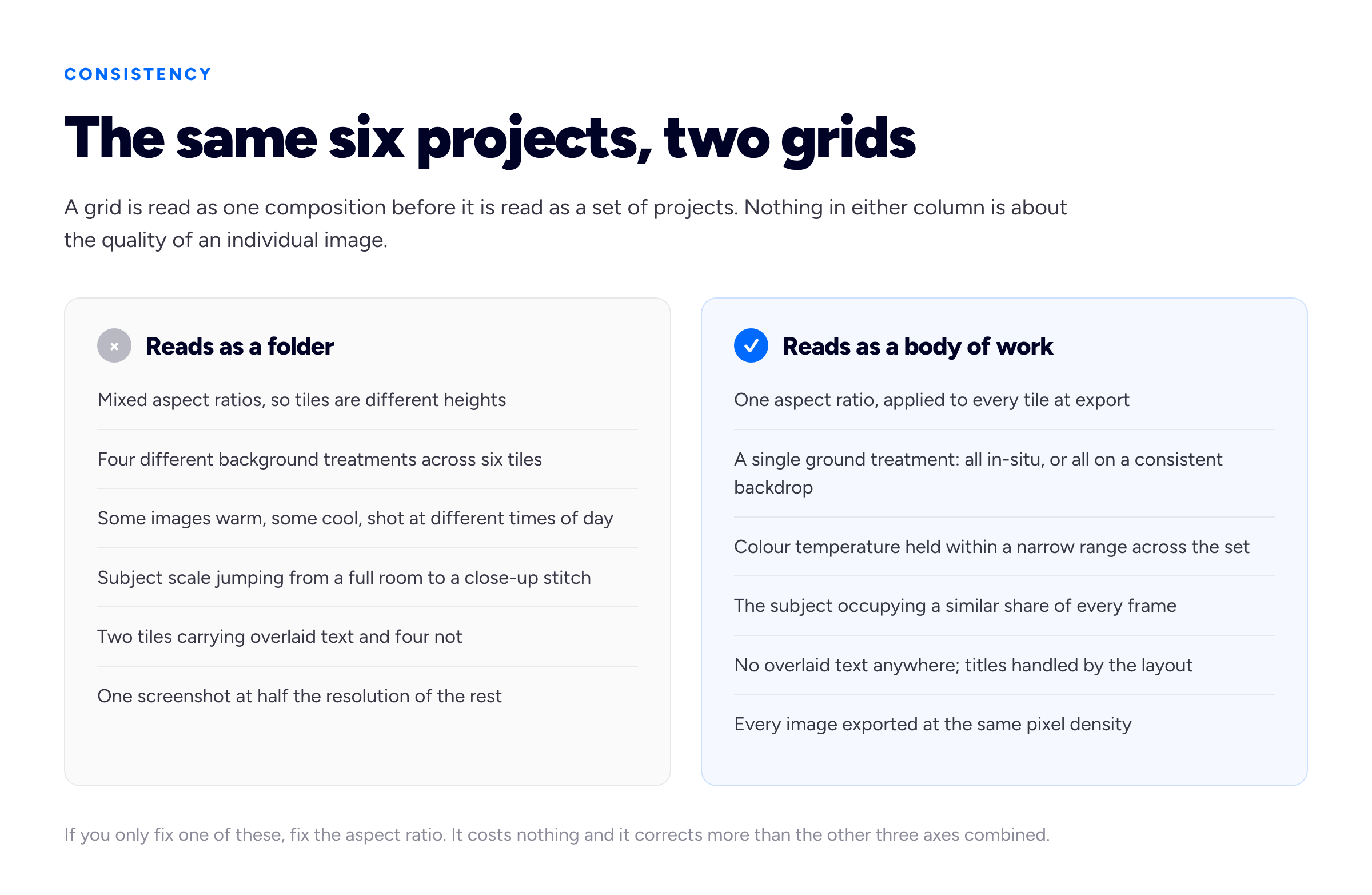
Consistency is a decision made across the set, not inside any single image. It is also the cheapest upgrade available to most portfolios.
Four axes to hold steady, in descending order of how much they matter:
- Aspect ratio. Non-negotiable. Mixed ratios produce ragged tile heights and the grid stops reading as a grid.
- Ground treatment. Decide whether your work is shown in the world or on a neutral backdrop, and apply that to all of it. Alternating between the two is the most common source of an incoherent grid.
- Colour temperature. A set shot across different lighting conditions can be nudged into a narrow range in ten minutes of editing. You are not making them identical, just stopping one tile reading orange next to one reading blue.
- Subject scale. If the work occupies about 70% of the frame in one tile and about 15% in the next, the set feels arbitrary even when every image is good.
If you can only do one of these, do aspect ratio. It costs nothing and it fixes more than the other three combined.
What leads, by discipline
The frame ranking above is a general default. Each discipline bends it, usually because of what a reader in that field is actually trying to establish.
- Graphic design and branding. Lead on the applied artefact, not the logo on a white square. A logo in isolation proves you can draw a mark; the same mark letterpressed on a business card, screen-printed on a bag or painted on a shopfront proves it works. Detail crops of print finishes are unusually strong here, because they carry material information nothing else does. Our graphic design portfolio guide covers the rest of the set.
- Web and product design. One screen, cropped to the region where the design decision lives, straight-on and full-bleed. Not the whole flow, not three phones fanned out. If the project is a redesign, a tight before-and-after of the same component beats any hero. Our UX portfolio guide covers what the page behind it has to prove.
- Development. The hardest case, because the work is not visual and a screenshot of an interface someone else designed misrepresents what you did. Lead on the interface anyway — a reader needs to know the thing exists and shipped — and let the project page carry the architecture, the constraint and the code. A clean, legible screenshot of a running product beats a photograph of a code editor, which tells a reader nothing except that you have a dark theme.
- Photography. The strongest single frame in the set, and the one exception to "crop harder" — a photographer's crop is part of the work and should not be re-cut to fit a tile. Choose a frame that survives the reduction instead of cropping one that does not.
- Interiors and architecture. The wide establishing shot, because the spatial move is the work and a detail crop of a beautiful reveal is illegible as a subject. Level verticals matter more here than anywhere else, since one leaning tile in a grid of straight ones is visible at any size.
- Film and motion. A deliberately chosen still, not whatever frame the video player happened to grab. Automatic poster frames land mid-blink, mid-transition and mid-motion-blur with remarkable reliability. Export a frame you picked. Our video editor portfolio guide covers players and poster frames properly.
- Writing, strategy and consulting. Covered below, because the honest answer is that there is no image, and pretending otherwise is the trap.
When the work has no image
Writers, strategists, developers, virtual assistants, operations people and consultants all hit the same wall: the grid demands a picture and the work is not a picture. There are four honest responses and one dishonest one.
The dishonest one first, because it is everywhere: the stock photograph. A laptop on a wooden table, someone laughing at a spreadsheet, an abstract gradient with a lightning bolt through it. It communicates nothing about the work, it is instantly recognisable as stock to anyone who spends time online, and it actively signals that you had nothing to show. A plain typographic tile is better than a stock tile, every time.
The four that work:
- Show the artefact where it lives. A published article is a page on a website with a masthead, a headline and your byline on it. Screenshot it in context — the masthead is doing real credentialling work that a plain block of text cannot. A strategy deck is a slide. A report is a spread. An email campaign is an inbox.
- Show the number. If the outcome is the product, set the outcome as type: one figure, a short label, nothing else, in your own typographic style. This is a made object rather than a photograph and it has to look designed — one number, one line, a lot of space. It is the one place a text tile is genuinely correct.
- Show the surface you changed. A copywriter who rewrote a checkout can show the checkout. A developer who halved a load time can show the running product. You are not claiming the visual design; the project page states your role, and stating it plainly is what keeps this honest.
- Build one typographic system and reuse it. If several projects have no image, do not solve each one separately. Design a single tile treatment — a set colour, one typeface, a fixed layout, the project title and a three-word descriptor — and apply it across all of them. Six deliberate typographic tiles read as an editorial decision. Six separate improvisations read as a problem.
Our guides to freelance writing portfolios and virtual assistant portfolios go further into presenting work that has no obvious visual form.
The image above the grid is a different problem
The single image at the top of your homepage — a portrait, a workspace, a hero, or nothing at all — is not a thumbnail, and most of the rules above do not apply to it. It has one job: establish who is speaking, before the work starts arguing for itself.
Three things are worth knowing about it. It is almost always your site's Largest Contentful Paint element, which makes it the thing a visitor waits for and the thing performance is measured on — so it loads eagerly, never lazily, and it should be the most carefully compressed file on the site. It should not repeat a project image, because a reader who then meets the same picture again in the grid has effectively lost a project. And for freelancers taking direct enquiries, a photograph of you generally outperforms an abstract one, for reasons that have little to do with design: someone hiring an individual is deciding whether to trust a person, and a face answers a question a gradient does not.
If you have no usable photograph of yourself, do not force one. A clean typographic opening — your name, what you do, who for — is a legitimate and frequently better choice than a badly lit portrait taken at arm's length.
Text overlays and device mockups
Two conventions are so widespread that people adopt them without asking whether they work. Usually they do not.
Text on thumbnails. Overlaying the project name on the image fails on two counts. At tile size the type is either unreadably small or so large it obscures the work, and the title is nearly always already printed directly below the tile by the layout — so you have spent your most valuable pixels duplicating a line of text that was free. There is one legitimate use: a single short word that categorises work a reader could not otherwise place, on a grid that has no captions at all. If your layout has captions, let it do its job.
Device mockups. A phone or browser frame usefully tells a reader "this is a digital product" in one glance, which is worth something. The failure is one of proportion. A laptop rendered at a three-quarter angle on a wooden desk with a plant and a cup of coffee gives roughly a third of the frame to the actual interface and the rest to a stock photograph of nobody's office. Crop into the screen until the work dominates, use a flat straight-on frame rather than a perspective one, and drop the desk entirely. Perspective mockups also make text inside the interface illegible, which is the point of showing an interface.
The related trap is the mockup that flatters. A branding project presented entirely as pristine renders on floating billboards is showing you a render, not a project, and experienced readers discount it heavily. One real photograph of the thing existing beats six perfect mockups of it hypothetically existing.
File names and alt text, which is how images get found
Image search is a genuine discovery route into a portfolio, particularly for visual disciplines, and it costs about ten minutes to become eligible for it.
Name the files descriptively before you upload them. distillery-packaging-label-detail.webp is a sentence a search engine can read. IMG_4471.jpg and final_v3_FLAT.png are not. Rename at export, because renaming after publishing changes URLs and breaks anything already linking to them.
Write alt text as a sentence you would say out loud. Alt text serves a screen reader user first and a crawler second, and both want the same thing: a plain description of what is in the frame. "Close crop of a letterpressed gin label showing the embossed serif wordmark against uncoated stock" does the job. "Packaging design" does not, and "packaging design branding identity graphic design portfolio" is keyword stuffing, which is both unpleasant to listen to and counterproductive.
Google publishes its own guidance on this in the Google Images best practices documentation, and it is short and worth reading at source rather than through a summary. The broader on-page work — titles, descriptions, structure — is in our portfolio SEO guide.
The technical floor, briefly
Four things that are not about image choice but will undo good choices if you get them wrong:
- Set explicit width and height on every image so the browser reserves the space before the file arrives and the grid does not jump around as it loads. The MDN reference for the image element covers the attributes.
- Lazy-load below the fold, load the first row eagerly. Lazy-loading everything including your lead image delays the thing a visitor is waiting for, which is the metric Google measures as Largest Contentful Paint.
- Serve modern formats. WebP or AVIF at sensible quality rather than a full-resolution JPEG out of the camera.
- Check the grid on a phone on mobile data, not on your desktop over office broadband. A grid of twelve heavy tiles is a page nobody waits for.
If your site is built on a hosted portfolio platform, most of this is handled for you — a portfolio template that already ships correct ratios, lazy-loading and responsive exports removes the entire category of problem, which is worth more than it sounds when you are choosing where to build.
Two honesty questions about images
Both of these come up constantly, and both have quiet reputational consequences.
How much retouching is acceptable? Our line: correct the medium, do not invent the outcome. Straightening verticals, balancing colour towards what the eye actually saw, removing a stray cable or a dust speck — that is compensating for the camera, and nobody sensible objects. Removing a structural element you were asked to keep, compositing in a finish that was never installed, or rendering a room that got built differently and presenting it as photography is claiming a result you did not deliver. The practical test is whether the client, standing in the room or holding the object, would recognise it. If they would be surprised, the image is a claim rather than a record, and it needs labelling as a render or a concept.
Whose images are they? If a photographer shot the project, they generally hold copyright in those photographs by default in most jurisdictions, and your right to publish them in a portfolio is a licence you ask for rather than one you assume. The same applies to images produced by an employer or a studio: the work may well be theirs, and portfolio use is usually granted readily when you ask at the time and awkwardly when it is discovered later. Ask at the contract stage, get it in writing, and credit the photographer where the layout allows. Our guide to showing confidential and NDA work covers the adjacent problem of work you may describe but not display.
A twenty-minute audit of your own grid
Do this now, in order. It is the fastest quality gain available to an existing portfolio.
- Open your portfolio on your phone. Not a simulator. Your actual phone, held at arm's length.
- Cover the captions with your thumb. Can you name the discipline and the subject of each project from the image alone? Every tile that fails is a tile to re-crop.
- Squint. Genuinely. If two tiles collapse into the same shape and colour when blurred, one of them needs a different frame.
- Check the ratios. Any tile a different height from its neighbours gets re-exported.
- Check the order. The work closest to what you want more of goes first, because a meaningful share of readers never reach the bottom of the grid — which is also the argument for keeping the set short. Our guide to how many projects a portfolio should show covers where to draw that line.
- Read the alt text on the first six images. If any of it is a file name or a keyword list, rewrite it.
Most portfolios come out of that list with three or four tiles to re-crop and one to replace outright. That is an afternoon, and it changes the first impression of the entire site.
Frequently asked questions
What size should portfolio images be?
Export at roughly twice the size the image is actually displayed, so it stays sharp on high-density screens without wasting bandwidth. A grid tile shown 400 pixels wide wants an 800 pixel export; a full-width project image shown at 1,280 wants around 2,560. Going larger does not look better — the browser scales it down to the same result — it just makes the page slower. Use WebP or AVIF rather than a full-quality JPEG, and keep one aspect ratio across every tile in the grid.
What makes a good portfolio thumbnail?
Legibility at its real display size, not beauty at full size. A good thumbnail identifies the discipline and subject without a caption, holds its information when scaled to the width of a playing card, looks different from the tiles either side of it, and raises a question the project page answers. In practice a tight detail crop achieves this more often than the finished wide shot, which loses everything that makes it good when it is scaled down.
Should all my portfolio images be the same size?
Every image in the grid, yes — one aspect ratio, applied deliberately at export rather than left to automatic cropping, because automatic crops are centre-weighted and the important part of an image often is not centred. Images inside a project page can vary, and should: full-width for the establishing shot, smaller for details. The consistency rule is about the grid, which is read as a single composition.
Should I put text on my portfolio thumbnails?
Usually not. At tile size the type is either too small to read or large enough to cover the work, and most layouts already print the project title directly beneath the image, so an overlay duplicates a line you were given for free. The one defensible case is a single short categorising word on a grid that carries no captions at all.
Are device mockups a good idea in a portfolio?
They are useful for signalling that digital work is digital, and harmful when the frame takes more pixels than the work. Use a flat, straight-on device frame rather than a three-quarter perspective one — perspective makes interface text illegible, which defeats the purpose — crop in until the screen dominates, and lose the desk, plant and coffee cup. And show at least one real photograph of physical work existing in the world rather than presenting a whole project as renders; experienced readers discount pure mockups heavily.
How many images should one project have?
Our working range is four to eight for most disciplines: one establishing image, two or three that carry the substance, a detail or two, and something showing process or context. Past about ten the reader is scrolling rather than looking. The count matters much less than the sequence — the first image decides whether the rest are seen at all.
What should I name my portfolio image files?
Describe the content in words, separated by hyphens, before you upload: distillery-packaging-label-detail.webp rather than IMG_4471.jpg. Do the renaming at export, since changing file names after publishing changes their URLs and breaks any existing links to them. Then write real alt text as well — the file name is a weak signal and the alt attribute is the one that matters.
Do portfolio images help SEO?
Indirectly and directly. Directly, descriptive file names and alt text make your images eligible to appear in image search, which is a real route into a visual portfolio; Google's image guidance sets out what it looks at. Indirectly, correctly sized and lazy-loaded images keep the page fast, and page speed is measured on real visits. What images cannot do is substitute for text — a page that is entirely pictures gives a search engine almost nothing to rank.
Can I use stock photos in my portfolio?
For project thumbnails, no. A stock image communicates nothing about the work, is recognisable as stock to most readers, and signals that you had nothing of your own to show. If a project genuinely has no visual output — writing, strategy, operations, back-end development — build a deliberate typographic tile instead and apply the same treatment to every image-less project, so the set reads as an editorial decision rather than a gap. Stock photography is defensible as incidental background texture elsewhere on a site; it is never defensible as the image representing a piece of work.
What image should go at the top of my portfolio homepage?
Something that establishes who is speaking, and never a repeat of an image used in the grid. For freelancers taking direct enquiries a photograph of you usually works best, because someone hiring an individual is deciding whether to trust a person. If you have no good photograph, a clean typographic opening — your name, what you do, who for — beats a badly lit self-portrait. Whatever you choose, load it eagerly rather than lazily and compress it carefully: it is normally the page's Largest Contentful Paint element, which makes it the thing every visitor waits for.
How we put this guide together
Bunfolio hosts portfolio sites, so we spend a lot of time looking at grids — including a great many built by people who chose every thumbnail in the last five minutes before publishing. The framework here is our own recommendation formed from that vantage point: the ranking of the six frame types, the argument that a detail crop usually beats a finished wide as a thumbnail, the four consistency axes and the order we put them in, the position on text overlays and device mockups, and the four-to-eight images per project range. Read those as judgement rather than as findings. A photographer whose work is the image itself would reasonably rank the frame types differently, and an architect would put the wide shot first.
The technical claims are a different kind of statement and you can check them. That a browser scales a 4,000 pixel image down to the same visible result as an 800 pixel one, that explicit width and height attributes reserve layout space before a file arrives, that a centre-weighted automatic crop removes off-centre subjects — these are behaviours of the medium, verifiable in your own browser this afternoon rather than matters of taste. Where we point at a specification we have linked the primary source: Google's image best practices, web.dev on Largest Contentful Paint and the MDN image element reference. All three change over time, so check them at source rather than trusting an article — including this one.
The specific numbers we give — exporting at roughly twice the displayed size, the upper two-thirds placement, four to eight images per project, the twenty-minute audit — are working defaults we recommend, not measurements from a controlled test, and we have flagged them as ours rather than dressing them up as research. We have not quoted a statistic anywhere in this guide, deliberately. There is a great deal of confident numerical writing about how long a reviewer looks at a portfolio and what percentage of visitors do what; when we have tried to trace those figures they have led to another article rather than to a study with a stated method, and we would rather tell you we could not source a number than repeat one we cannot stand behind. Where we describe how a reader behaves, that is an observation offered as one.
Every project, file name and example description here is invented for illustration — there is no distillery, and the file names exist to show the shape of a good one. We have also deliberately not named or reproduced any real designer's portfolio grid to hold up as good or bad, because publishing judgements about identifiable people's work is not something we are in a position to do fairly.
Related reading: building a photography portfolio website for export formats, colour profiles and compression, building an art portfolio website for sequencing and captioning work where the image is the piece, how to write a portfolio case study for the page the thumbnail is selling, and portfolio SEO for the rest of being found.
More from the blog
July 27, 2026 · 29 min read
UX Designer Portfolio: What Gets You the Interview
Your screens cannot carry the argument, so the writing has to. The three passes your portfolio gets, a case study spine with word budgets, a skeleton you can copy straight into a draft, and why proces...
September 7, 2026 · 15 min read
Makeup Artist Portfolio: The Photograph Is the Product
A flawless face shot under salon spotlights arrives orange, blurred and texture-free — the makeup was excellent and the evidence is worthless. The three books this discipline needs, the retouching lin...
September 9, 2026 · 19 min read
Motion Design Portfolio: What Studios Look At Before the Reel
A showreel proves something moved well. It cannot prove you designed it, timed it, or built any of it — and on a five-craft job the silence reads as a claim to all of it. Why style frames outrank the...