
August 5, 2026 · 18 min read · Updated September 25, 2026
Video Editor Portfolio Website: Reel First, Everything Else Second
Most video editor portfolios lose the job in the first eight seconds, and it is rarely because the work is weak. Reel-first architecture, where the video should actually live, and how to credit your real role on a shared edit.
Most video editor portfolios lose the job in the first eight seconds, and almost never because the work is weak. The page opens on a grid of twelve thumbnails, or a full-bleed hero with a headline over a muted loop, and the reel — the only thing the visitor came for — is three scrolls down or behind a link that says "Showreel 2026". By the time the producer finds it, they have formed a view of you as someone who has been busy with their website.
The second failure is technical, and worse, because it happens to people who did put the reel first. They self-hosted it. The visitor gets a 240 MB file served at one bitrate from a shared host on another continent, so the player spins, then stutters, then plays a version of your grade that looks nothing like the one you approved. You have just demonstrated, to someone who works in video, that you do not understand delivery.
This guide covers the mechanics that decide those eight seconds: how a 60–90 second reel is built, where the file lives and with which embed settings, how to credit a role you only partly held, why naming your software is a filter rather than a flex, and what to do when your best work is under embargo or was never paid for.
What a video portfolio actually is
A video portfolio is a single page whose job is to get a stranger from "someone sent me a link" to "I will email this person", using moving footage as the primary evidence. Worth stating, because the word imports habits from design and photography that do not transfer.
A photographer can put twenty frames in a grid and let the visitor graze: a still is legible in a glance, and twenty cost four seconds. Video is not. Every piece on the page is a request for thirty seconds of attention, and a page making six such requests in parallel gets none granted. So the page has one primary asset and a few secondary ones, and the primary asset is the reel.
Showreel or website — do you need both?
Both, and they do different jobs. The reel is a portable file with a URL. It travels: pasted into an email, dropped into an application, forwarded inside a production company by someone who is not the person you sent it to. It has to work with no page around it, because most of the time there will be none.
The site is what the reel converts into. Someone watches ninety seconds, decides you might be right, then needs six things the reel cannot carry: your role on each piece, what you cut it in, which genres you work in, whether you are near their timezone, whether anyone else has hired you, and an email address. A reel with no site behind it forces all of that into a message the busy version of your visitor will not send. Build the site as scaffolding around the reel — not as a second reel.
Reel-first architecture, and the first ten seconds
Put the player above the fold. Not below a hero, not below a positioning statement, not below a six-item navigation bar. Name, one line of role and genre, the player. Then build the reel with an actual structure, because the default — an unstructured montage cut to a track, running until the track ends — is why so many reels feel identical.
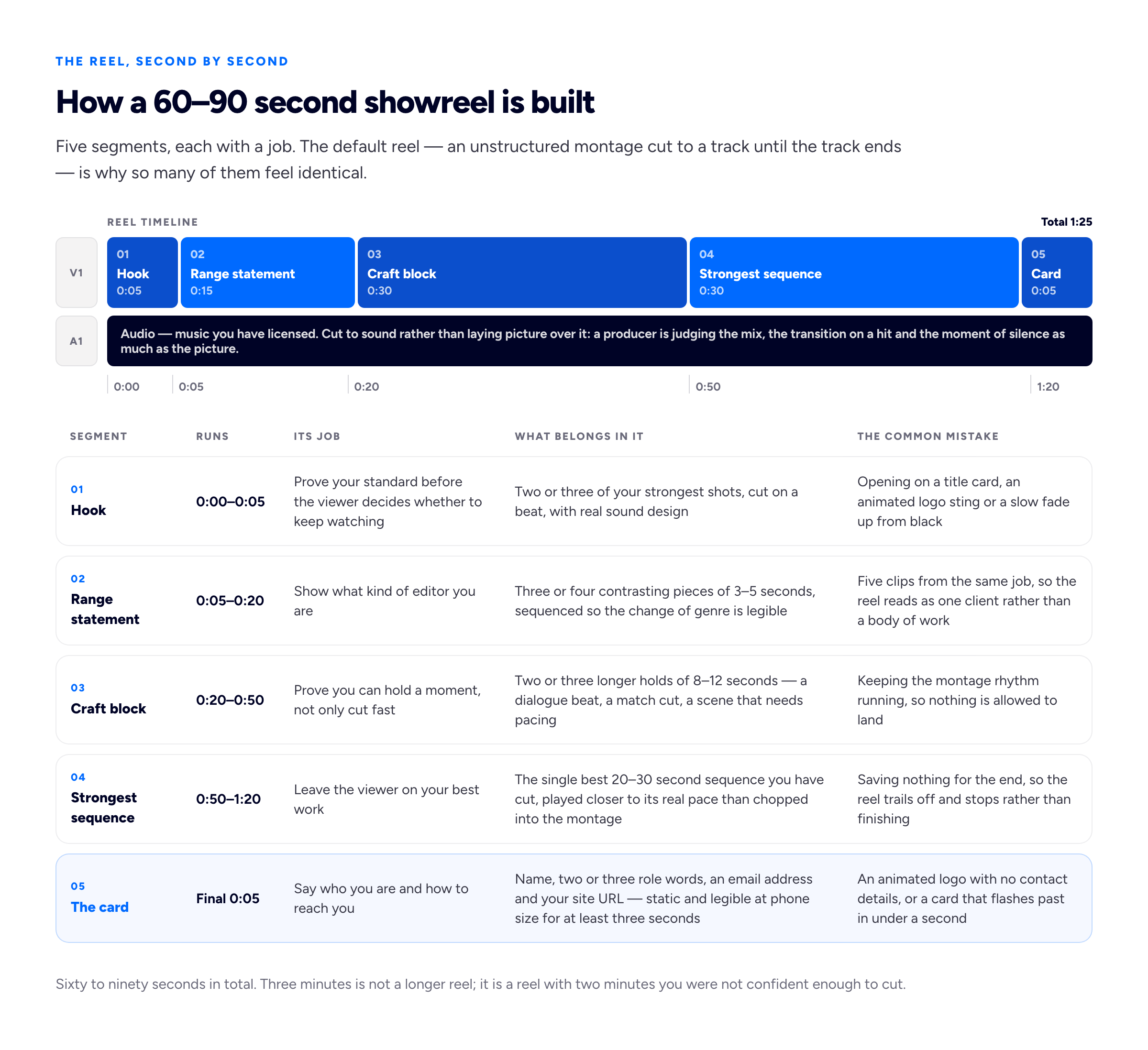
The first five seconds decide whether the other eighty-five get watched. Spend them on work, not on your name.
The most common self-inflicted wound is the opening title card. You have a viewer's attention for as long as they will give a stranger the benefit of the doubt, and you spend the first three seconds of it on a logo animation and the words "Showreel 2026". Nobody has ever hired an editor because of a title card. Your name goes at the end, where the viewer who is still watching genuinely wants it.
The second wound is length. Sixty to ninety seconds is where you can show range, hold one moment properly, and finish on your best sequence without needing a second act. Three minutes is not a longer reel; it is a reel with two minutes you were not confident enough to cut.
And cut to sound. A reel assembled visually then laid under a track sounds exactly like what it is. Sound — a mix, a transition on a hit, a moment of silence — is half of what a producer is assessing, and the half that separates people who cut from people who assemble. Use music you have licensed.
Where the video actually lives
Embed from a video platform. Do not put an MP4 on your own hosting and point a <video> tag at it. This is the most consequential technical decision on the page, and it takes four minutes.
Why self-hosting is the wrong default
- One file, one bitrate. A self-hosted MP4 is a single rendition. The producer on hotel wi-fi and the one on fibre get the identical file, so the first of them buffers. Video platforms transcode your upload into several renditions and serve the one the connection can sustain, switching as it changes. You cannot reproduce that with a file on a web host.
- Weight. Ninety seconds of decent 1080p is tens of megabytes at best, and editors — who have the source — export generously. Every visit pays that cost, and on metered mobile data a share of your visitors stop.
- The loading behaviour is yours to get wrong. The
videoelement'spreloadattribute takesnone,metadataorauto, and the specification is explicit that it is a hint the browser need not follow, so the outcome varies. Setautoplayas well and it takes precedence overpreload: the download starts regardless. - Everything else you would have to build. Captions, a quality selector, a decent thumbnail, playback analytics, and a URL that works without your site.
Vimeo or YouTube
Vimeo's embed lets you strip the interface down — title=0, byline=0 and portrait=0 remove the metadata overlays, controls toggles the playbar, and dnt=1 asks the player not to collect tracking data on your visitors. Its privacy settings are more granular too: on paid plans, Embed Only makes a video embeddable on your site but not viewable on Vimeo.com, and domain-level privacy lets you list the domains where it may embed — anything else gets an error. For work you can show a client but do not want circulating as a public URL, that is why most working editors end up paying for Vimeo.
YouTube gives fewer levers and one limitation worth knowing before it surprises you: you cannot switch off related videos. The rel parameter used to do that, but since a change in September 2018, rel=0 means related videos come from the same channel as the one that just played rather than none. A YouTube embed always offers the viewer somewhere else to go at the end. If your channel holds other work, fine; if it holds your holiday footage, not fine.
The embed settings that actually matter
A working Vimeo embed URL looks like https://player.vimeo.com/video/VIDEO_ID?title=0&byline=0&portrait=0&dnt=1, a YouTube one like https://www.youtube.com/embed/VIDEO_ID?rel=0&playsinline=1. Then two things on the iframe itself. Put loading="lazy" on every embed except the reel — iframes take the same lazy-loading attribute images do, so the browser defers each until it approaches the viewport, which with four secondary pieces is the difference between one player initialising on load and five. And set allow="fullscreen; picture-in-picture", since allow is how permissions policy is delegated to a frame and the old allowfullscreen is now defined in those terms. A player a producer cannot make fullscreen is one they will watch at 320 pixels wide.
Poster frames, and why autoplay with sound is a mistake
The poster frame is the still shown before anyone presses play, and the most neglected asset on an editor's site. Left alone the platform picks one, and it is frequently a black frame, a mid-blink, or the middle of a whip pan. On Vimeo you scrub the video in its settings and press Select this frame, or upload a custom thumbnail. Choose one legible at the size it appears — a face or a clear subject, not a wide shot that turns to mush at 320 pixels.
Then leave autoplay alone. Practically you cannot autoplay with sound: Chrome's policy always permits muted autoplay, but permits autoplay with sound only where the user has already interacted with the domain, has crossed a media engagement threshold from previous visits, or has installed the site. A first-time visitor arriving from a link — every visitor who matters — meets none of those. And muted autoplay is worse than it sounds: the reel gets judged on picture alone, with the half you worked hardest on switched off.
Credit your actual role
This is the fastest way to lose a job and it is entirely avoidable. You put a well-known spot on your page under your name. The producer likes it, then asks one follow-up — "what was the brief on that?", "who graded it?" — and the answer reveals you were the assistant editor, or cut the social versions from someone else's master. The problem is no longer the credit. It is that they now have to re-examine everything else on the page.
Post-production has many distinct crafts and clients know it. Editor, assistant editor, colourist, sound designer, mixer, motion designer, online editor and "additional editing" are different jobs, and someone hiring for one is not impressed by a page that blurs them. Give the role, then one clause saying what it meant on this job.
- "Editor (offline). Colour by a freelance grader, mix by the client's audio house." — you cut it, you did not finish it, and you said so before being asked.
- "Additional editing: I cut the 15-second and 6-second social versions from the finished 60." — a real, common, paid job, and harder than it sounds.
- "Assistant editor: media management, sync, selects and string-outs. The released cut was by the lead editor." — an honest, hireable credit any post house understands immediately.
Two rules follow. Credit the other crafts by name where you can: naming the colourist and the mixer costs nothing and signals that you have worked on real crews. And never put a brand name as a heading over something you assisted on. "Assistant editor on a national retail campaign" is accurate, survives the follow-up, and still conveys the scale of the production without claiming authorship.
Naming your tools is a filter, not a flex
An editor's tool list is not a badge collection. It is a compatibility statement, because of how the work changes hands.
When a client hands you a job in progress, they are handing you a project file. A Premiere project opens in Premiere. An Avid bin belongs to an Avid workflow, usually with shared storage and several people in the same project. Resolve carries edit, grade and audio in one file. Final Cut has its own library structure. Moving a job between them means exporting an interchange file — AAF, XML, EDL — and every one of those translations loses something: effects, speed ramps, nested sequences, track-level audio processing. Someone rebuilds it by hand, and that someone is you, on a rate you quoted before you knew.
So a producer scanning your page for "Premiere" is not checking whether you are good. They are checking whether handing you their project costs them a day of conform. It runs the other way too: if the job finishes in a Pro Tools mix and a Resolve grade, they want to know you can send a clean AAF without being walked through it.
So list two or three tools you would take a paid job in tomorrow, and say what each is for — "Premiere Pro and After Effects for commercial and branded work; Resolve for grading and finishing; comfortable conforming from Avid." Nine applications reads as a list of things you have opened, and destroys the filtering value the list existed to provide.
How many pieces, and how to organise them
Three or four full pieces below the reel. Not twelve. The reel has already made the argument about your standard; the pieces answer "have you done my kind of job", and a visitor asked to choose between twelve watches none. Our guidance on how many projects belong on a portfolio lands in the same place, and video makes the case harder because the cost per item is higher.
Organise by genre, because genre is what the buyer is shopping for: commercial · branded documentary · narrative · social · corporate. Pick the two or three you want more of and lead with them. This is positioning more than navigation — a page showing a wedding film, a startup explainer, a short film and a gym advert tells a producer you will take anything, a weaker offer than being the person who cuts branded documentaries. Our post on niching down works through the trade-off.
Each piece needs a small, consistent block underneath: client or production, format and duration, your exact role, other key credits, tools, year, and a link to where it lives publicly. Six lines. That block is what turns a video into evidence, and the part almost everyone leaves out. Where a job deserves more, write it up properly rather than expanding the block; our guide to writing a portfolio case study covers the shape.
Embargoed, unreleased and never-aired work
Editors accumulate work they cannot show: campaigns under embargo, pitches that lost, films stuck in approval, anything under an NDA. In descending order of preference:
- Ask. A named request — "may I show the 30-second cut from launch date?" — is granted more often than people assume, because the objection is usually about timing rather than principle. Get it in writing.
- Show a fragment. Permission for ten seconds inside a reel is an easier ask than for the whole spot, and ten seconds is all the reel wanted.
- Password-protect it, or restrict where it embeds. Vimeo's password setting and its domain-level privacy list — up to fifty allowed domains — exist for exactly this. "Further work available on request", plus a password handed out per enquiry, is legitimate.
- Describe it without showing it. "A 90-second launch film for a European fintech, cut from 40 hours of interview and observational footage. Under embargo until spring; happy to screen it on a call."
What not to do: post it anyway with the client's logo blurred. Our post on showing confidential work goes through the boundaries.
When you have no paid work yet
Reel-first structure is easier to satisfy with no clients than a case-study portfolio is, because a reel is judged on cutting rather than provenance. It only requires that you label things honestly, which costs less than you fear.
- Spec edits. Cut a spot for a real brand from publicly available footage, or re-cut an existing campaign to a different brief. Label it: "Spec edit — not commissioned by or affiliated with the brand." That clause is the difference between a portfolio piece and a misrepresentation, and costs nothing; the viewer is watching your cutting either way.
- Re-cuts. Cut an existing scene or trailer again with a different intent, and say what the intent was: "Re-cut of a public-domain feature's opening as a thriller trailer — an exercise in restructuring for tension." A re-cut shows editorial judgement more nakedly than most commercial work.
- Passion projects and collaborations. Cut for a friend's short, a musician's video, a local charity. Real work with a real client and a real deadline; the only thing missing is an invoice, and nobody asks.
The honesty test: would the label survive the client discovering the truth ten minutes later? "Spec" and "personal project" pass. A brand's logo over unlabelled spec work does not. Our guide to a portfolio with no experience applies the principle elsewhere.
The page, top to bottom
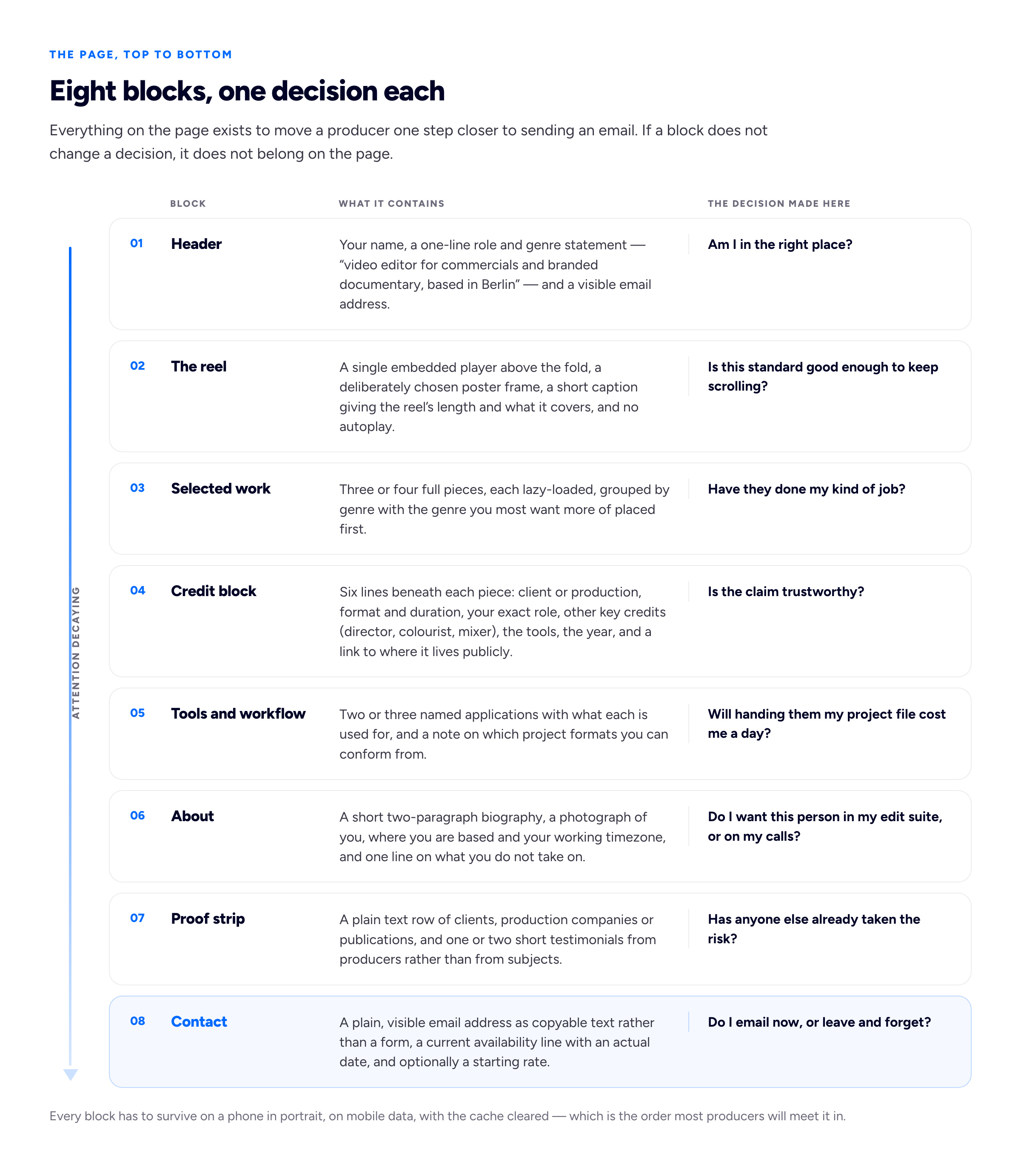
Eight blocks, one decision each. If a block does not change a decision, it does not belong on the page.
Two are worth expanding. The about block matters more in editing than in most freelance work, because hiring an editor is a decision about spending three weeks in a shared timeline with someone; a photograph, where you are, and one line about what you do not do ("I do not take wedding work") saves both sides an enquiry. And the contact block should hold a real email address as selectable text, not a form: producers work in email and often need to forward you on, which a form makes impossible. Give it an availability line with an actual date, because a stale portfolio and an unavailable editor look identical from outside.
A ten-minute audit
- Open your site on a phone, on mobile data, cache cleared. Time it until the poster frame is visible and the play button tappable. Over four seconds and the embed setup is the problem, not the design.
- Watch your reel's first five seconds with sound on. If the first thing that happens is your name, re-cut it.
- Read every credit as though a producer will ask one follow-up. Change any that would not survive, and count your pieces while you are there: more than five below the reel is a decision nobody makes.
Frequently asked questions
Do I need a website if I have a Vimeo page?
A channel is where your videos live; it is not a portfolio. It cannot state your role on each piece in a way anyone reads, cannot say where you are or what you charge, puts another company's branding around your work, and does not rank for your own name the way a site on your own domain does. Use the platform for hosting and the site for everything else — the same division of labour we describe for photography sites and social platforms.
What about captions?
Add them to anything with dialogue. An interview or documentary piece without captions is both an accessibility failure and a poor signal from someone whose job includes delivery specifications. Both platforms accept a caption file; a music-only reel does not need one.
One page, or a page per project?
One page suits most editors: the reel plus three or four credited pieces is the whole argument, and splitting it adds clicks between the visitor and the work. Separate pages earn their place when you have long-form write-ups per job, which is unusual in editing. The trade-off is in one-page versus multi-page portfolios.
Where does Bunfolio fit?
Bunfolio gives you a free one-page portfolio site on a subdomain — sign in with Google, fill a short wizard or import a LinkedIn profile, publish — and a custom domain is optional and paid. Four fixed templates, no page builder, no drag-and-drop, deliberately: it is the fastest route from having a reel to having a page around it. It is the wrong tool if you want a bespoke player, a separate page per job, or a design that is itself part of the pitch. If that is you, hire a developer or use something with a builder in it — and keep the reel-first structure regardless.
How we put this guide together
The reel structure, the segment durations, the three-or-four-pieces recommendation, the credit wording and the eight-block page anatomy are Bunfolio's own guidance, drawn from what we see working on portfolio sites and from how post-production hiring conversations run. They are opinions with reasons attached, not measurements. The interchange description — that moving a project between Premiere, Avid, Resolve and Final Cut via AAF, XML or EDL loses effects, speed ramps and nesting that must then be rebuilt — describes common practice rather than any one application's current behaviour; test the round trip you care about before quoting a rate on it.
Every platform claim above is checkable against current official documentation. The embed parameters and the September 2018 change that makes rel=0 serve related videos from the same channel rather than none are in Google's YouTube Player Parameters reference, with the public, unlisted and private settings in YouTube's privacy help page. Vimeo's title, byline, portrait, controls and dnt parameters come from its player parameters overview; Embed Only, Password and Unlisted and their plan requirements from About video privacy settings; the fifty-domain allowlist from domain-level privacy; the Select this frame workflow from changing a video's thumbnail. The autoplay rules are Chrome's autoplay policy; that preload is only a hint and that autoplay overrides it is MDN's video element reference; the iframe loading and allow attributes MDN's iframe reference. We assert nothing about how either platform's recommendation systems behave, because that is not documented in a way anyone outside those companies can verify.
You will notice there is no statistic here about how many seconds a viewer watches before leaving. That number circulates constantly in video-portfolio advice and we could not trace any version of it to a primary source, so we have not used it — nor the percentages about reel length and completion rates. Where this guide says "most people stop watching", that is an argument from how the medium works, not a finding dressed up as one. Every client, brand, campaign and piece of example copy above is invented as illustration and refers to no real job.
Related reading: building a photography portfolio website, how many projects to put in a portfolio, showing confidential work in a portfolio, and building a portfolio with no experience.
More from the blog
October 1, 2026 · 16 min read
Freelancing Tips: 29 Practical Habits From First Client to Tax
The freelancing habits that prevent most problems before they start, grouped by stage from setting up to looking after yourself. Each of the 29 tips comes with a concrete action, a template line you c...
September 15, 2026 · 18 min read
Data Analyst Portfolio: What a Reviewer Opens First
The review lasts under a minute and almost none of it is reading. What a hiring reviewer actually does in that minute, why the Google capstone project now works against you, how to write a project up...
September 9, 2026 · 19 min read
Motion Design Portfolio: What Studios Look At Before the Reel
A showreel proves something moved well. It cannot prove you designed it, timed it, or built any of it — and on a five-craft job the silence reads as a claim to all of it. Why style frames outrank the...