
November 20, 2026 · 19 min read
ChatGPT Resume Prompts: 8 to Copy, and What to Check After Each
The ChatGPT resume prompts that work give the model your own notes and the job advert, then one narrow job: extract achievements, read the advert, rewrite bullets with outcomes, draft a summary, skills or cover letter, convert to a CV, or quiz you before the interview. Check every line afterwards, because it invents numbers and skills you never gave it.
The ChatGPT resume prompts that work hand the model your own raw material and then give it one narrow job: pull achievements out of your notes, read a job advert for what it really wants, rewrite a bullet so it ends in an outcome, draft a summary or a skills section from the advert, write a first-draft cover letter, convert a US resume into a UK CV, or quiz you on your own resume before an interview. Prompts that ask it to "write me a resume" from a job title fail, because the model has nothing true to work with and fills the gap with confident, generic invention. Each prompt below is ready to copy, with the placeholders in [square brackets], and each is followed by what to check in the output before any of it goes near an application.
The checking is the part most prompt lists leave out, and it is the part that decides whether the tool helps you. ChatGPT will add numbers you never gave it, list skills you do not have, and sand your voice down until you sound like every other applicant. None of that is a reason not to use it. It is a reason to treat everything it gives you as a draft written by a fast, eager assistant who has never met you, and to edit accordingly. The second half of this guide covers exactly that: the invented-metric problem, what to strip out before you paste anything, what employers and applicant tracking systems do and do not tell you, and a final edit checklist.
Throughout, we follow one invented candidate, Theo Nakamura, an implementation specialist at a payroll software company, applying for a Customer Onboarding Lead role at an invented firm, Pellucid Systems, where the hiring manager is Grace Mbeki.
Three rules before you paste anything
Your notes are the source, not the model. ChatGPT is good at rearranging, condensing and rephrasing material. It is bad at knowing what you did, because it cannot. Every prompt below starts from something you supply: rough notes, an existing resume, an advert. If you find yourself asking it to imagine your experience, stop and write the notes first.
Strip the personal data first. Your name, phone number, email, home address, date of birth, and anything identifying a client or colleague do not need to be in the chat for any of these prompts to work. Replace them with placeholders such as [NAME] and [CLIENT A]. The privacy section below explains why, and where to check the settings yourself.
One job, one conversation. Run each application in its own chat, and paste the advert you are tailoring to. A model that has seen three adverts in one thread will blend them, and you will end up promising Grace Mbeki skills from a job at another company.
The eight prompts, stage by stage
Work through these in order the first time. Later, for each new application, you will mostly repeat prompts 2, 3, 4, 5 and 6 against a new advert, because your achievement list from prompt 1 does not change between jobs.
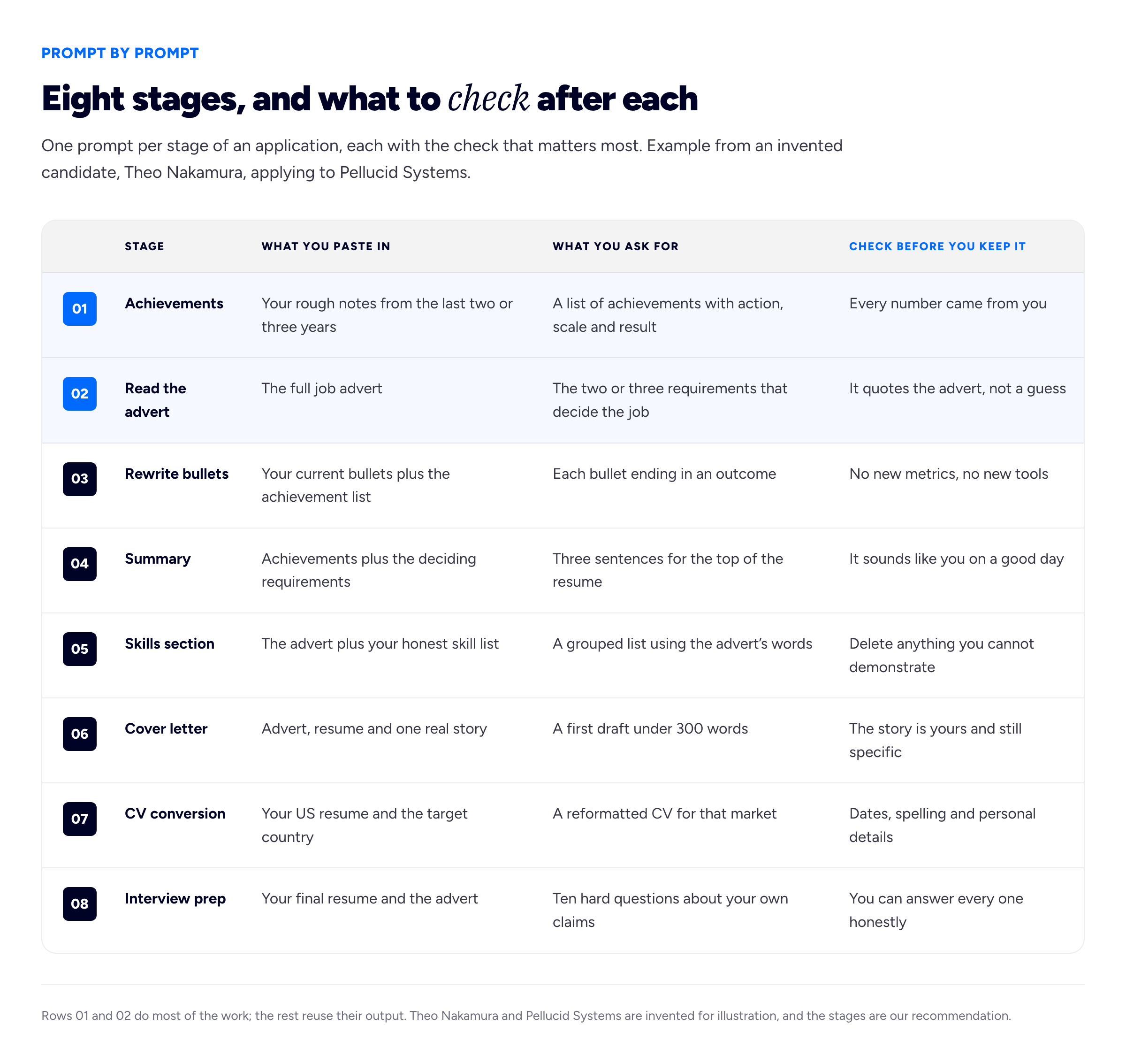
The first two prompts produce the raw material; the other six only rearrange it, which is why they cannot add anything true that the first two missed.
1. Extract achievements from your notes
Before any resume prompt, open a plain document and write down, untidily, what you did in each job: projects, problems you fixed, things that went better because you were there, anything you were thanked for. Then paste it with this prompt.
Below are my rough notes about my work as [JOB TITLE] from [YEAR] to [YEAR]. Turn them into a list of distinct achievements. For each one, give the action I took, the scale (how many, how often, how big) and the result. Use only facts that appear in my notes. If the scale or result is missing for an item, do not estimate it: write "MISSING" and ask me a question that would help me find it. Do not write resume bullets yet.
[PASTE NOTES]
What to check: the word "MISSING" is the point of this prompt. Without that instruction the model will cheerfully supply "reduced onboarding time by 30%" because that is what resume achievements tend to look like. Read every number in the output and find it in your notes. Then answer the questions it asks you, from records if you have them: old emails, tickets, reports, appraisals. Theo's notes said he "sorted out the onboarding checklist mess"; the model asked how many customers went through the checklist, and Theo found in his ticket history that it was every new account for eighteen months.
2. Read the advert for what it actually wants
Tailoring starts with reading, and this is where the model is genuinely useful, because it is quick at spotting repetition and emphasis across a long advert.
Here is a job advert. Identify the two or three requirements that would most likely decide who gets this job, as opposed to the filters every applicant must pass. For each, quote the exact words from the advert that support your view, and note if the same idea appears more than once. Then list the filter requirements separately. Do not suggest what I should write yet.
[PASTE ADVERT]
What to check: that every claim is backed by a quotation from the advert. If the model says "they value stakeholder management" and cannot point to the words, it is guessing from what adverts usually say. In the invented Pellucid advert, the phrase "first ninety days" appeared three times and "without escalating to engineering" twice. It also claimed Pellucid wanted Salesforce experience, which the advert never mentioned; Theo deleted that line. Our guide to making a resume stand out covers the reading in more depth, without a model.
3. Rewrite your bullets so each ends in an outcome
Below are my current resume bullets for [JOB TITLE], followed by my achievement list and the deciding requirements from the job I am applying for. Rewrite each bullet so it starts with a strong verb, includes the scale and ends with the result. Use only facts from my achievement list. Do not add any number, percentage, tool, team size or outcome that is not already there. Keep each bullet under 25 words. Where a bullet relates to one of the deciding requirements, mark it with an asterisk.
[PASTE BULLETS]
[PASTE ACHIEVEMENT LIST]
[PASTE DECIDING REQUIREMENTS]
What to check: compare the rewrite with your achievement list, line by line. Theo's original bullet was "Responsible for onboarding new customers". The first rewrite came back as "Led end-to-end onboarding for 200+ enterprise clients, cutting time-to-value by 40%". Theo had never counted 200 clients, never measured time-to-value, and his customers were mid-sized firms, not enterprises. Even with an explicit instruction, the model added three facts. The version he kept was "Rebuilt the onboarding checklist used for every new account over eighteen months, so new customers ran their first payroll without an engineer on the call".
4. Draft a professional summary
Using my achievement list and the deciding requirements for this job, write three options for a professional summary of two or three sentences each. Write in the first person without using "I". Avoid these words: passionate, dynamic, results-driven, proven track record, detail-oriented, team player. Each option should name what I do, for whom, and one specific piece of evidence from my list.
What to check: read all three aloud. Discard any that you would be embarrassed to say in an interview, and any that could describe a thousand other applicants. The banned-word list matters because these are the words a model reaches for first. Most people end up taking one sentence from one option and one from another, then rewriting both in their own phrasing. Our guide to the professional summary explains what each sentence is for.
5. Build the skills section from the advert
Here is the job advert and an honest list of my skills and tools, with how I have used each one. Build a resume skills section grouped into two or three categories. Use the advert's exact wording where my skill genuinely matches it. If the advert asks for a skill that is not on my list, do not add it. Instead, list it separately under the heading "Gaps" so I can decide what to do.
[PASTE ADVERT]
[PASTE SKILLS LIST]
What to check: the "Gaps" list is the safety valve. Without it, a model asked to match an advert will match it, which means adding whatever the advert asked for. Delete any skill you could not demonstrate if asked to, and treat using the advert's phrasing for a skill you do have as the legitimate part. If Pellucid calls it "customer health scoring" and you call it "account risk tracking", using their term is fair; claiming it when you have never done it is not. More on structure in our resume skills section guide.
6. A first-draft cover letter
Write a first draft of a cover letter for this job, under 300 words. Open with the specific reason I am applying to this company, not with my name or the job title. Build the middle paragraph around this one story, using only the facts I give: [DESCRIBE ONE REAL SITUATION, WHAT YOU DID, AND WHAT HAPPENED]. Connect it to one of the deciding requirements. Close with one sentence about what I would do first in the role. Plain, direct British English. No flattery about the company.
[PASTE ADVERT]
[PASTE RESUME]
What to check: the opening. Models default to "I am writing to express my keen interest in", which tells the reader nothing. Our guide on how to start a cover letter has openings that do work. Next, check that the story kept its specifics; models tend to generalise "a client whose payroll failed on a Friday afternoon" into "challenging client situations". Finally, check for invented praise of the employer. Theo's draft said he admired "Pellucid's industry-leading platform"; he had no idea whether it led anything, and Grace Mbeki would know he did not.
7. Convert a US resume into a UK CV, or the reverse
The "ChatGPT CV" search often comes from people moving between markets. The model is useful for the mechanical half of that job.
Convert this US-style resume into a CV for applying to jobs in [COUNTRY]. Change spelling to [BRITISH/AMERICAN] English, adjust the date format and section headings to local convention, and tell me which conventions you changed and why. Do not change, add or remove any experience, qualification, date or achievement. Flag anything, such as a qualification name or a job title, that an employer in [COUNTRY] might not recognise, and leave it for me to decide.
[PASTE RESUME]
What to check: that the list of changed conventions is believable, and that your dates are exactly as they were. Models sometimes reformat "Mar 2023 – present" into a different date entirely. Check also that it has not added personal details: a UK CV does not usually carry a photo or date of birth, and our recommendation is to leave both off. Our explainer on CVs versus resumes covers the differences that a reformatting prompt will not.
8. Interview prep from your own resume
You are a sceptical hiring manager for this role. Read my resume and the job advert. Ask me ten questions, one at a time, that probe the claims most likely to be exaggerated or the gaps most likely to worry you. After each of my answers, tell me what was vague and what follow-up question you would ask next.
[PASTE FINAL RESUME]
[PASTE ADVERT]
What to check: this prompt is the test for everything above. If the model asks about a figure on your resume and your honest answer is "the chatbot put that there", you have found a line to delete before Grace Mbeki finds it for you. Answer out loud: typed answers are always tidier than spoken ones.
Where ChatGPT goes wrong, and why
The failure modes are predictable once you know where they come from. A language model writes the most likely next words given everything it has seen. Resume bullets it has seen tend to contain percentages, big round numbers and well-known tools. So when your input is thin, the most likely output is a bullet with a percentage in it.
It invents numbers
This is the one that does damage. A made-up metric on a resume is not a stylistic flaw; it is a false statement about your work, and an interviewer's most natural follow-up is "how did you measure that?". Our rule is simple: never accept a number you cannot evidence, from a record, an email, a report or a count you could repeat. If you know something improved but never measured it, say what improved in words. "So new customers ran their first payroll without an engineer on the call" is more convincing than "improved efficiency by 35%", because it is checkable and nobody suspects it was generated.
It invents skills and tools
Ask a model to tailor a resume to an advert and it will tend to make the resume look like the advert. That includes software you have never opened and methods you have only read about. Tufts University's careers service makes a related point in plainer terms, warning that AI "might misinterpret facts or oversell certain points". The skills prompt above deals with this by forcing gaps into their own list, but read every tailored draft for nouns that were not in your notes.
It flattens your voice
The third problem is subtler. Model output is fluent, balanced and safe, so a resume and cover letter that have both been through it start to read like everyone else's. The University of Edinburgh's careers service warns that relying on generative AI can leave you with "a generic application that looks the same as everyone else". The fix is to keep the specific, slightly odd details that only you would include, and to rewrite any sentence you would not naturally say.
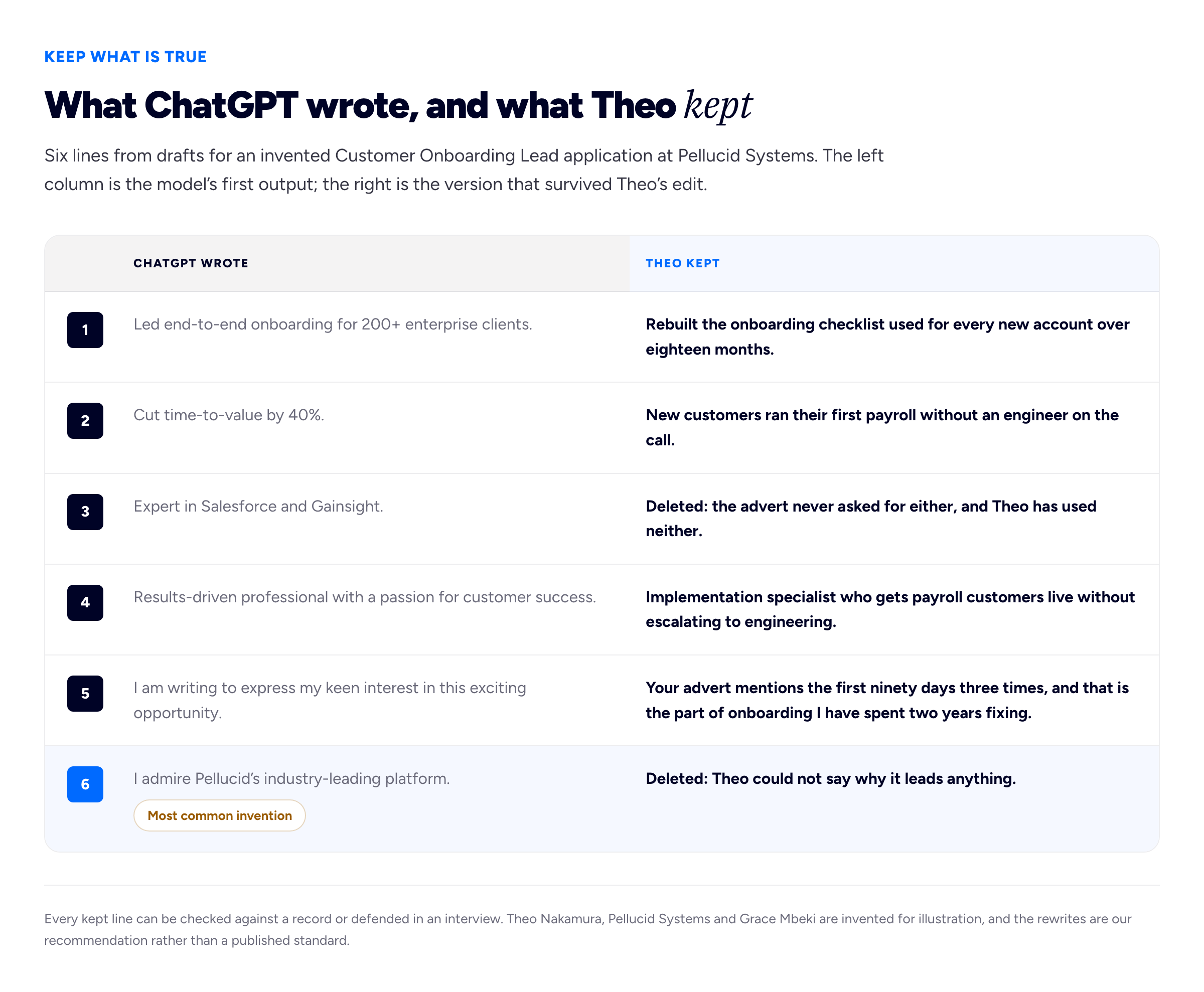
Half the edits were deletions: the most useful thing Theo did with each draft was remove what was not true.
Privacy: what to take out before you paste
A resume is a dense bundle of personal data. Before pasting one into any chatbot, replace with placeholders:
- your name, phone number, email address and home address;
- your date of birth, nationality, visa status and any reference or ID numbers;
- names of clients, colleagues, referees or patients, and anything covered by a confidentiality agreement at work;
- internal figures your employer has not published, such as revenue, prices or customer counts you only know from the inside.
None of the prompts above need any of that to work. The model does not need to know your name to rewrite your bullet, and it does not need the real client name to tighten the story. Put the details back in your own document afterwards.
How a chatbot provider stores and uses what you type depends on the provider, your account type and the settings you have chosen, and those details change. OpenAI publishes its own explanation in its data controls help article, and ChatGPT has a data controls area in its settings. Read the current version of that page yourself and check your settings before pasting work material. We have deliberately not summarised what it says here, for a reason explained at the end of this guide. Edinburgh's careers guidance puts the general caution well: "Be cautious about submitting any personal data". If your employer has a policy on using AI tools with work information, it applies to the internal figures in your notes too.
Will an employer or an ATS know you used ChatGPT?
We do not know, and you should be wary of anyone who claims to. Pages that tell you an applicant tracking system "detects AI" or that a stated share of recruiters can spot it rarely say how they know. We could not find a published method behind those claims, so we are not repeating them.
What we can say is more useful. First, an applicant tracking system stores and searches the text of your application; what it rewards is clear structure and the relevant words, however they were written. Our guide to ATS-friendly resume format covers that. Second, some employers have their own position on AI in applications, and the University of Edinburgh's careers service is direct about it: "follow their guidance", noting that some employers say they will not accept AI-generated applications. If an application form asks whether you used AI, or tells you not to, take it at its word. Third, the real risk is not detection. It is that a hiring manager reads a generic application and moves on, or reads an invented metric and asks you about it.
The final human edit checklist
Run through this once every draft is assembled, with the advert open beside it.
- Every number. For each figure, name the record it comes from. No record, no number.
- Every tool and skill. Could you use it in front of the interviewer tomorrow? If not, remove it or move it to a "currently learning" line.
- Every claim of scope. "Led", "managed" and "owned" mean something. If you contributed, say contributed.
- The deciding requirements. Do the top third of the resume and the middle of the cover letter answer the two or three things the advert cares most about?
- Your voice. Read the summary and the cover letter aloud. Rewrite any sentence you would never say.
- Stock phrases. Search for passionate, dynamic, results-driven, leverage, spearheaded, synergy, and "I am writing to express". Each one is a sentence to rewrite.
- Details the model touched. Dates, job titles, employer names and spelling, especially after a CV conversion.
- Personal details back in. Replace every placeholder, and check that nothing reading [NAME] or [CLIENT A] survived.
- The interview test. Run prompt 8 one last time, or ask a friend to do the same job without a model.
A no-sign-up alternative for the drafting
If you would rather not paste your resume into a general chatbot at all, Bunfolio has two free tools that do the drafting part without an account. The free resume builder lets you type your experience into a structured editor and export a PDF, with optional AI help on individual fields; every field can also be filled by hand. The cover letter generator drafts a letter from the role and the points you give it. The same checking rules apply to anything either of them writes: they work from what you type, and you should still read every line as if someone else wrote it.
One more thing a resume cannot do on its own: show the work. If your achievements include things people can look at, a simple portfolio site gives a hiring manager like Grace Mbeki somewhere to check them after the interview, which is a better answer to "how do I know this is real?" than any phrasing.
Frequently asked questions
What is the best ChatGPT prompt for a resume?
The best prompt gives the model your own notes or current resume plus the job advert, asks for one narrow task such as rewriting bullets to end in outcomes, and tells it explicitly not to add numbers, tools or results that are not in your material. Prompts that ask it to write a whole resume from a job title produce generic text full of invented detail.
Can ChatGPT write my whole resume?
It can produce something that looks like one, but it cannot know what you did, so the gaps get filled with plausible invention. Use it to extract, rearrange and rephrase material you supply, one section at a time, and do the final edit yourself.
Is it OK to use ChatGPT for a cover letter?
For a first draft, generally yes, unless the employer says otherwise; some state that they will not accept AI-generated applications, and their guidance comes first. Rewrite the opening, keep the story specific and yours, and delete any praise of the company you could not explain.
Can employers tell if my resume was written by ChatGPT?
We have not found reliable published evidence either way, so we do not make claims about detection. The practical risk is different: generic phrasing reads as generic, and an invented metric falls apart the first time an interviewer asks how you measured it.
Should I put my personal details into ChatGPT?
Our recommendation is no. None of the prompts need your name, contact details, date of birth or the names of clients and colleagues, so replace them with placeholders, read OpenAI's own data controls help article, and check your settings before pasting work material.
How do I stop ChatGPT making up numbers on my resume?
Tell it to use only facts from your notes and to write "MISSING" where a scale or result is absent, then check every figure in the output against a record. Even with that instruction it sometimes adds numbers, so the line-by-line check is not optional.
How we put this guide together
The prompts, the order of the stages, the "MISSING" technique, the banned-word list, the rule that no number survives without a record, and the edit checklist are our recommendation, drawn from building Bunfolio's free career tools and from how hiring managers read applications. They are not the result of a study, and we have not tested them against any measure of hiring outcomes.
We have deliberately left out the figures that usually appear in articles on this subject: the percentage of job seekers said to use ChatGPT, the share of recruiters who supposedly reject AI-written applications or can spot them, and any claim that a particular applicant tracking system detects AI text. We could not trace any of them to a published method, sample and date we were willing to stand behind, and a number nobody can source is worse than none.
On privacy, we tried to read OpenAI's Data controls in ChatGPT help article on 16 November 2026, but the page would not load for us, so we have not described its default settings, retention periods or options. Read it directly, because those details are the provider's to state and they change. The quoted guidance comes from pages we read on 16 November 2026: the University of Edinburgh Careers Service's guidelines on the use of generative AI in the application process (published 29 July 2025) and Tufts University Career Center's using AI to improve your cover letters.
Theo Nakamura, Grace Mbeki and Pellucid Systems are invented for illustration, as are Theo's notes, the Pellucid advert, every draft and rewrite, and every detail in both diagrams.
Related reading: how to make a resume stand out, writing a professional summary, the resume skills section and ATS-friendly resume format.
More from the blog
November 1, 2026 · 19 min read
Cover Letter vs Resume: What Goes in Each, and When You Need Both
The resume is the record; the cover letter is the argument for this role. What belongs in each and what must never be repeated, when a letter is really needed, how the two should point at each other,...
November 16, 2026 · 19 min read
Best Font for a Resume: Safe Choices, Sizes and How to Test
The best font for a resume is a plain one already installed on the reader's computer: Arial, Georgia or Verdana ship with both Windows and macOS, while Calibri and Cambria are safe once the file is a...
October 28, 2026 · 19 min read
References on a Resume: Should You List Them, and How?
Usually not on the resume itself, and never "available on request". When references do belong on the application, how to choose referees who will actually help, how to ask and brief them, the referenc...