
November 19, 2026 · 18 min read
LinkedIn Headline Examples: 30+ Headlines and Why They Work
A strong LinkedIn headline names the role you want to be found for, narrows it with a specialism, and adds one piece of proof or the people you help. Here are more than thirty examples for job-seekers, employed people, freelancers, career changers, students and creatives, each with the reason it works.
A good LinkedIn headline follows one formula: the role you want to be found for, the specialism that narrows it, and either one piece of proof or the people you help. "UX Researcher | B2B SaaS onboarding | Turned 40 interviews into a redesign that halved support tickets" works; "Passionate problem-solver seeking new opportunities" does not, because nobody searches for "passionate" and nobody can check it. Below are more than thirty example headlines sorted by situation — job-seekers, people happily employed, freelancers and consultants, career changers, students and creatives — each with a line on why it works, so you can borrow the reasoning rather than the wording.
The rest of this guide covers what most lists leave out: where your headline actually shows up, two full before-and-after rewrites, how the headline differs from the "Open to Work" setting, how to use keywords without stuffing them in, and the mistakes that make a headline invisible. If you want a first draft to react to, our free LinkedIn headline generator writes several versions from your role and specialism, and you can edit any of them with the formula below.
What your headline is actually for
LinkedIn's help page on editing the headline describes it as the text below your name in the introduction section of your profile, and notes that it is also displayed in search results. That second part matters most. Most people who see your headline are not on your profile. They are scanning a list and deciding in a second or two whether to click your name.
So a headline has two jobs. It has to contain the words a recruiter or client would type, so you appear at all, and it has to make someone scanning a list want to know more. A headline that only does the first reads like a keyword dump; one that only does the second reads like a slogan and never gets found.
The same page notes that the headline "can be separate from the title of your current position". LinkedIn usually fills it in when you add a current job, which is why so many headlines read "Analyst at Company". That default wastes the line: your job title is already in your Experience section, and the headline is the one place where you describe what you are good at, in your own words, in front of everyone who passes your name.
Where people see your headline
Each place your headline travels has a different reader with a different question.
- Search results. A recruiter searching for "UX researcher" sees names, photos and headlines. The headline is your whole pitch, and on a narrow screen it may be cut short, so the first few words carry the most weight.
- Comments and posts. The line under your name when you comment is your headline. The reader's question is "who is this, and should I listen?".
- Invitations and messages. Someone deciding whether to accept your request often sees only your name, photo and headline.
- Your profile itself. The least important, because by then they have already clicked.
LinkedIn's help page confirms the profile and search placements; the others are where we see headlines appear when using the site, and layouts change. The lesson does not: write for the person scanning a list, and front-load the words that matter, because the end of a long headline is the part most likely to be cut.
The formula: role, specialism, proof or audience
Almost every strong headline we have seen is built from three parts. Their order can move and you will not always need the third, but a headline missing the first two will not work.
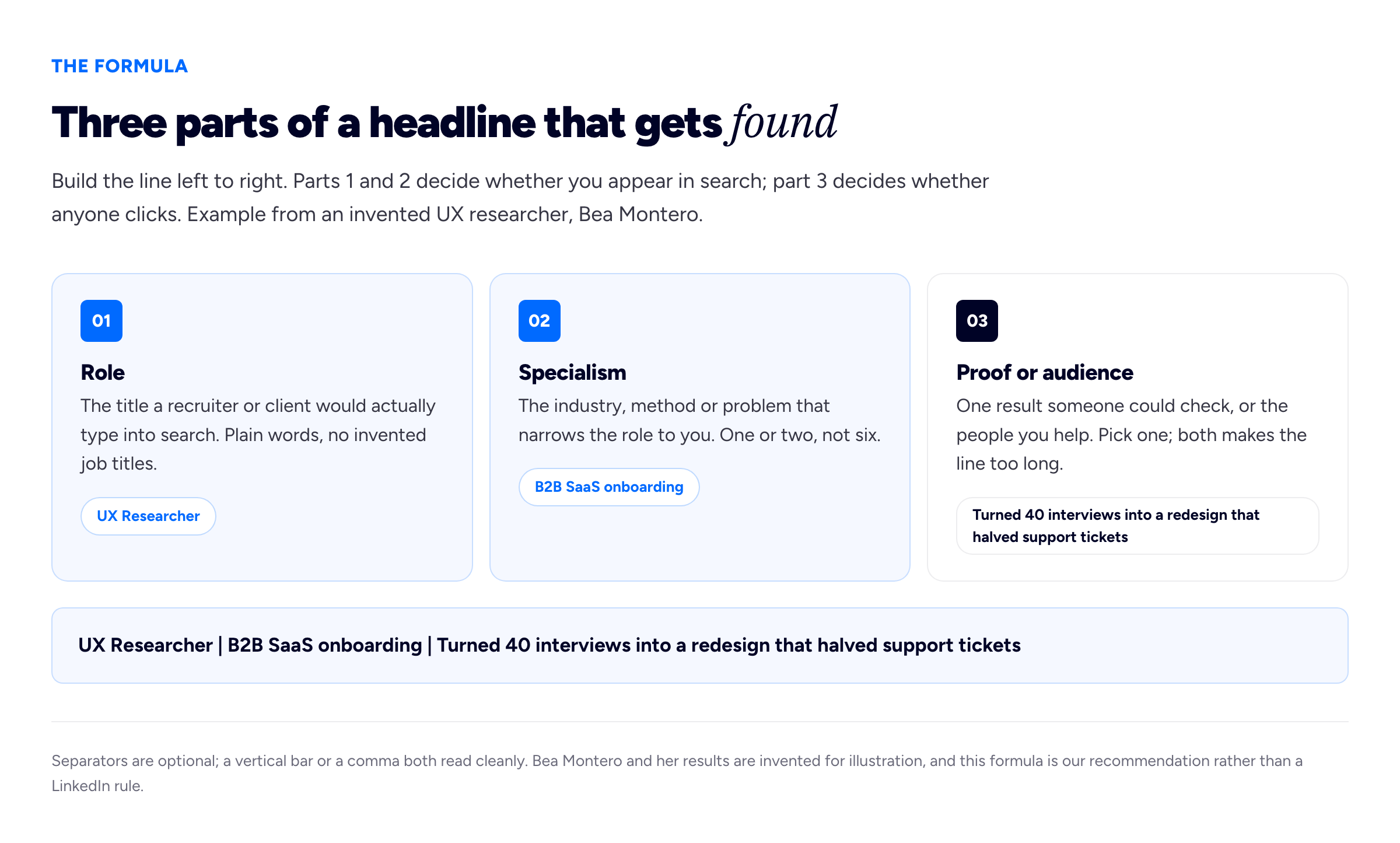
The formula in one line: the first two parts get you into search results, the third gets you the click.
Part one: the role
Use the job title someone would type into a search box, not your employer's internal name for it. If your company calls you a "Customer Happiness Hero", recruiters are searching for "Customer Success Manager", and so should your headline. If you sit between two titles, pick the one that matches the roles you want next.
Part two: the specialism
"Software engineer" describes a very large number of people; "software engineer, payments infrastructure" far fewer. The specialism can be an industry (healthcare, public sector), a method (quantitative research, Python) or a problem you solve (reducing churn, migrating legacy systems). One or two is plenty.
Part three: proof or audience
Proof is a result a reader could, in principle, check: a shipped product, a measurable outcome, a credential that matters in your field. Audience is the people you help: "for early-stage founders", "for independent restaurants". Proof suits employed people and job-seekers; audience suits freelancers, who are chosen by a buyer rather than a hiring panel. Choose one — both usually makes the line run long and get cut at the most interesting part.
LinkedIn headline examples, by situation
Every example below is invented. Where one includes a figure, it shows the shape a proof line takes, not a target; use your own true numbers or none at all.
If you are looking for a job
- Financial Analyst | FP&A for retail and e-commerce | Built the forecast model my team still runs every month — concrete, modest proof, and "still runs" suggests it was good enough to last.
- Registered Nurse, critical care | Eight years in ICU | Moving to Bristol in the spring — a location line helps when you are relocating, because recruiters filter by place.
- Customer Success Manager | Mid-market SaaS | Renewals, onboarding and the awkward calls — a touch of personality, placed after the searchable words have done their work.
- Backend Engineer | Go and PostgreSQL | Payments and high-volume APIs — no proof line at all, yet specific enough for a technical recruiter.
- Operations Coordinator | Logistics and warehousing | Available immediately — availability is a kind of proof where speed of hiring matters.
- Marketing Manager | B2B demand generation | Paid search, lifecycle email, attribution — three skills recruiters for this role search for, in plain words.
None of these say "seeking new opportunities". Announcing that you are looking does not help anyone find you; the right keywords do.
If you are employed and not actively looking
- Head of Data at a logistics scale-up | Building the team and the warehouse from scratch — names the employer type, not the employer, so it travels with you if you leave.
- Product Designer at Quillon Labs | Design systems and accessibility — naming the employer is fine when it adds credibility; the specialism still does the work.
- Solicitor, employment law | Advising charities and the third sector — audience-led, which reads well to people who might refer work to you.
- Secondary school maths teacher | Head of KS4 | Writing about making algebra less frightening — the last part tells people what your posts are about, and gives them a reason to follow.
- Site Reliability Engineer | Keeping a busy checkout online during sales peaks — describing the stakes says more than "passionate about uptime".
- HR Business Partner | Tech and engineering teams | Hiring, restructures, people data — lists the situations people would come to you about.
When you are not looking, your readers are mostly peers and the occasional recruiter, so you can lean slightly towards what you think about — but keep the role first. If you have just been promoted, see our guide to adding a promotion on LinkedIn so the headline and the Experience section tell the same story.
If you are a freelancer or consultant
- Freelance Data Engineer | Pipelines and warehouses for small analytics teams | dbt, Airflow, Snowflake — audience and stack in one line; buyers can see at a glance whether you fit.
- Brand identity designer for independent food and drink businesses — one sentence, clear niche. A café owner knows immediately you are for them.
- Freelance copywriter | Websites and email for B2B software companies | Clear words, fewer meetings — the closing phrase is a promise buyers actually care about.
- Fractional CFO for venture-backed startups between seed and Series B — the stage range does the filtering for you.
- Bookkeeper for tradespeople and sole traders | Xero certified — a credential that matters to this audience.
- Interim project manager | NHS and public sector digital programmes | Available from March — interim work is booked against dates, so availability earns its place.
For freelancers the headline is closer to a shop sign than a job title. The buyer's question is "can this person do my thing?", so naming the client type usually beats a career achievement. Make sure the click lands somewhere — we cover that in turning your LinkedIn profile into a portfolio website.
If you are changing careers
- Junior Software Developer | Former secondary school teacher | JavaScript, React, explaining things clearly — names the old career as an asset, not an apology.
- Aspiring UX Designer — a warning: "aspiring" tells a recruiter you do not count yourself yet, so why should they? Compare the next one.
- UX Designer | Ten years in retail operations | Designing tools for frontline staff — the past career becomes the specialism, the most useful thing a career changer can do with it.
- Data Analyst | Moving from finance into healthcare | SQL, Python, Power BI — honest about the move, specific about the skills.
- Project Coordinator | Ex-hospitality manager | Rotas, budgets and calm under pressure — translates hospitality work into the new field's vocabulary.
The trap is leading with the old job ("Retail manager transitioning to tech"), so searches for the new job never find you. Put the new role first, even if you are junior in it.
If you are a student or recent graduate
- Mechanical Engineering student at the University of Leeds | Formula Student powertrain team | Graduating 2027 — the graduation year tells recruiters which intake you fit.
- Economics graduate | Looking for analyst roles in energy and climate — stating the target is fine at this stage, when you have less proof to show.
- Computer Science student | Building small tools in Python | Summer internship at a fintech — a side project and an internship are the proof most students have, and they count.
- Law student | Interested in data protection and tech regulation | Mooting and pro bono clinic — interests work as a specialism before you have specialised.
- Graphic Design graduate | Packaging and editorial | Portfolio linked below — pointing to your work is a legitimate proof line when the work is the evidence.
What does not work is "Student at University" alone. Add the subject, one thing you have done, and when you are available. If you are also writing a professional summary for a CV, the headline is a good place to test its shortest version.
If you are a creative
- Illustrator | Children's books and editorial | Represented by a London agency — representation is meaningful proof in this field.
- Wedding and portrait photographer in the Peak District — location is the specialism for any work done in person.
- Motion designer | Explainer videos for health tech | After Effects and Cinema 4D — industry plus tools, both things a producer would search for.
- Video editor | Documentary and long-form YouTube | Fast turnaround, clean handovers — the ending speaks to what most often goes wrong with editors.
- Interior designer for small homes and rented flats — a narrow audience many people will recognise themselves in.
Creative headlines can afford more voice, but a witty line that never names what you do will not be found. Be clever in the third part, after the role and specialism are safely in place.
Two worked rewrites
Bea Montero, UX researcher
Bea works in-house at Quillon Labs, an invented software company, and is thinking about her next role. Her headline was the default LinkedIn gave her:
Senior User Researcher at Quillon Labs
It repeats her Experience section and gives a recruiter nothing to choose her over the next senior researcher in the list. Her first attempt went too far the other way:
Curious human | Empathy-driven insights | Turning user voices into product magic | Researcher | Speaker | Coffee lover
Nothing in the first half is searchable, "magic" cannot be checked, and her job arrives fourth. Working through the formula, she asked three questions. What would a recruiter type? "UX researcher", the more common search term than her internal title. What narrows it? Three years on onboarding for business software. What could someone check? The research programme behind the onboarding redesign. Her final headline:
UX Researcher | B2B SaaS onboarding | Turned 40 interviews into a redesign that halved support tickets
She dropped "Senior" to save space, since her experience shows it, and kept the figures because she can back every one up in an interview. If she could not, "Mixed-methods research that shaped our onboarding redesign" would be less striking but still true.
Jonah Achterberg, freelance data engineer
Jonah left a permanent job last year to freelance. His headline still read like a job-seeker's:
Data Engineer | Open to opportunities | Python, SQL, Spark, Airflow, dbt, Snowflake, AWS, GCP, Docker, Kafka
"Open to opportunities" reads as unemployed rather than independent, and ten tools say nothing about which problems he solves. His clients are heads of data at small companies who search for "freelance data engineer" and then look for someone who understands a team their size. His rewrite:
Freelance Data Engineer | Pipelines and warehouses for small analytics teams | dbt, Airflow, Snowflake
He moved "freelance" into the searchable role, cut the tools to the three clients ask for most, and used an audience instead of a proof, because for a freelancer the buyer recognising themselves is worth more than one result. The other tools live in his skills section and About summary, where they help search without crowding the headline.
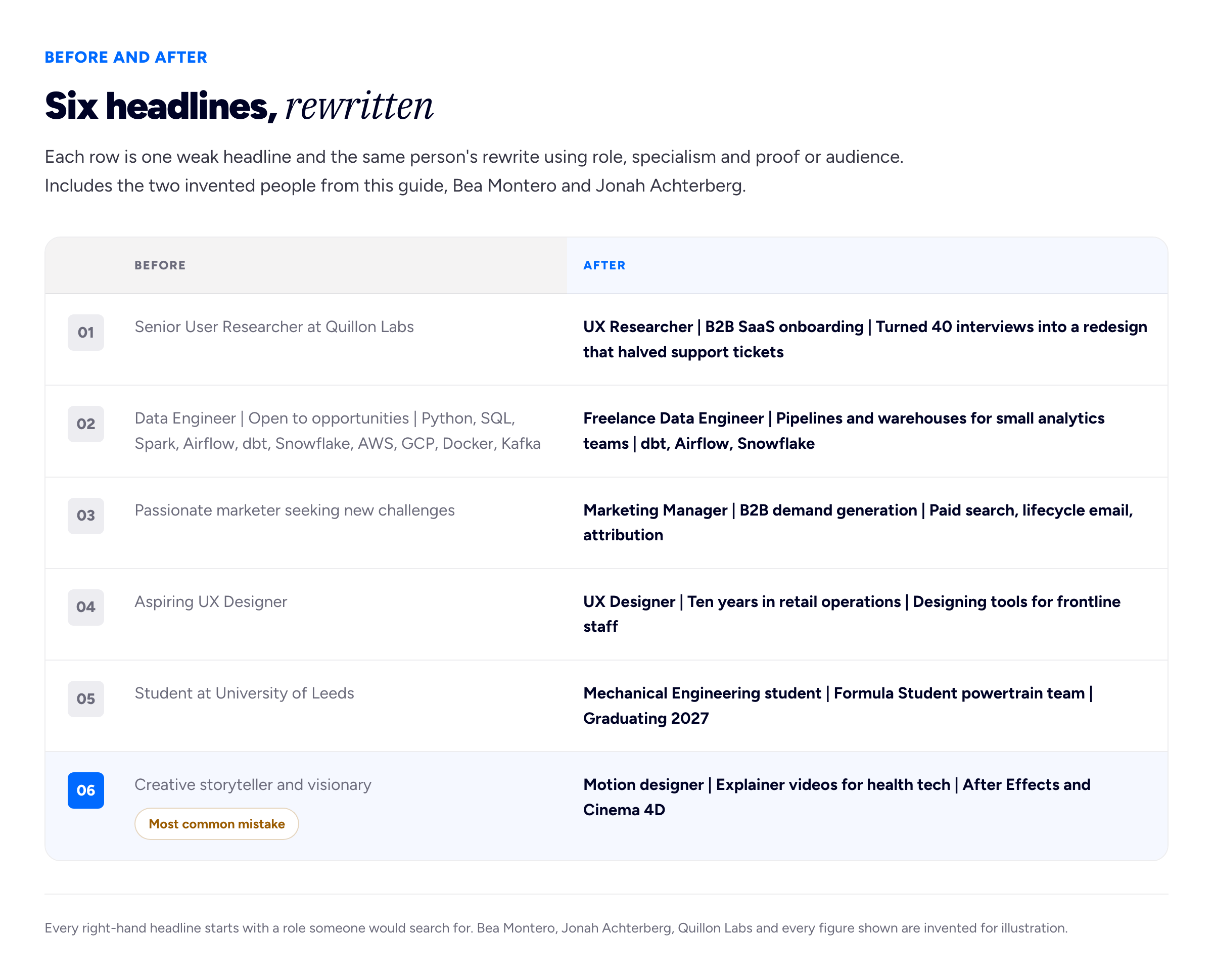
The common thread: the searchable role moves to the front, and vague adjectives give way to something a reader could check.
"Open to Work" versus your headline
These are separate settings that do different jobs. According to LinkedIn's help page "Let recruiters know you're Open to Work", you choose who sees that you are looking. With the all-members option everyone can see it, including people at your current company, and the #OpenToWork frame is added to your profile photo. With recruiters-only, the signal is shown only to people using LinkedIn Recruiter, and no frame is added. LinkedIn says it tries to hide the signal from Recruiter users at your current company but "can't guarantee complete privacy".
Your headline, by contrast, is always public. So the practical split is:
- Use "Open to Work" to tell recruiters you are available, choosing recruiters-only if your employer should not find out.
- Use the headline to tell everyone what you are good at, in the words they would search for.
- If you are between jobs and want to say so, put a short availability line last ("Available immediately", "Available from March"). It answers a question a recruiter actually has, which "seeking opportunities" does not.
Keywords without stuffing
The headline is one of the places LinkedIn search reads, but a line built only for search reads like a robot wrote it, and people still have to click.
- Find the real search terms. Open ten job adverts for the role you want and note the title they use most and the skills in nearly all of them. Your employer's internal vocabulary is not a search term.
- Use the role title once. Repeating "designer" in three phrasings does not help a reader.
- Pick two or three skills, not ten. The rest belong in your skills section and About summary, which also feed search and have more room.
- Prefer nouns to adjectives. "Python" and "brand identity" are searched for; "dynamic" and "results-driven" are skipped.
- Read it aloud. If it sounds like a list of tags rather than a person, cut until it does not.
Your CV should say the same thing as your headline; our guide to adding your resume to LinkedIn covers the places a CV can live on your profile and who sees each one.
How long should a LinkedIn headline be?
We could not confirm a character limit from LinkedIn's own help pages. "Edit your headline" and "Edit the Introduction section on your profile" both describe the field without stating a maximum, and figures quoted elsewhere disagree, so we will not give a number we cannot stand behind. The editor will stop you if you go over.
The length that matters more is what survives in a list, where headlines are often shortened, especially on a phone. Write your headline, then find your own name in a comment thread on your phone. If the visible part is "Curious human | Empathy-driven", reorder.
Common mistakes
- Leaving the default. "Job title at Company" wastes the only line where you describe yourself in your own words.
- Starting with adjectives. "Passionate", "driven" and "visionary" are claimed by almost everyone and searched for by nobody.
- Burying the role. If your job title is the fourth item, it is the part most likely to be cut.
- Listing every tool you have touched. Readers want to see that you know which ones matter.
- Inflated titles and numbers you cannot defend. "Head of" when you lead nobody, or a team's result claimed as yours, will come up in an interview. Say "helped", or drop the number.
- Emoji and decorative symbols. They break up search terms and read as noise in a list of names.
- Writing it once and forgetting it. LinkedIn's help page on the introduction section says your network is not notified when you change it, so there is no cost to editing whenever your role or search changes.
To edit it, the help page gives the route as the Me icon, your profile, the Edit icon on your introduction section, then the Headline field in the "Edit intro" window, then Save. If you are stuck on a first draft, give the LinkedIn headline generator your role and specialism and use what it suggests as something to argue with; it is free and needs no account. And if your headline promises work worth seeing, a simple portfolio site linked from your profile gives the person who clicked your name something to check.
Frequently asked questions
What is a good LinkedIn headline example?
A good example names the role you want to be found for, narrows it with a specialism, and adds one piece of proof or the people you help. "Freelance Data Engineer | Pipelines and warehouses for small analytics teams | dbt, Airflow, Snowflake" works because every part is searchable or checkable. Avoid lines built only from adjectives such as "passionate".
What should I put in my LinkedIn headline if I am unemployed?
Lead with the role you want, not the fact that you are looking, so that searches for that role find you. Add your specialism and, if it helps, a short availability line at the end, such as "Available immediately". Use LinkedIn's separate Open to Work setting to signal to recruiters that you are looking.
Should my LinkedIn headline be my job title?
It can be, and LinkedIn fills it in with your current position by default, but that usually wastes the space. Your job title already appears in your Experience section. Adding a specialism and a proof point or audience tells a reader far more in the same line.
How many characters can a LinkedIn headline have?
LinkedIn's help pages on editing the headline and the introduction section do not state a limit, and figures quoted elsewhere differ, so we have not given one. The profile editor will stop you if you go over. What matters more is that the first few words say what you do, because headlines are often shortened in lists.
Should I put "Open to Work" in my headline?
Usually not. LinkedIn has a separate Open to Work feature that can be shown to all members, with a photo frame, or only to recruiters, without one. Keeping the headline for your role and specialism keeps you findable for the job you want, whichever setting you choose.
Does LinkedIn notify my network when I change my headline?
According to LinkedIn's help page on editing the introduction section, your network is not notified when you change it. So you can edit and test your headline as often as you like, which is worth doing whenever your role, specialism or job search changes.
How we put this guide together
The three-part formula, the advice on proof versus audience, the keyword rules and the mistakes list are our recommendation, drawn from building career tools at Bunfolio, including the headline generator. They are not LinkedIn rules and are not based on measured data.
What LinkedIn's interface does comes from its own help pages, read on 16 November 2026: Edit your headline (where the headline appears, that it can differ from your current position, and the editing steps), Edit the Introduction section on your profile (that your network is not notified of changes) and Let recruiters know you're Open to Work (the visibility options, the photo frame and the privacy caveat). The placements beyond profile and search — comments and invitations — are what we have observed on the site, not documented behaviour, and LinkedIn changes its layouts.
We have deliberately not stated a headline character limit, because none of the help pages we opened gives one and the numbers repeated elsewhere disagree. We have also left out the claims that usually decorate articles like this — how many more profile views a good headline earns, what share of recruiters search by keyword, how many seconds a recruiter spends on a profile — because we could not trace any of them to a published method, sample and date. A number nobody can source reads as evidence and is not.
Bea Montero, Jonah Achterberg and Quillon Labs are invented for illustration, as is every example headline in this guide and every figure inside them, including those in both diagrams. Real university, agency and place names in the examples only show the shape of a headline and describe no real person.
Related reading: turning your LinkedIn profile into a portfolio website, how to add a promotion on LinkedIn, adding your resume to LinkedIn and how to write a professional summary.
More from the blog
November 17, 2026 · 19 min read
How to Add a Promotion on LinkedIn (and Make It Read as Progress)
To add a promotion on LinkedIn, add the new title as a separate position at the same company, dated to the month it took effect, then give the old role an end date with no gap. LinkedIn groups positio...
November 5, 2026 · 19 min read
Student Portfolio Examples: How to Build One From Coursework
What counts as work when you have no clients, from coursework and group projects to societies and part-time jobs, how to write each project up in five short parts, how many pieces to show, how to stru...
November 2, 2026 · 19 min read
Upwork vs Fiverr: Which Suits the Way You Work?
Upwork has you pitch for posted jobs with Connects; Fiverr has buyers order a fixed-price Gig you defined. Who each suits by service and experience, how the first job happens on each, the fees, paymen...